



10-13-2026, 06:25 PM
aaPanel hotlink protection can restrict image requests based on their HTTP Referer header. Open Website → Conf → Hotlink Protection, choose the protected extensions and allowed domains, then test actual requests. The empty-referrer setting matters: direct image links can fail when it is disabled.
Tested environment
Ubuntu 22.04, aaPanel 8.0.7 Free Edition, Nginx 1.30.5 and a separate static demo website. We protected PNG files, allowed the demo hostname and used the panel's 404 response. Same-site requests returned 200, an outside referrer returned 404, and direct requests changed from 200 to 404 when we disabled empty-referrer access. We reverted the test configuration afterwards.
What this feature does
Hotlinking occurs when another page embeds a resource hosted on your server. Referrer filtering can reduce ordinary browser-based embedding from domains you have not allowed. It is not authentication, copyright enforcement or complete download prevention: the Referer header can be supplied by a client, and legitimate browsers sometimes omit it. Use an access-controlled delivery method when a file must be private.
1. Record your current settings
Open Website, locate the site and choose Conf → Hotlink Protection. Record whether protection is enabled, the suffix list, allowed domains, response and empty-referrer setting before editing. Work on a test site first.
Our original demo settings had protection disabled, suffixes jpg,jpeg,gif,png,js,css, allowed domain demo.adminslab.com and response 404. We narrowed the test to png so other file types were outside this exercise. Protecting JavaScript or CSS without testing your integrations can affect more than images.
2. Set allowed domains and direct-access behaviour
Use URL suffix for the comma-separated extensions you intend to protect. In Access domain, include the actual site hostname and any legitimate embedding domains required by your workflow. Do not copy our lab hostname into your own configuration.
Select Enable hotlink protection. For the first test, also select Allow empty HTTP_REFERER requests. This allows requests without a Referer header while the allowed-domain check still applies to requests carrying one. Keep the configured 404 response for this walkthrough and click Save.
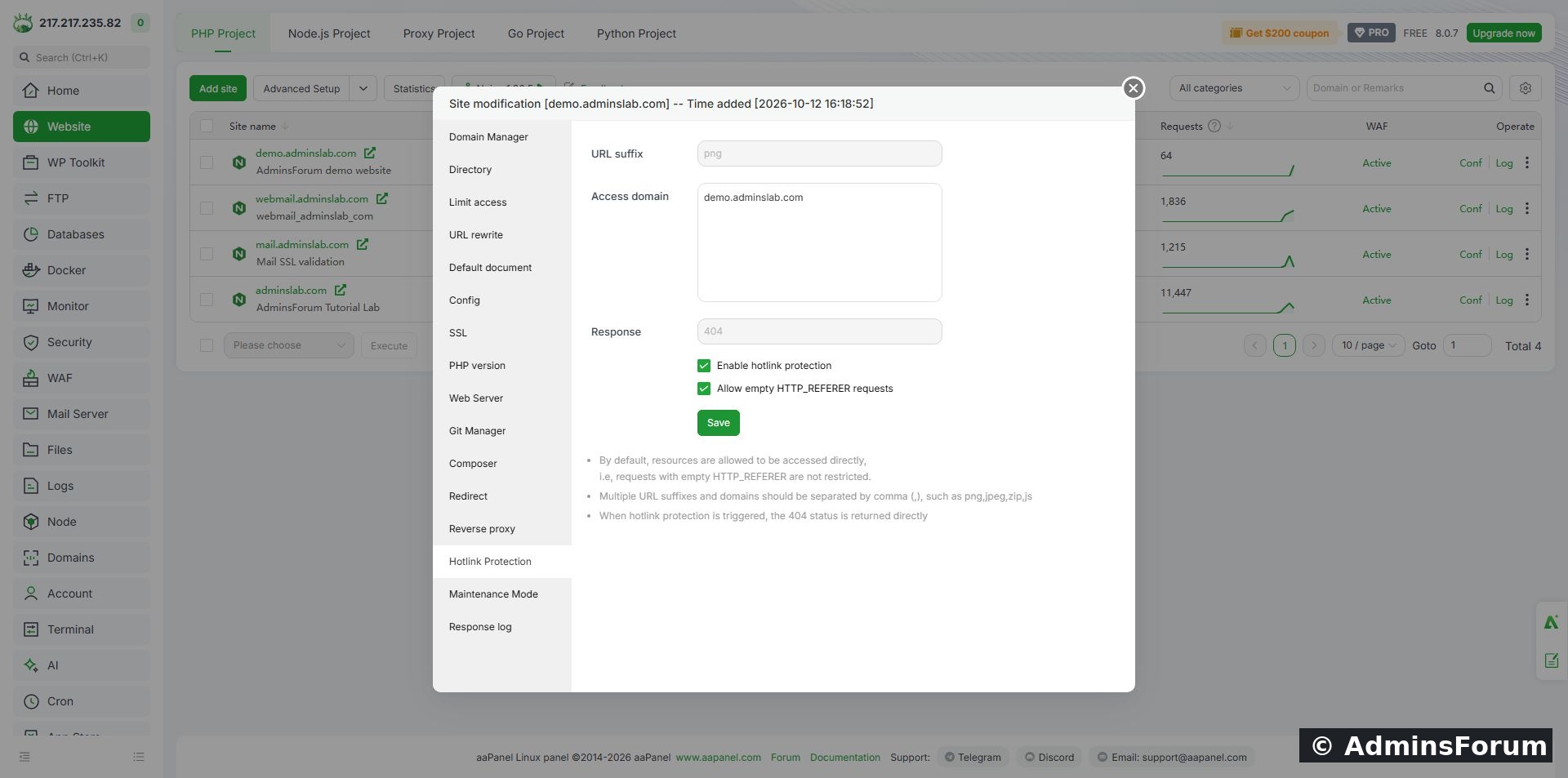
PNG-only protection enabled, demo hostname allowed, and empty-referrer requests allowed.
In our panel, changing these checkboxes submitted immediately; text fields and the Save button were separate controls. Wait for any submitting message to finish and recheck the visible states. Some fields became disabled while protection was enabled. Do not assume an unsaved-looking checkbox is only a draft.
3. Test three request types
Choose one existing protected image. Our test used the static sample's /images/firefox-icon.png. Test the image directly, with the site's own page as Referer, and with an outside Referer. We used example.com only as a simulated header value; no request was sent to that domain.
The verified results with empty-referrer access allowed were:
Optional commands for your own site:
Replace the hostname and image path. These examples use Linux's /dev/null; on Windows use NUL. A 404 in the outside-referrer test does not mean the file was deleted. Compare it with the same-site response.
4. Understand the stricter empty-referrer option
We then unchecked Allow empty HTTP_REFERER requests while protection remained enabled.
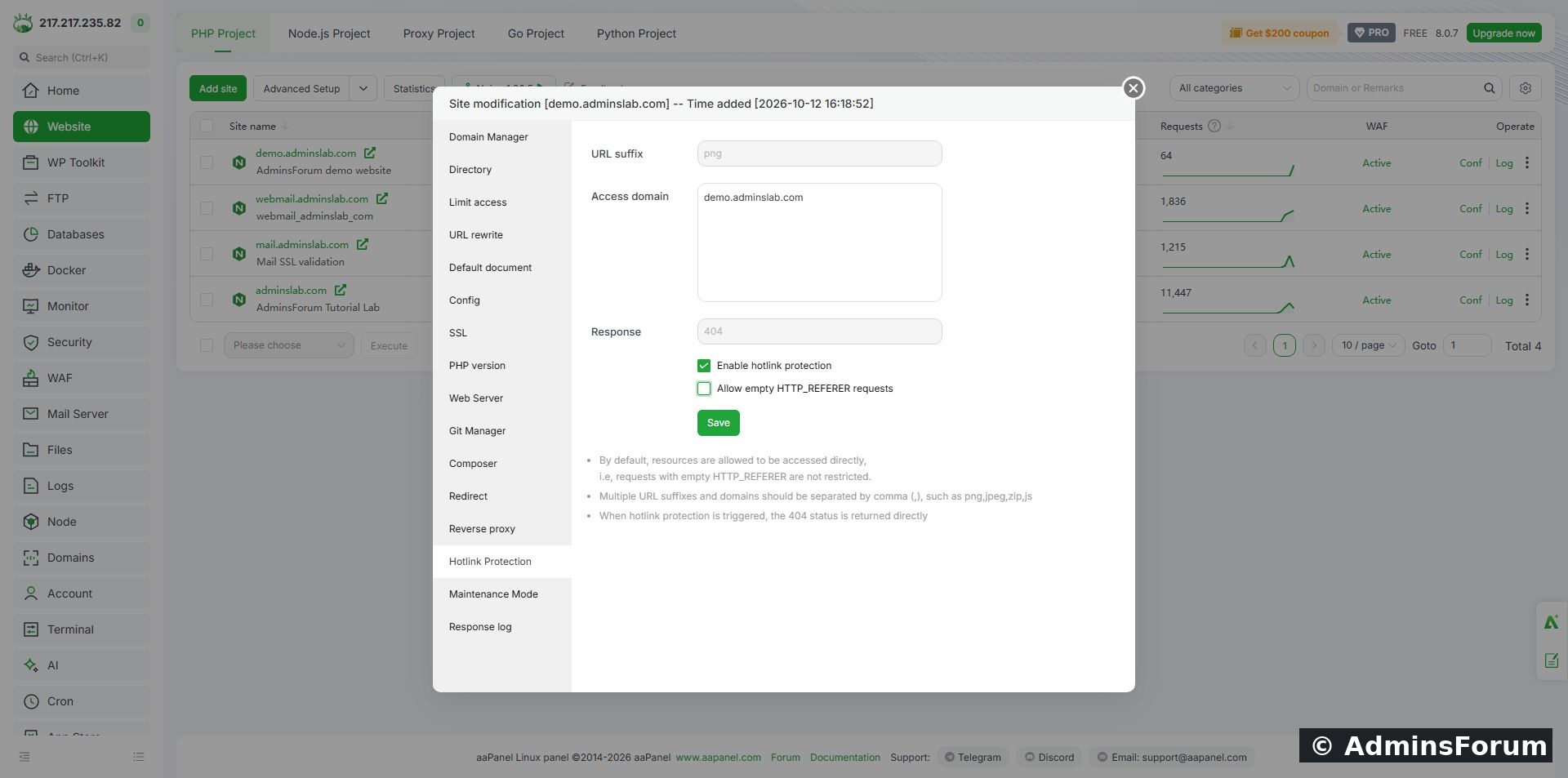
Stricter test: empty-referrer requests are no longer allowed.
Fresh requests returned 404 without a Referer and 200 with the allowed same-site Referer. This directly demonstrates the effect of the setting in our Nginx installation. A bookmarked image URL or a client that omits the header can be affected. Verify real pages, image previews and any required integrations before adopting that stricter setting. We did not test every browser, CDN or search-engine preview.
5. Revert the lab test or apply your chosen production policy
For this tutorial we unchecked Enable hotlink protection, restored the original suffix list and saved. Both checkboxes returned to their original unchecked states. The allowed hostname and response stayed unchanged.
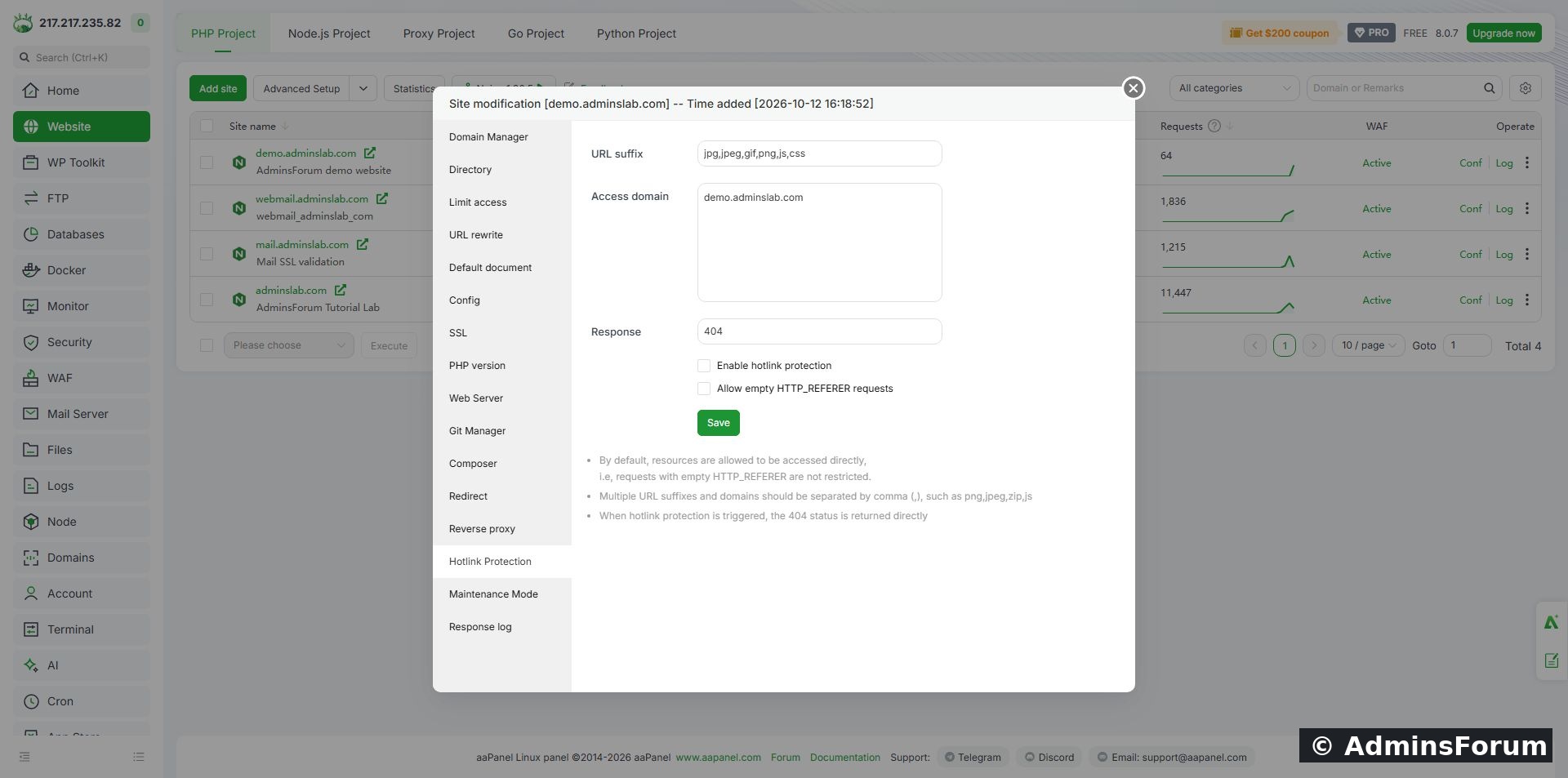
The demo restored to its original disabled-protection state after testing.
A fresh request with the simulated outside Referer then returned 200, confirming cleanup. On your actual website, keep protection enabled only after choosing and verifying the access policy you need. Our disabled final state is lab cleanup, not a recommendation for every site.
Troubleshooting
Reference: Official Nginx Referer module documentation explains its purpose and limitations.
Need help? Include the aaPanel/web-server versions, protected suffix, allowed hostname, empty-referrer setting and status results in Server Security Support. Avoid sharing private URLs or tokens.
Tested environment
Ubuntu 22.04, aaPanel 8.0.7 Free Edition, Nginx 1.30.5 and a separate static demo website. We protected PNG files, allowed the demo hostname and used the panel's 404 response. Same-site requests returned 200, an outside referrer returned 404, and direct requests changed from 200 to 404 when we disabled empty-referrer access. We reverted the test configuration afterwards.
What this feature does
Hotlinking occurs when another page embeds a resource hosted on your server. Referrer filtering can reduce ordinary browser-based embedding from domains you have not allowed. It is not authentication, copyright enforcement or complete download prevention: the Referer header can be supplied by a client, and legitimate browsers sometimes omit it. Use an access-controlled delivery method when a file must be private.
1. Record your current settings
Open Website, locate the site and choose Conf → Hotlink Protection. Record whether protection is enabled, the suffix list, allowed domains, response and empty-referrer setting before editing. Work on a test site first.
Our original demo settings had protection disabled, suffixes jpg,jpeg,gif,png,js,css, allowed domain demo.adminslab.com and response 404. We narrowed the test to png so other file types were outside this exercise. Protecting JavaScript or CSS without testing your integrations can affect more than images.
2. Set allowed domains and direct-access behaviour
Use URL suffix for the comma-separated extensions you intend to protect. In Access domain, include the actual site hostname and any legitimate embedding domains required by your workflow. Do not copy our lab hostname into your own configuration.
Select Enable hotlink protection. For the first test, also select Allow empty HTTP_REFERER requests. This allows requests without a Referer header while the allowed-domain check still applies to requests carrying one. Keep the configured 404 response for this walkthrough and click Save.
PNG-only protection enabled, demo hostname allowed, and empty-referrer requests allowed.
In our panel, changing these checkboxes submitted immediately; text fields and the Save button were separate controls. Wait for any submitting message to finish and recheck the visible states. Some fields became disabled while protection was enabled. Do not assume an unsaved-looking checkbox is only a draft.
3. Test three request types
Choose one existing protected image. Our test used the static sample's /images/firefox-icon.png. Test the image directly, with the site's own page as Referer, and with an outside Referer. We used example.com only as a simulated header value; no request was sent to that domain.
The verified results with empty-referrer access allowed were:
Code:
No Referer header:                     HTTP 200
Referer: https://demo.adminslab.com/    HTTP 200
Referer: https://example.com/          HTTP 404
Optional commands for your own site:
Code:
curl -o /dev/null -w '%{http_code}
' 'https://YOUR_DOMAIN/images/test.png'
curl -o /dev/null -w '%{http_code}
' -e 'https://YOUR_DOMAIN/' 'https://YOUR_DOMAIN/images/test.png'
curl -o /dev/null -w '%{http_code}
' -e 'https://example.com/' 'https://YOUR_DOMAIN/images/test.png'4. Understand the stricter empty-referrer option
We then unchecked Allow empty HTTP_REFERER requests while protection remained enabled.
Stricter test: empty-referrer requests are no longer allowed.
Fresh requests returned 404 without a Referer and 200 with the allowed same-site Referer. This directly demonstrates the effect of the setting in our Nginx installation. A bookmarked image URL or a client that omits the header can be affected. Verify real pages, image previews and any required integrations before adopting that stricter setting. We did not test every browser, CDN or search-engine preview.
5. Revert the lab test or apply your chosen production policy
For this tutorial we unchecked Enable hotlink protection, restored the original suffix list and saved. Both checkboxes returned to their original unchecked states. The allowed hostname and response stayed unchanged.
The demo restored to its original disabled-protection state after testing.
A fresh request with the simulated outside Referer then returned 200, confirming cleanup. On your actual website, keep protection enabled only after choosing and verifying the access policy you need. Our disabled final state is lab cleanup, not a recommendation for every site.
Troubleshooting
- Images disappear on your own pages: compare the actual embedding hostname with Access domain. Check the empty-referrer option and any privacy or referrer policy involved.
- External requests still succeed: confirm the suffix matches the requested file and test the server response rather than a cached image. A CDN may serve a previously cached copy; this lab did not test CDN cache behaviour.
- Direct links return 404: repeat the request with and without a same-site Referer to distinguish filtering from a missing file.
- New domain or subdomain: review the allowed-domain list after a site move. Test required root and www hostnames individually.
- Files must be confidential: referrer filtering is insufficient. Use real authentication or another appropriate access-control mechanism.
Reference: Official Nginx Referer module documentation explains its purpose and limitations.
Need help? Include the aaPanel/web-server versions, protected suffix, allowed hostname, empty-referrer setting and status results in Server Security Support. Avoid sharing private URLs or tokens.