Quick answer
A CNAME record makes one DNS hostname an alias of another hostname. In Cloudflare, select Add record, choose CNAME, enter the alias under Name and the destination hostname under Target, review proxy status and TTL, then save. Verify both the CNAME target and the final address it resolves to.
We created alias-lab.adminslab.com pointing to dns-lab.adminslab.com in our own Cloudflare lab on 17 October 2026. The target A record was tested in the preceding Cloudflare A-record lesson. We used DNS only so we could inspect the alias chain. This walkthrough did not configure a website or change any existing mail record.
1. Decide whether you need A or CNAME
Our lab target dns-lab.adminslab.com already resolved to 217.217.235.82. Instead of putting that IP into another A record, we created an alias whose target is the hostname. The alias depends on the target continuing to resolve correctly. It does not automatically make a web server serve the alias as a website.
If your provider gives you an IPv4 address, use an A record. If it gives you a hostname for a CNAME integration, use that exact hostname and follow its verification requirements. Do not invent a CNAME target or copy our lab settings into a production service.
2. Add the CNAME in Cloudflare
Open your domain and DNS > Records. Search for the intended alias name first and review any existing record. Our filtered table had no alias-lab record. Choose Add record and change Type from A to CNAME. The IPv4 address field becomes Target.
We entered:
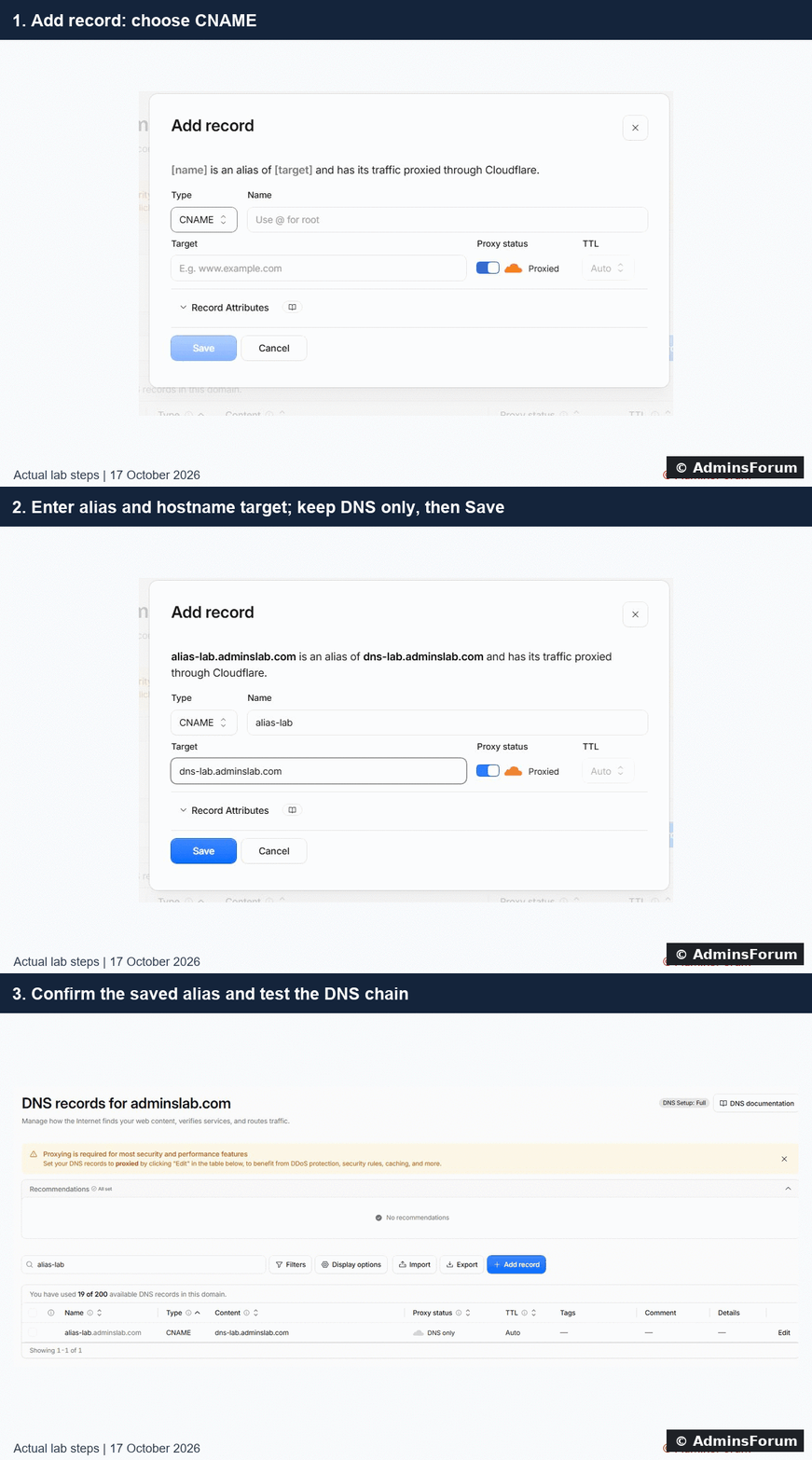
The GIF shows actual lab dashboard states with added captions; it is not a continuous recording. The summary read that alias-lab.adminslab.com was an alias of dns-lab.adminslab.com. We reviewed it, then clicked Save. The table showed the saved CNAME, correct target, DNS only and Auto.
The Target field takes a hostname. Do not enter https://, an IP address, a port or /some/path. A CNAME is not a mechanism for changing a URL path. Avoid an alias that points back to itself or a circular chain between two names.
3. Ask for the CNAME target
We queried one of our own authoritative nameservers:
At 09:12:43 UTC the answer was:
This matches the saved target. Use your own domain's assigned nameserver when adapting the command. The trailing dot in the result denotes a fully qualified DNS name; it is not an extra website-path character.
4. Resolve the alias to an IP
Both public resolvers returned this chain during our test:
The first line maps alias to target. The second maps target to IPv4 address. This is a successful DNS check for these names and resolvers at that time. If the target stops resolving, the alias cannot provide a working final address merely because its CNAME still exists.
Why is a CNAME sometimes absent from the public answer?
Proxying and CNAME flattening can alter the answers you see. Cloudflare flattening follows the target and returns an address instead of returning the CNAME itself; it also permits a CNAME-style configuration at the zone apex. We did not replace our apex record or change flattening settings in this test.
For provider ownership verification, retain the provider's required DNS-only/flattening behavior. An integration that expects to see a CNAME may fail when that CNAME is flattened. Diagnose using the record's purpose, proxy state, target and zone settings instead of assuming every missing CNAME answer means a failed save.
CNAME versus website redirect
Our query verified DNS only. It did not test an HTTP 301 or 302 response. A browser redirect is a separate web-layer operation that tells the browser to request another URL. If you want alias.example.com to send visitors to example.com/help, configure an appropriate redirect separately. A CNAME target cannot include /help.
Likewise, an HTTPS certificate must cover the hostname visitors request. Resolving an alias to a server does not automatically supply its certificate or virtual-host configuration. We did not issue a certificate for this alias or claim a successful browser hosting test.
Correcting a target and lab cleanup
If you mistyped the target, locate the exact new CNAME, choose Edit, correct the target and verify again. Save the old value before changing a production record. Do not remove a working A record simply to resolve a conflict without understanding the service it supports.
Our alias and its target remain in the lab for later lessons. No deletion or rollback was tested here. If you later retire the target, review its dependent aliases; do not leave service-provider aliases pointing to an abandoned resource.
References
Cloudflare subdomain records and CNAME flattening. Screenshots and query results come from our own lab.
A CNAME record makes one DNS hostname an alias of another hostname. In Cloudflare, select Add record, choose CNAME, enter the alias under Name and the destination hostname under Target, review proxy status and TTL, then save. Verify both the CNAME target and the final address it resolves to.
We created alias-lab.adminslab.com pointing to dns-lab.adminslab.com in our own Cloudflare lab on 17 October 2026. The target A record was tested in the preceding Cloudflare A-record lesson. We used DNS only so we could inspect the alias chain. This walkthrough did not configure a website or change any existing mail record.
1. Decide whether you need A or CNAME
Our lab target dns-lab.adminslab.com already resolved to 217.217.235.82. Instead of putting that IP into another A record, we created an alias whose target is the hostname. The alias depends on the target continuing to resolve correctly. It does not automatically make a web server serve the alias as a website.
If your provider gives you an IPv4 address, use an A record. If it gives you a hostname for a CNAME integration, use that exact hostname and follow its verification requirements. Do not invent a CNAME target or copy our lab settings into a production service.
2. Add the CNAME in Cloudflare
Open your domain and DNS > Records. Search for the intended alias name first and review any existing record. Our filtered table had no alias-lab record. Choose Add record and change Type from A to CNAME. The IPv4 address field becomes Target.
We entered:
Code:
Type: CNAME
Name: alias-lab
Target: dns-lab.adminslab.com
Proxy status: DNS only
TTL: Auto
The GIF shows actual lab dashboard states with added captions; it is not a continuous recording. The summary read that alias-lab.adminslab.com was an alias of dns-lab.adminslab.com. We reviewed it, then clicked Save. The table showed the saved CNAME, correct target, DNS only and Auto.
The Target field takes a hostname. Do not enter https://, an IP address, a port or /some/path. A CNAME is not a mechanism for changing a URL path. Avoid an alias that points back to itself or a circular chain between two names.
3. Ask for the CNAME target
We queried one of our own authoritative nameservers:
Code:
dig @sam.ns.cloudflare.com alias-lab.adminslab.com CNAME +noall +answerCode:
alias-lab.adminslab.com. 300 IN CNAME dns-lab.adminslab.com.4. Resolve the alias to an IP
Code:
dig @1.1.1.1 alias-lab.adminslab.com A +noall +answer
dig @8.8.8.8 alias-lab.adminslab.com A +noall +answerCode:
alias-lab.adminslab.com. 300 IN CNAME dns-lab.adminslab.com.
dns-lab.adminslab.com. 300 IN A 217.217.235.82Why is a CNAME sometimes absent from the public answer?
Proxying and CNAME flattening can alter the answers you see. Cloudflare flattening follows the target and returns an address instead of returning the CNAME itself; it also permits a CNAME-style configuration at the zone apex. We did not replace our apex record or change flattening settings in this test.
For provider ownership verification, retain the provider's required DNS-only/flattening behavior. An integration that expects to see a CNAME may fail when that CNAME is flattened. Diagnose using the record's purpose, proxy state, target and zone settings instead of assuming every missing CNAME answer means a failed save.
CNAME versus website redirect
Our query verified DNS only. It did not test an HTTP 301 or 302 response. A browser redirect is a separate web-layer operation that tells the browser to request another URL. If you want alias.example.com to send visitors to example.com/help, configure an appropriate redirect separately. A CNAME target cannot include /help.
Likewise, an HTTPS certificate must cover the hostname visitors request. Resolving an alias to a server does not automatically supply its certificate or virtual-host configuration. We did not issue a certificate for this alias or claim a successful browser hosting test.
Correcting a target and lab cleanup
If you mistyped the target, locate the exact new CNAME, choose Edit, correct the target and verify again. Save the old value before changing a production record. Do not remove a working A record simply to resolve a conflict without understanding the service it supports.
Our alias and its target remain in the lab for later lessons. No deletion or rollback was tested here. If you later retire the target, review its dependent aliases; do not leave service-provider aliases pointing to an abandoned resource.
References
Cloudflare subdomain records and CNAME flattening. Screenshots and query results come from our own lab.