10-19-2026, 02:20 PM
Quick answer
Orange cloud (Proxied) routes supported web traffic through Cloudflare. Gray cloud (DNS only) provides DNS resolution without Cloudflare's HTTP proxy. Choose based on what the hostname does: a website, mail service and domain-verification record do not have identical requirements.
This guide shows our own lab comparison on 19 October 2026. We changed only the disposable alias-lab.adminslab.com CNAME from DNS only to Proxied. Its target, dns-lab.adminslab.com, stayed DNS only. The main website, panel hostname, mail records and nameservers were not changed. No working website or certificate was created for this alias; our result is a DNS-behavior test, not an end-to-end HTTPS test.
1. Identify the record and its purpose first
Open the correct domain in Cloudflare, then DNS > Records. Search for the full hostname or its unique label. We searched alias-lab and found one CNAME pointing to dns-lab.adminslab.com, with DNS only and TTL Auto.
We originally created it in Create a Cloudflare CNAME Record and Verify the Alias. That dated lesson describes its earlier DNS-only state. This follow-up intentionally changes that lab state.
Before toggling a real record, note its type, name, content, proxy status and TTL. Confirm the application's origin, supported port and certificate requirements. Do not experiment on your only administrative access hostname or an existing mail service.
2. Record the DNS-only baseline
At 14:17:46 UTC we queried our assigned authoritative nameserver:
The results were:
The target address was the lab origin IP. The alias still exposed its CNAME target. Use your own domain and assigned nameserver if adapting these commands, not our server or nameserver.
3. Change only the disposable alias
We chose Edit on alias-lab.adminslab.com. The form showed the CNAME target and a Proxy status switch. We turned that switch on, confirmed that the label changed to Proxied and clicked Save. TTL stayed Auto; it was not an editable custom TTL while proxying was enabled.
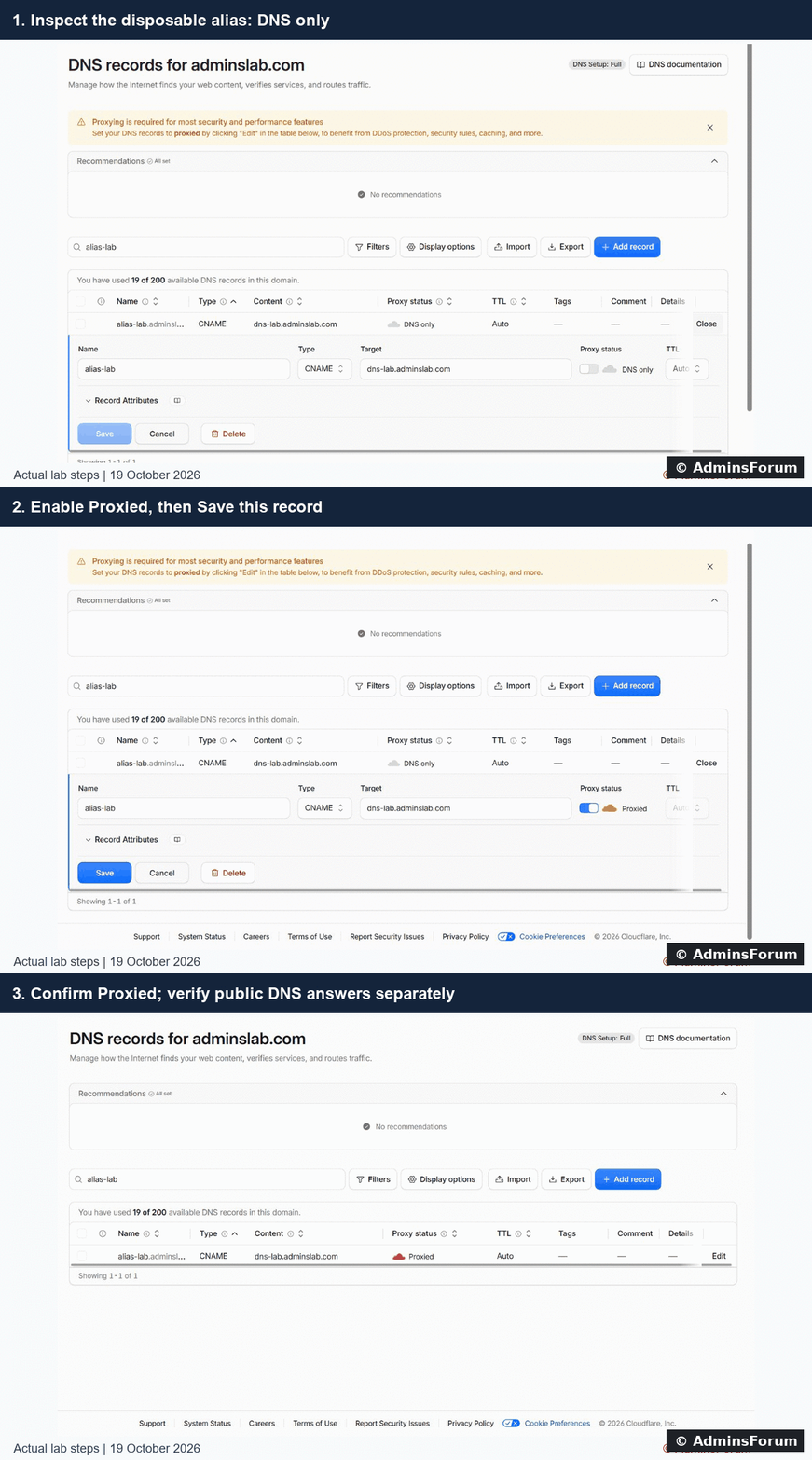
The GIF is an annotated sequence of actual dashboard captures. It is not a continuous video recording. After saving, the filtered table displayed the same CNAME target with Proxied. We left the lab alias in that state for later lessons.
4. Compare the answers after saving
At 14:18:52 UTC we ran:
The alias A queries returned these Cloudflare addresses during our test:
The CNAME-only query had no answer line, while the dashboard retained its CNAME configuration. The target A lookup still returned:
These results demonstrate the difference: the proxied alias resolves to edge addresses, and its DNS-only target resolves directly to the lab server. The specific edge addresses are observations, not values readers should create as their own origin records. Our application target was unchanged.
Which mode should a hostname use?
What we have not proved yet
This test did not request a working website on the alias, issue its certificate, demonstrate a cache HIT or validate a firewall rule. Cloudflare IPs in a DNS response alone cannot establish any of those results. A certificate warning or HTTP error needs separate origin/TLS/application investigation.
Caching also depends on eligibility, headers and rules. Proxied does not mean every page is cached, and DNS only does not mean the server has no other security controls. Use actual response headers and application tests in later lessons.
If a change breaks a working site
Keep the original values and inspect the exact error, hostname, port, origin reachability and certificates. Review the appropriate recovery action before making more changes. Switching a production hostname back to DNS only can change its exposure and traffic path; it is not an automatic fix for every Cloudflare error. We did not test a production rollback, and did not switch this alias back during this walkthrough.
If your lookup still shows an older result immediately after a change, compare an authoritative query with a recursive resolver and record the UTC time. Do not repeatedly edit the origin IP merely because one resolver retains an older cached answer. See Check Cloudflare DNS Records for interpreting those queries.
Reference
Cloudflare proxy status documentation. The before/after captures and DNS observations are our own lab evidence.
Orange cloud (Proxied) routes supported web traffic through Cloudflare. Gray cloud (DNS only) provides DNS resolution without Cloudflare's HTTP proxy. Choose based on what the hostname does: a website, mail service and domain-verification record do not have identical requirements.
This guide shows our own lab comparison on 19 October 2026. We changed only the disposable alias-lab.adminslab.com CNAME from DNS only to Proxied. Its target, dns-lab.adminslab.com, stayed DNS only. The main website, panel hostname, mail records and nameservers were not changed. No working website or certificate was created for this alias; our result is a DNS-behavior test, not an end-to-end HTTPS test.
1. Identify the record and its purpose first
Open the correct domain in Cloudflare, then DNS > Records. Search for the full hostname or its unique label. We searched alias-lab and found one CNAME pointing to dns-lab.adminslab.com, with DNS only and TTL Auto.
We originally created it in Create a Cloudflare CNAME Record and Verify the Alias. That dated lesson describes its earlier DNS-only state. This follow-up intentionally changes that lab state.
Before toggling a real record, note its type, name, content, proxy status and TTL. Confirm the application's origin, supported port and certificate requirements. Do not experiment on your only administrative access hostname or an existing mail service.
2. Record the DNS-only baseline
At 14:17:46 UTC we queried our assigned authoritative nameserver:
Code:
dig @sam.ns.cloudflare.com dns-lab.adminslab.com A +noall +answer
dig @sam.ns.cloudflare.com alias-lab.adminslab.com CNAME +noall +answerCode:
dns-lab.adminslab.com. 300 IN A 217.217.235.82
alias-lab.adminslab.com. 300 IN CNAME dns-lab.adminslab.com.3. Change only the disposable alias
We chose Edit on alias-lab.adminslab.com. The form showed the CNAME target and a Proxy status switch. We turned that switch on, confirmed that the label changed to Proxied and clicked Save. TTL stayed Auto; it was not an editable custom TTL while proxying was enabled.
The GIF is an annotated sequence of actual dashboard captures. It is not a continuous video recording. After saving, the filtered table displayed the same CNAME target with Proxied. We left the lab alias in that state for later lessons.
4. Compare the answers after saving
At 14:18:52 UTC we ran:
Code:
dig @sam.ns.cloudflare.com alias-lab.adminslab.com A +noall +answer
dig @sam.ns.cloudflare.com alias-lab.adminslab.com CNAME +noall +answer
dig @1.1.1.1 alias-lab.adminslab.com A +noall +answer
dig @sam.ns.cloudflare.com dns-lab.adminslab.com A +noall +answerCode:
alias-lab.adminslab.com. 300 IN A 172.67.168.183
alias-lab.adminslab.com. 300 IN A 104.21.62.236Code:
dns-lab.adminslab.com. 300 IN A 217.217.235.82Which mode should a hostname use?
- A supported HTTP/HTTPS website can use Proxied to receive applicable Cloudflare web features, provided its origin is correctly configured.
- An SMTP/IMAP mail hostname generally needs DNS only for the ordinary DNS proxy service. MX and TXT records themselves are not proxy-enabled record types.
- A third-party verification CNAME usually needs the provider's specified DNS-only behavior so its target remains visible as required.
- SSH, FTP and panel access need their own service/port review. An orange-cloud toggle is not a general proxy for every protocol or port.
What we have not proved yet
This test did not request a working website on the alias, issue its certificate, demonstrate a cache HIT or validate a firewall rule. Cloudflare IPs in a DNS response alone cannot establish any of those results. A certificate warning or HTTP error needs separate origin/TLS/application investigation.
Caching also depends on eligibility, headers and rules. Proxied does not mean every page is cached, and DNS only does not mean the server has no other security controls. Use actual response headers and application tests in later lessons.
If a change breaks a working site
Keep the original values and inspect the exact error, hostname, port, origin reachability and certificates. Review the appropriate recovery action before making more changes. Switching a production hostname back to DNS only can change its exposure and traffic path; it is not an automatic fix for every Cloudflare error. We did not test a production rollback, and did not switch this alias back during this walkthrough.
If your lookup still shows an older result immediately after a change, compare an authoritative query with a recursive resolver and record the UTC time. Do not repeatedly edit the origin IP merely because one resolver retains an older cached answer. See Check Cloudflare DNS Records for interpreting those queries.
Reference
Cloudflare proxy status documentation. The before/after captures and DNS observations are our own lab evidence.