10-16-2026, 06:50 PM
To check Redis in aaPanel, confirm that the service is running, verify its listening address, authenticate locally and run PING. Then inspect memory and application connectivity separately. Installing the Redis server does not automatically connect a PHP website or enable WordPress object caching.
Tested on aaPanel 8.0.7 with Redis 7.4.11 on 16 October 2026. Redis was already installed. We inspected its panel controls and ran read-only checks through SSH; we did not reinstall it, restart it, change authentication or clear any data.
1. Find the installed Redis service
Open App Store and find Redis in the installed applications. Our row showed Redis 7.4.11 and a Setting link. Click Setting on that exact row.
On Service, our panel displayed Current state: Start and offered Stop, Restart and Reload. The daemon switch was enabled. This screen also said the daemon checks periodically and can start Redis again after it stops.
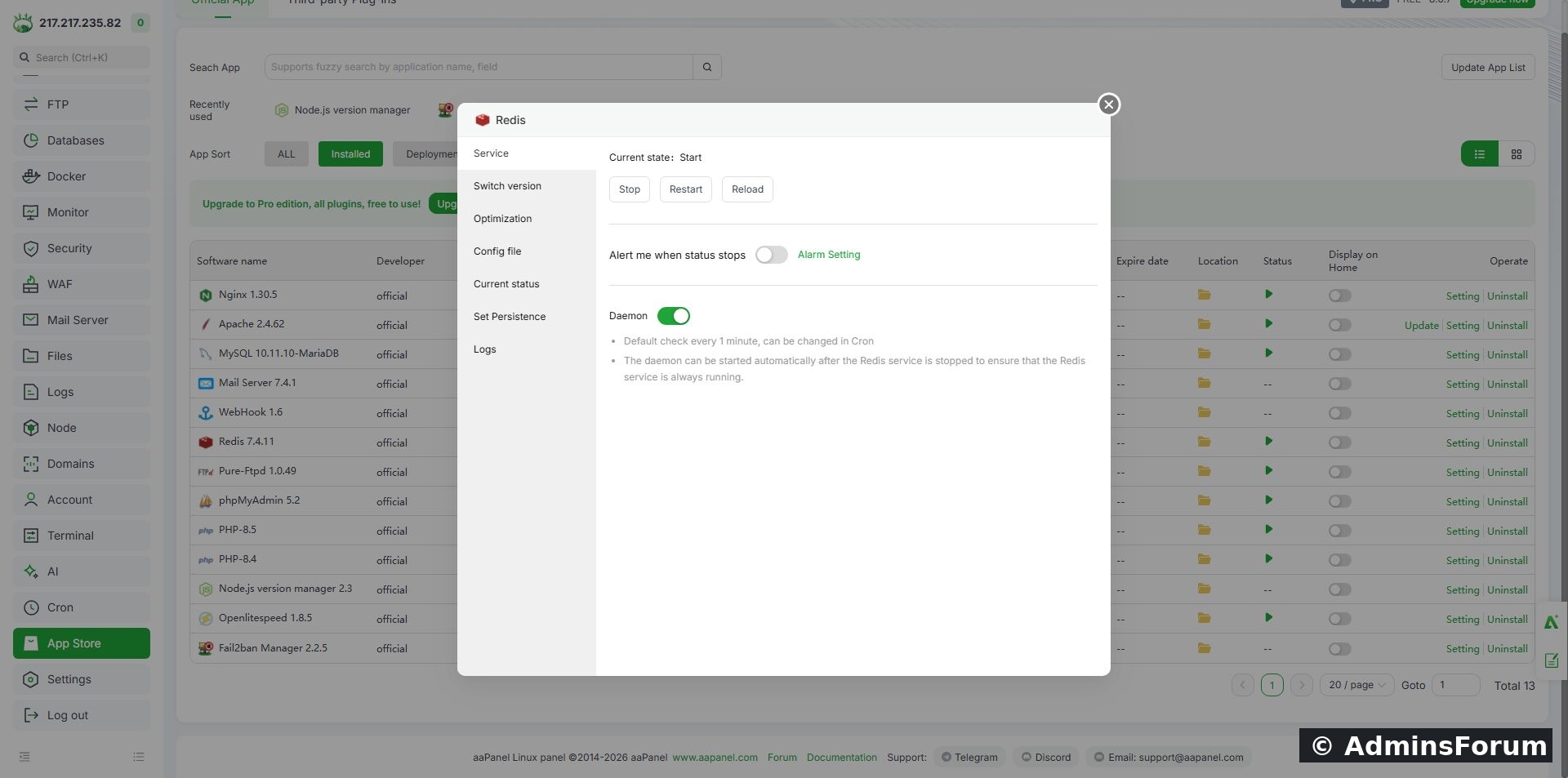
Actual Service screen. Inspect status before clicking any service controls; a restart can affect every application using this instance.
Do not use Stop as a harmless connectivity test on a shared server. Mail filtering, applications and caches may depend on Redis. We kept the service running throughout this lesson.
2. Verify the listener from SSH
In an authorized SSH session on the same server, inspect the Redis TCP listener:
Our result showed redis-server on 127.0.0.1:6379. The inspected configuration also contained bind 127.0.0.1 and protected-mode yes. A password was configured; its value is deliberately omitted.
127.0.0.1 is the local loopback address. This check establishes where the process listens; it is not a full external firewall audit. If you use a different port, substitute the actual one. If several Redis instances exist, identify the instance your application uses.
Keep Redis private. A website's public DNS record does not require opening port 6379 to the Internet. If your application runs on another host, design private connectivity and access controls separately rather than changing bind to all addresses as a troubleshooting shortcut. See Redis security guidance.
3. Authenticate locally and run PING
Our aaPanel installation provides this client:
Verify the path on your installation. On a password-protected instance, this interactive example prompts for the existing password without placing it in the command text:
For a named ACL user, add --user followed by the existing authorized username. Do not create a new user just to copy this example. Do not paste passwords into forum replies, screenshots or commands using the -a option.
For our check, an SSH helper read the existing local configuration and passed the credential only to its local client process; the credential was never printed. The result was PONG with exit code 0. We did not test the interactive password prompt itself.
PING checks whether the server responds. PONG does not prove that a website is using Redis, that stored application data is correct or that a cache improves response time. The Redis CLI documentation explains client authentication options.
4. Read current status and memory
Back in Redis Setting, open Current status. Our panel showed uptime, port, connected clients, memory and keyspace counters.
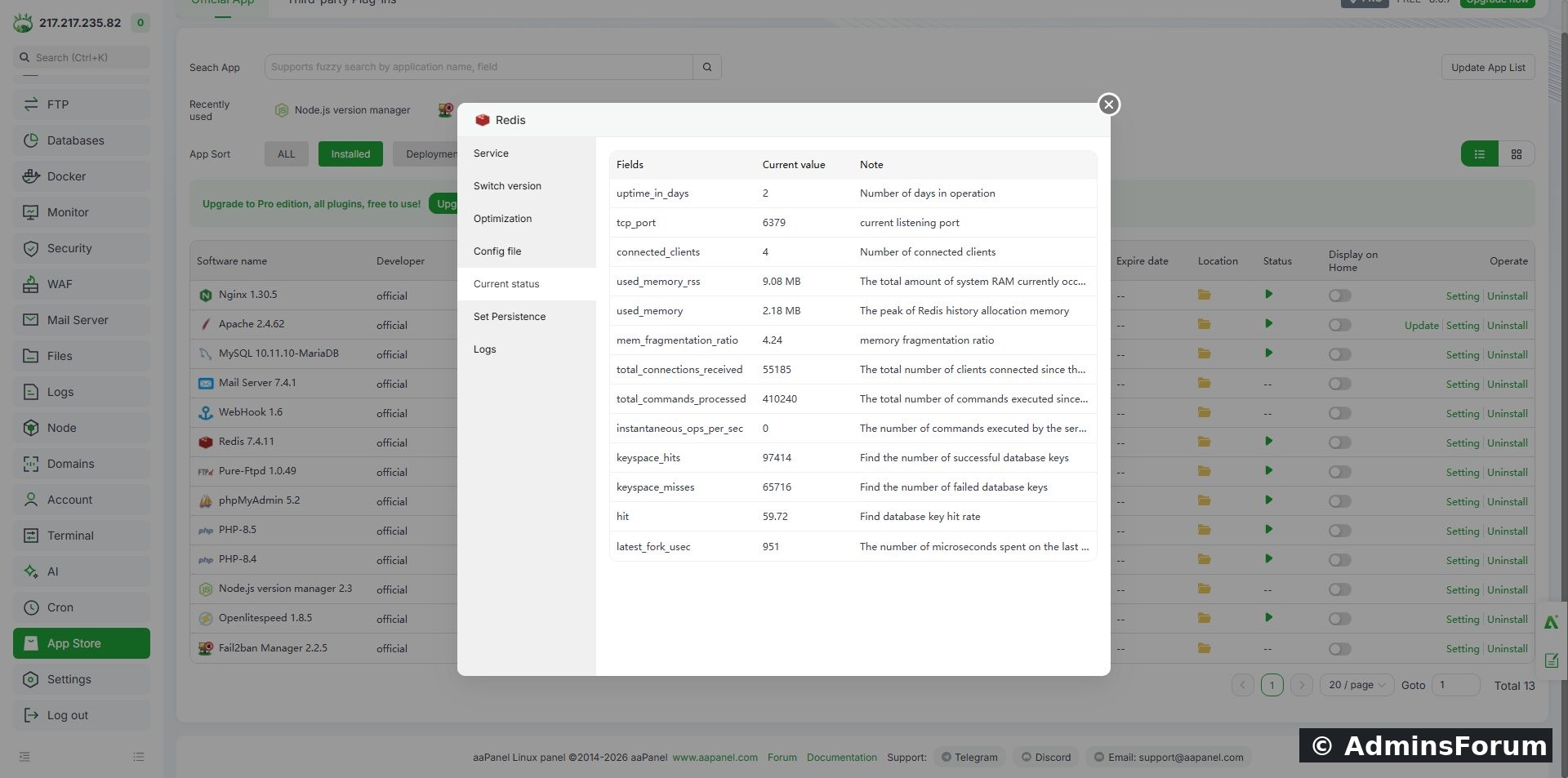
Actual metrics screen. Values change over time; compare the same fields over a useful interval.
Our separate CLI observations were:
The panel screenshot was taken slightly later, so small counter differences are expected. Its note beside used_memory incorrectly described a historical peak. According to the official INFO reference, used_memory is memory allocated by Redis; used_memory_peak is the peak field. used_memory_rss describes resident memory reported by the operating system. Do not treat these as interchangeable.
For selected sections, use the same approved client and authentication method with INFO server, INFO memory or INFO stats instead of PING. Review output privately before sharing it.
5. Review memory limits without copying a generic preset
The observed 0B maxmemory value means no explicit Redis dataset memory limit was configured. It does not mean Redis can never run out of memory. Our small current usage does not demonstrate safe behavior under future load.
Before setting a limit, identify all consumers, available RAM, workload peaks and persistence requirements. An eviction policy that suits disposable cache entries can be wrong for queues or other application state. With noeviction, writes requiring additional memory can fail when a configured limit is reached. See Redis eviction documentation.
We did not change the memory policy or measure a performance improvement. Do not use FLUSHALL or FLUSHDB to fix an unknown application error; those commands remove data.
6. Check the application separately
If Redis returns PONG but the website reports a connection failure, compare the application's host, port, authorized user and authentication configuration with this instance. For PHP, verify the Redis extension in the runtime actually serving that website. A CLI extension check alone does not establish PHP-FPM or OpenLiteSpeed's loaded modules.
For WordPress, continue with Enable Redis Object Cache for WordPress in aaPanel. That is a separate integration step, not an automatic result of installing the service.
Common results and the next check
These error branches are diagnostic guidance; we did not deliberately break the working instance to reproduce them. This lesson's completed tests were the panel status inspection, localhost listener verification, authenticated PING and selected read-only INFO checks.
Tested on aaPanel 8.0.7 with Redis 7.4.11 on 16 October 2026. Redis was already installed. We inspected its panel controls and ran read-only checks through SSH; we did not reinstall it, restart it, change authentication or clear any data.
1. Find the installed Redis service
Open App Store and find Redis in the installed applications. Our row showed Redis 7.4.11 and a Setting link. Click Setting on that exact row.
On Service, our panel displayed Current state: Start and offered Stop, Restart and Reload. The daemon switch was enabled. This screen also said the daemon checks periodically and can start Redis again after it stops.
Actual Service screen. Inspect status before clicking any service controls; a restart can affect every application using this instance.
Do not use Stop as a harmless connectivity test on a shared server. Mail filtering, applications and caches may depend on Redis. We kept the service running throughout this lesson.
2. Verify the listener from SSH
In an authorized SSH session on the same server, inspect the Redis TCP listener:
Code:
ss -lntp 'sport = :6379'Our result showed redis-server on 127.0.0.1:6379. The inspected configuration also contained bind 127.0.0.1 and protected-mode yes. A password was configured; its value is deliberately omitted.
127.0.0.1 is the local loopback address. This check establishes where the process listens; it is not a full external firewall audit. If you use a different port, substitute the actual one. If several Redis instances exist, identify the instance your application uses.
Keep Redis private. A website's public DNS record does not require opening port 6379 to the Internet. If your application runs on another host, design private connectivity and access controls separately rather than changing bind to all addresses as a troubleshooting shortcut. See Redis security guidance.
3. Authenticate locally and run PING
Our aaPanel installation provides this client:
Code:
/www/server/redis/src/redis-cliVerify the path on your installation. On a password-protected instance, this interactive example prompts for the existing password without placing it in the command text:
Code:
/www/server/redis/src/redis-cli -h 127.0.0.1 -p 6379 --askpass PINGFor a named ACL user, add --user followed by the existing authorized username. Do not create a new user just to copy this example. Do not paste passwords into forum replies, screenshots or commands using the -a option.
For our check, an SSH helper read the existing local configuration and passed the credential only to its local client process; the credential was never printed. The result was PONG with exit code 0. We did not test the interactive password prompt itself.
PING checks whether the server responds. PONG does not prove that a website is using Redis, that stored application data is correct or that a cache improves response time. The Redis CLI documentation explains client authentication options.
4. Read current status and memory
Back in Redis Setting, open Current status. Our panel showed uptime, port, connected clients, memory and keyspace counters.
Actual metrics screen. Values change over time; compare the same fields over a useful interval.
Our separate CLI observations were:
- Redis version: 7.4.11; port: 6379.
- used_memory_human: 2.17M.
- maxmemory_human: 0B; maxmemory_policy: noeviction.
- keyspace_hits: 97414; keyspace_misses: 65710; evicted_keys: 0.
The panel screenshot was taken slightly later, so small counter differences are expected. Its note beside used_memory incorrectly described a historical peak. According to the official INFO reference, used_memory is memory allocated by Redis; used_memory_peak is the peak field. used_memory_rss describes resident memory reported by the operating system. Do not treat these as interchangeable.
For selected sections, use the same approved client and authentication method with INFO server, INFO memory or INFO stats instead of PING. Review output privately before sharing it.
5. Review memory limits without copying a generic preset
The observed 0B maxmemory value means no explicit Redis dataset memory limit was configured. It does not mean Redis can never run out of memory. Our small current usage does not demonstrate safe behavior under future load.
Before setting a limit, identify all consumers, available RAM, workload peaks and persistence requirements. An eviction policy that suits disposable cache entries can be wrong for queues or other application state. With noeviction, writes requiring additional memory can fail when a configured limit is reached. See Redis eviction documentation.
We did not change the memory policy or measure a performance improvement. Do not use FLUSHALL or FLUSHDB to fix an unknown application error; those commands remove data.
6. Check the application separately
If Redis returns PONG but the website reports a connection failure, compare the application's host, port, authorized user and authentication configuration with this instance. For PHP, verify the Redis extension in the runtime actually serving that website. A CLI extension check alone does not establish PHP-FPM or OpenLiteSpeed's loaded modules.
For WordPress, continue with Enable Redis Object Cache for WordPress in aaPanel. That is a separate integration step, not an automatic result of installing the service.
Common results and the next check
- Connection refused: check service state, correct instance, local port and listening address.
- NOAUTH: authenticate through the approved method; do not disable protection.
- WRONGPASS: confirm the existing authorized user and credential privately. Do not reset a shared password casually.
- PONG but website error: inspect application settings and its actual PHP/runtime extension.
- Memory-related write errors: inspect INFO memory, the configured policy and all consumers before changing limits.
These error branches are diagnostic guidance; we did not deliberately break the working instance to reproduce them. This lesson's completed tests were the panel status inspection, localhost listener verification, authenticated PING and selected read-only INFO checks.