



11-14-2026, 05:55 PM
Block Bad Bots, Probes and IPs on a CyberPanel Website With Rewrite Rules (Tested)
Aggressive crawlers and scanners can make up most of a small site's traffic: SEO bots that hit every page, and scripts that look for
files and old backups. You can turn them away per website in CyberPanel with a few rewrite rules, no extra software needed. We added the rules below to a WordPress site on a CyberPanel 3.0.8 server and tested each one with real requests.
Which web server: our test server runs LiteSpeed Enterprise. The rules are ordinary rewrite rules, the kind OpenLiteSpeed also reads from this box, but we ran these exact tests on Enterprise only.
Step 1: See who is hitting your site
Each website has its own access log. Over SSH, list the most common visitors by their browser name (user agent):
And the addresses that cause the most "not found" errors, a typical sign of a scanner:
On our small test site, a single address had caused 1,713 not-found requests. That's the kind of visitor these rules are for.
Step 2: Add the rules
Open Websites → your site → Config → Rewrite Rules. Paste this block at the very top, above everything that's already there, and click Save Rewrite Rules:
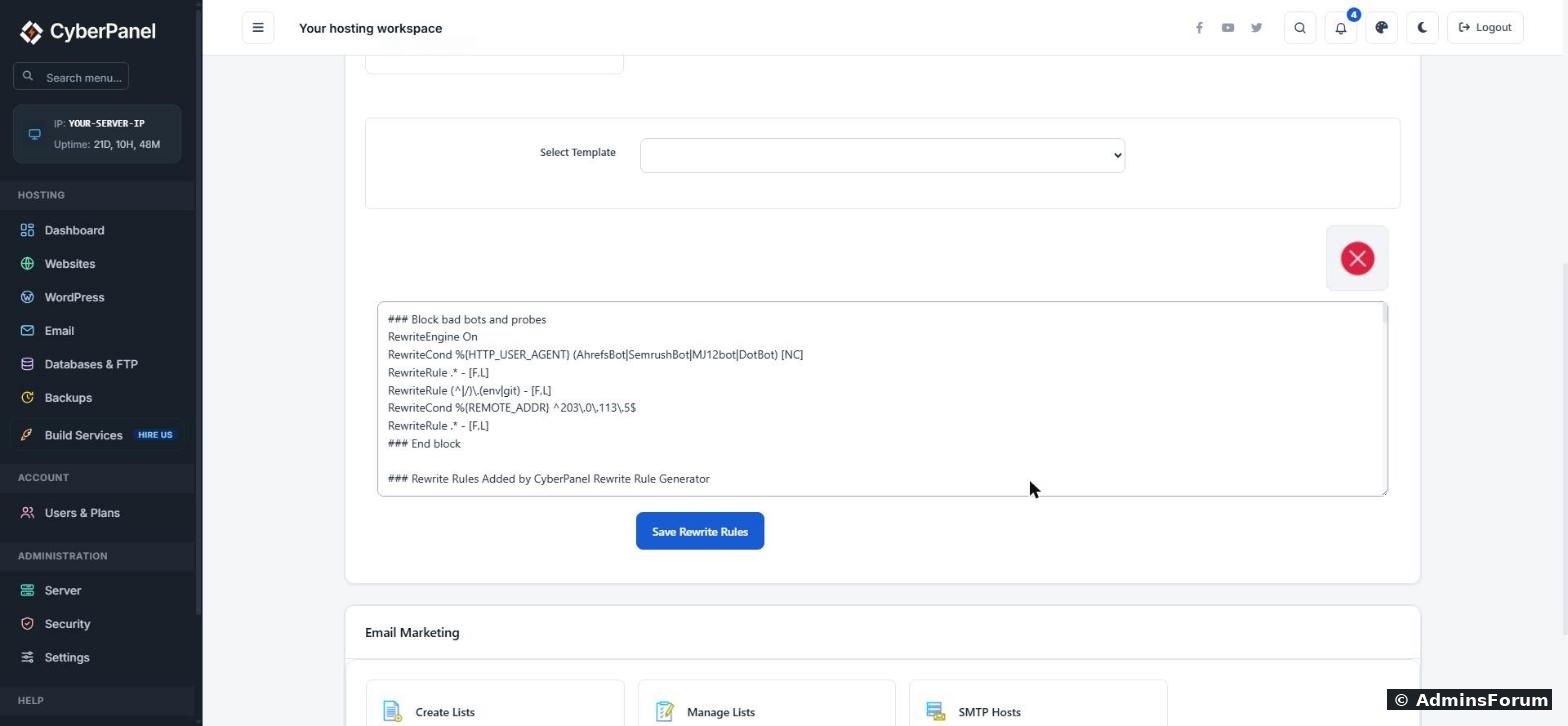
What each part does:
Step 3: Test it
From any computer with curl, pretend to be a bot with
. The command prints only the status code:
Our results:
Two results worth pointing out. The bot was also refused on a page that LiteSpeed Cache had already stored (
for normal visitors), so the cache doesn't let bots slip past. And Googlebot still got through, because it isn't in our list.
Be careful what you block
Not sure which names to block? Reply below with the top lines from the user agent command in step 1.
Aggressive crawlers and scanners can make up most of a small site's traffic: SEO bots that hit every page, and scripts that look for
Code:
.envWhich web server: our test server runs LiteSpeed Enterprise. The rules are ordinary rewrite rules, the kind OpenLiteSpeed also reads from this box, but we ran these exact tests on Enterprise only.
Step 1: See who is hitting your site
Each website has its own access log. Over SSH, list the most common visitors by their browser name (user agent):
Code:
L=/home/yourdomain.com/logs/yourdomain.com.access_log
awk -F'"' '{print $6}' $L | sort | uniq -c | sort -rn | headCode:
awk '$9==404{print $1}' $L | sort | uniq -c | sort -rn | headStep 2: Add the rules
Open Websites → your site → Config → Rewrite Rules. Paste this block at the very top, above everything that's already there, and click Save Rewrite Rules:
Code:
### Block bad bots and probes
RewriteEngine On
RewriteCond %{HTTP_USER_AGENT} (AhrefsBot|SemrushBot|MJ12bot|DotBot) [NC]
RewriteRule .* - [F,L]
RewriteRule (^|/)\.(env|git) - [F,L]
RewriteCond %{REMOTE_ADDR} ^203\.0\.113\.5$
RewriteRule .* - [F,L]
### End block
What each part does:
- Lines 3 and 4 refuse any visitor whose user agent contains one of the names in the brackets. Add or remove names, separated by
.Code:|
ignores upper and lower case.Code:[NC]
- Line 5 refuses any address that contains
orCode:/.env
, in any folder.Code:/.git
- Lines 6 and 7 refuse one IP address. Replace
with the address from your log, and keep the backslash before each dot. Delete these two lines if you don't need them.Code:203.0.113.5
- means "forbidden": the visitor gets a 403 error and PHP never starts, so it costs your server almost nothing.Code:
[F]
Step 3: Test it
From any computer with curl, pretend to be a bot with
Code:
-ACode:
curl -s -o /dev/null -w "%{http_code}\n" -A "AhrefsBot" https://yourdomain.com/
curl -s -o /dev/null -w "%{http_code}\n" https://yourdomain.com/.envCode:
Normal browser                        200
AhrefsBot                             403
semrushbot (lower case)               403
Googlebot                             200
AhrefsBot on a page that was cached   403
/.env                                 403
/.git/config                          403
/wp-content/.env                      403
MJ12bot asking for a CSS file         403
The blocked IP address 403Code:
x-litespeed-cache: hitBe careful what you block
- Don't block search engines you want. Never add Googlebot or bingbot. The names in our example are SEO-tool crawlers. Blocking them doesn't affect your Google ranking, but if you use Ahrefs or Semrush for your own site, leave that one out.
- User agents can be faked. This stops bots that say who they are. A scanner that pretends to be Chrome passes rule one, which is what the IP rule and Fail2ban are for.
- For many IPs, use the firewall instead. A rewrite rule per address gets messy. To block addresses for the whole server, see our CyberPanel firewall guide and our Fail2ban guide in this section.
- The rules are per website. Add the block to each site that needs it.
- WordPress and LiteSpeed Cache also write to this box. Keep your block at the top, outside their marked sections, so they don't overwrite it.
Not sure which names to block? Reply below with the top lines from the user agent command in step 1.