



Yesterday, 03:00 AM
A backup is useful only if you can restore and run the application. This guide backs up our aaPanel-managed Node.js sample, extracts it into a separate folder, compares the restored files and runs the copy on a temporary localhost port. The live website is not replaced.
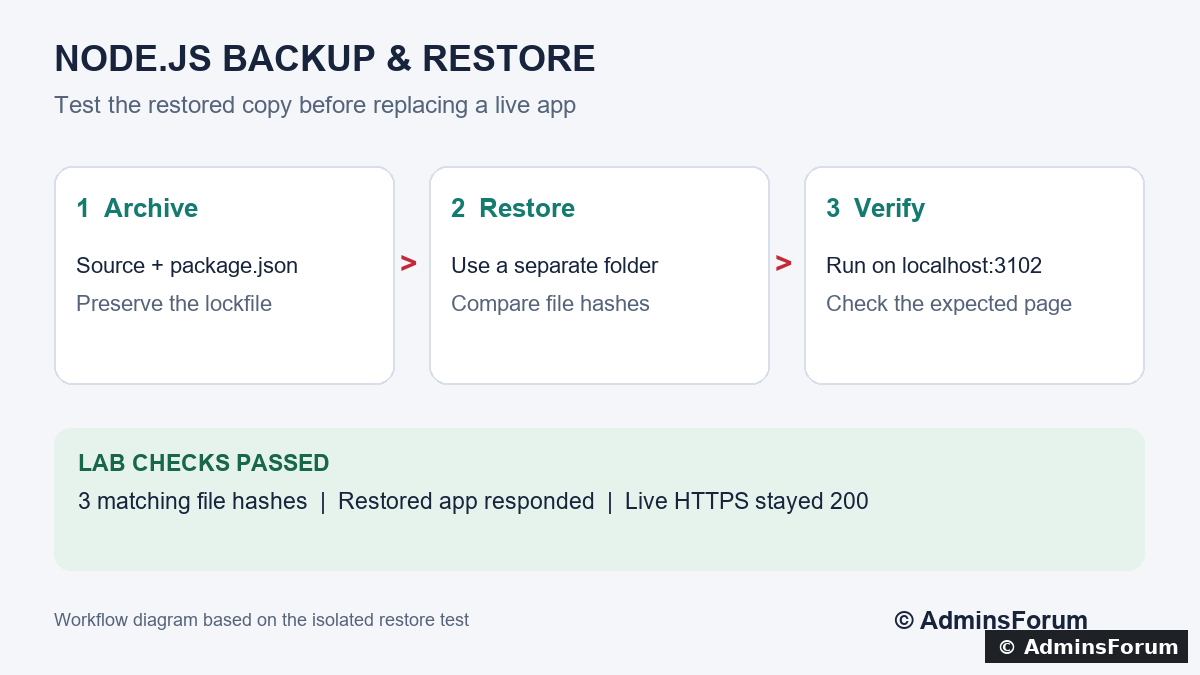
Backup and isolated restore workflow, based on the lab test below.
Tested setup: Ubuntu 22.04.5 LTS, aaPanel Free 8.0.7, Node.js 24.21.0. Source folder /www/wwwroot/af-node-lab; project afnodelab; live domain node.adminslab.com. Tested on 14 October 2026. These steps use SSH on the aaPanel server; they do not demonstrate aaPanel's native Backup / Restore button.
1. Decide what the backup must include
For this dependency-free sample, we preserved server.js, package.json and yarn.lock. For a real application, also identify configuration, required environment variables, uploaded files, generated assets and external services.
A source-file archive is not a database backup or a full aaPanel configuration backup. Record the project name, runtime, run user, startup command, port, domain mapping and Boot setting separately. Store secrets securely. Do not put an archive containing credentials under a publicly served website directory.
2. Check the live app before starting
Use your own domain and directory. Confirm the app is healthy and enough disk space is available. Our live app returned 200 before the test. For an application writing files or a database, plan a consistent backup process; copying changing files does not automatically produce a consistent recovery point.
3. Create the archive outside the website root
The following commands are for our lab. Use a unique archive filename to avoid overwriting an older backup:
The -C option changes the base directory before archiving. The archive contains the af-node-lab folder rather than absolute server paths. We excluded node_modules for this sample; a real app needs a reproducible dependency installation or another deliberate dependency-backup strategy. Preserve its lockfile and build requirements.
Our archive was 878 bytes because the sample contains only a few tiny source and lock files. That size is not representative of a real application.
4. Inspect the archive and keep an off-server copy
Check that the expected files appear. A readable archive list is useful, but it does not prove the app can run after restoration. Transfer a protected copy to a separate backup location and record its checksum. Our lab test verified a local archive and restore; an off-server transfer was not part of this test.
5. Restore into a new directory
Choose a directory that does not already exist. Never extract over the live app as your first recovery test:
The restored app is now under /www/af-node-restore-20261014/af-node-lab. This directory is separate from the live application's document root.
Before modifying the copy, compare hashes:
Repeat for package.json and yarn.lock. Matching digests confirm identical file contents at this point. Our test compared all three and they matched. A file checksum does not validate database contents or application behaviour.
6. Prepare the restored copy for an isolated test
Set ownership only on the separate test directory:
In the restored server.js only, change the sample port from 3100 to 3102 and update its startup message to match. Leave the live server.js untouched. Confirm that the temporary port is unused:
No matching listener should be present before this test. Do not use an occupied port. Keep the sample bound to 127.0.0.1 so the temporary copy is not exposed publicly.
Check its JavaScript syntax:
Replace the runtime path with your installed version. Real applications may also need dependencies, compilation and test environment configuration. Do not connect a recovery test to production services that could send mail, charge payments or modify live data.
7. Run the copy and check its response
In one SSH session, start it in the foreground as www:
In a second SSH session:
The restored sample should return HTTP 200 and the AdminsForum Node.js Lab page. The live domain should still return 200 independently. We verified the restored response and the live domain during our test.
When finished, stop the foreground test with Ctrl+C. Our test also stopped its temporary process after validation; the live app remained running. Confirm that the temporary listener has gone before reusing the port.
8. Record the recovery result
Our test result was:
The archive and isolated restored folder were retained for later inspection. This proves recovery of this small source-based sample, not a full server or database restore.
9. Before replacing a real deployment
Keep the current release and its backup, restore any database consistently, verify dependencies and secrets, then plan the switch and rollback. Use aaPanel to configure the intended project directory and runtime only after the recovery copy passes its checks. Repeat response tests after the change. This guide deliberately stops before a live cutover.
Related guide: Deploy a Node.js app in aaPanel with a domain and HTTPS.
Backup and isolated restore workflow, based on the lab test below.
Tested setup: Ubuntu 22.04.5 LTS, aaPanel Free 8.0.7, Node.js 24.21.0. Source folder /www/wwwroot/af-node-lab; project afnodelab; live domain node.adminslab.com. Tested on 14 October 2026. These steps use SSH on the aaPanel server; they do not demonstrate aaPanel's native Backup / Restore button.
1. Decide what the backup must include
For this dependency-free sample, we preserved server.js, package.json and yarn.lock. For a real application, also identify configuration, required environment variables, uploaded files, generated assets and external services.
A source-file archive is not a database backup or a full aaPanel configuration backup. Record the project name, runtime, run user, startup command, port, domain mapping and Boot setting separately. Store secrets securely. Do not put an archive containing credentials under a publicly served website directory.
2. Check the live app before starting
Code:
curl -I https://node.adminslab.com/
ls -l /www/wwwroot/af-node-lab
df -h /www3. Create the archive outside the website root
The following commands are for our lab. Use a unique archive filename to avoid overwriting an older backup:
Code:
sudo tar --exclude=af-node-lab/node_modules   -czf /www/backup/af-node-20261014.tar.gz   -C /www/wwwroot af-node-lab
sudo chmod 600 /www/backup/af-node-20261014.tar.gzOur archive was 878 bytes because the sample contains only a few tiny source and lock files. That size is not representative of a real application.
4. Inspect the archive and keep an off-server copy
Code:
sudo tar -tzf /www/backup/af-node-20261014.tar.gz
sudo sha256sum /www/backup/af-node-20261014.tar.gz5. Restore into a new directory
Choose a directory that does not already exist. Never extract over the live app as your first recovery test:
Code:
sudo mkdir /www/af-node-restore-20261014
sudo tar -xzf /www/backup/af-node-20261014.tar.gz -C /www/af-node-restore-20261014Before modifying the copy, compare hashes:
Code:
sha256sum /www/wwwroot/af-node-lab/server.js
sha256sum /www/af-node-restore-20261014/af-node-lab/server.js6. Prepare the restored copy for an isolated test
Set ownership only on the separate test directory:
Code:
sudo chown -R www:www /www/af-node-restore-20261014Code:
ss -ltn | grep ':3102'Check its JavaScript syntax:
Code:
/www/server/nodejs/v24.21.0/bin/node --check /www/af-node-restore-20261014/af-node-lab/server.js7. Run the copy and check its response
In one SSH session, start it in the foreground as www:
Code:
sudo runuser -u www -- /www/server/nodejs/v24.21.0/bin/node /www/af-node-restore-20261014/af-node-lab/server.jsCode:
curl -i http://127.0.0.1:3102/
curl -I https://node.adminslab.com/When finished, stop the foreground test with Ctrl+C. Our test also stopped its temporary process after validation; the live app remained running. Confirm that the temporary listener has gone before reusing the port.
8. Record the recovery result
Our test result was:
Code:
server.js file hash: MATCH
package.json file hash: MATCH
yarn.lock file hash: MATCH
Restored app on localhost:3102: EXPECTED PAGE
Live HTTPS website: 2009. Before replacing a real deployment
Keep the current release and its backup, restore any database consistently, verify dependencies and secrets, then plan the switch and rollback. Use aaPanel to configure the intended project directory and runtime only after the recovery copy passes its checks. Repeat response tests after the change. This guide deliberately stops before a live cutover.
Related guide: Deploy a Node.js app in aaPanel with a domain and HTTPS.