



Apache CVE-2026-119618: update aaPanel-managed Apache to 2.4.71
Checked against the Apache and aaPanel advisories on 14 November 2026. This is an upgrade guide, not a statement that any particular server has been exploited.
What needs attention?
Apache rates CVE-2026-119618 critical. A concurrency defect in mod_http2 can corrupt memory and allow remote code execution. Apache HTTP Server 2.4.55 through 2.4.70 is affected; 2.4.71 contains the fix. The separately distributed mod_h2 releases 2.0.8 through 2.0.42 are also listed as affected.
aaPanel's notice identifies Apache HTTP/2 (h2 or h2c) as the relevant exposure. Administrators should update affected installations promptly. Review Apache's advisory for your exact build; distribution packages may contain vendor-backported fixes even when their version number looks older.
Apache's official security advisory
aaPanel's upgrade notice
1. Identify the Apache instance you actually use
Check aaPanel's App Store and your site's web-server configuration. On a typical aaPanel Apache installation, these are read-only inspection commands:
Adjust the path if your installation differs. The options show the installed version, loaded modules, virtual hosts and configuration syntax. Look for http2_module in the module output, then inspect the effective configuration for Protocols directives and h2/h2c listeners. A loaded module alone does not establish that a particular listener accepts HTTP/2.
If Nginx or a CDN handles public HTTP/2, check the protocol used on the separate connection to Apache too. Frontend HTTP/2 does not automatically mean the backend uses Apache HTTP/2. Likewise, a public HTTP/1.1 response does not establish that every Apache listener is safe.
Do not use the HTTP Server header, an OpenSSL version, or the browser's HTTP protocol label as a substitute for checking the actual Apache build and configuration.
2. Prepare a recovery plan
Choose a short maintenance window and finish any unrelated server updates first. Save a recoverable server snapshot or backup, current Apache configuration, virtual hosts, certificate configuration and custom modules. Keep recovery access independent of the website.
Record the current versions and confirm that important sites work before starting. If the server already has database errors, overloaded storage or failed services, document those separately so they are not mistaken for a new Apache regression.
3. Update through aaPanel
The exact labels can differ by panel release. If a fixed build is unavailable, ask aaPanel support rather than replacing a panel-managed Apache with an unrelated operating-system package. Replacing it blindly can leave two installations or break the panel's paths and modules.
Updating aaPanel itself is not proof that its separately installed Apache component was updated.
Panel example from our demo lab
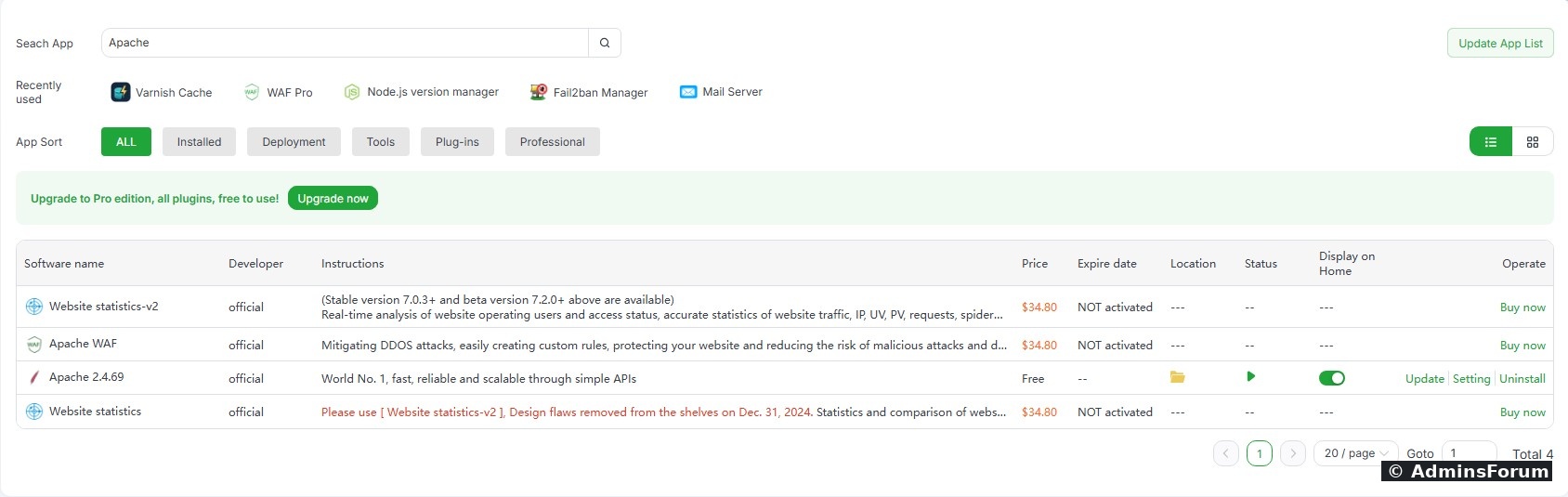
Before upgrade: Apache 2.4.69 in the demo App Store. Use Update App List, then the Update link in the Apache row. This screenshot shows the update entry point before installation.
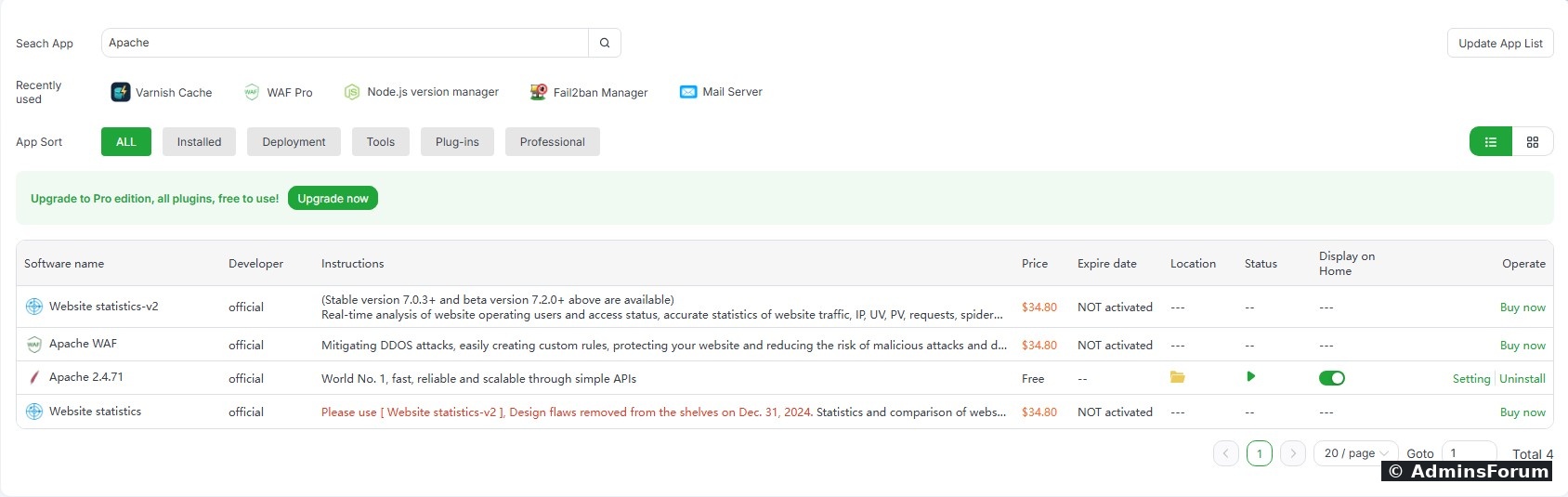
After upgrade: the same demo panel shows Apache 2.4.71. On 14 November 2026 we separately confirmed that the installed 2.4.71 executable was running and the configuration test reported Syntax OK. The panel task queue had finished. This demonstrates our lab result; repeat the checks below on your own server.
4. Verify the upgrade
Repeat the version, module and syntax checks from step 1. A successful configuration test should report Syntax OK. Resolve errors before requesting a restart.
Use aaPanel's supported Apache service controls to ensure the new executable is running. A version command reads the installed binary; it does not prove an old running process has been replaced. Do not create a second manual Apache instance alongside the panel-managed service.
Then check:
HTTP 200 is a useful availability check, but inspect the page too: an error or challenge page can also return 200. These checks establish update health; they are not an exploit test or proof that the server was never compromised.
5. Temporary mitigation if patching is delayed
aaPanel recommends removing h2 and h2c from Apache's Protocols settings while retaining HTTP/1.1. For an affected listener, the resulting directive is:
Back up the configuration first. Apply the restriction to the effective server and affected virtual hosts; do not assume one global edit overrides every virtual-host setting. Review internal/direct listeners as well as the public proxy route. Test the configuration, then apply it through the supported service controls and verify that affected Apache listeners no longer accept HTTP/2.
Changing only the CDN or Nginx frontend does not necessarily remove Apache backend exposure. This mitigation can change protocol performance and is a temporary alternative while arranging the fixed build. After installing and verifying a fixed release, re-enable HTTP/2 only where you intend to use it.
If an update fails
Keep the task result and first relevant Apache error, check configuration/module compatibility, and use your recovery plan or aaPanel support. Do not repeatedly start services or restore an affected build with HTTP/2 exposed. Never post passwords, private keys or an unredacted configuration backup in a support thread.
References
Checked against the Apache and aaPanel advisories on 14 November 2026. This is an upgrade guide, not a statement that any particular server has been exploited.
What needs attention?
Apache rates CVE-2026-119618 critical. A concurrency defect in mod_http2 can corrupt memory and allow remote code execution. Apache HTTP Server 2.4.55 through 2.4.70 is affected; 2.4.71 contains the fix. The separately distributed mod_h2 releases 2.0.8 through 2.0.42 are also listed as affected.
aaPanel's notice identifies Apache HTTP/2 (h2 or h2c) as the relevant exposure. Administrators should update affected installations promptly. Review Apache's advisory for your exact build; distribution packages may contain vendor-backported fixes even when their version number looks older.
Apache's official security advisory
aaPanel's upgrade notice
1. Identify the Apache instance you actually use
Check aaPanel's App Store and your site's web-server configuration. On a typical aaPanel Apache installation, these are read-only inspection commands:
Code:
/www/server/apache/bin/httpd -v
/www/server/apache/bin/httpd -M
/www/server/apache/bin/httpd -S
/www/server/apache/bin/httpd -t
Adjust the path if your installation differs. The options show the installed version, loaded modules, virtual hosts and configuration syntax. Look for http2_module in the module output, then inspect the effective configuration for Protocols directives and h2/h2c listeners. A loaded module alone does not establish that a particular listener accepts HTTP/2.
If Nginx or a CDN handles public HTTP/2, check the protocol used on the separate connection to Apache too. Frontend HTTP/2 does not automatically mean the backend uses Apache HTTP/2. Likewise, a public HTTP/1.1 response does not establish that every Apache listener is safe.
Do not use the HTTP Server header, an OpenSSL version, or the browser's HTTP protocol label as a substitute for checking the actual Apache build and configuration.
2. Prepare a recovery plan
Choose a short maintenance window and finish any unrelated server updates first. Save a recoverable server snapshot or backup, current Apache configuration, virtual hosts, certificate configuration and custom modules. Keep recovery access independent of the website.
Record the current versions and confirm that important sites work before starting. If the server already has database errors, overloaded storage or failed services, document those separately so they are not mistaken for a new Apache regression.
3. Update through aaPanel
- Open App Store in aaPanel.
- Use Update App List in the upper-right area.
- Locate Apache and use its upgrade/update control.
- Choose 2.4.71 or a newer supported release that includes this fix.
- Let the installation task finish and inspect its result/log. Avoid starting another update or repeatedly clicking the service start button while it is working.
The exact labels can differ by panel release. If a fixed build is unavailable, ask aaPanel support rather than replacing a panel-managed Apache with an unrelated operating-system package. Replacing it blindly can leave two installations or break the panel's paths and modules.
Updating aaPanel itself is not proof that its separately installed Apache component was updated.
Panel example from our demo lab
Before upgrade: Apache 2.4.69 in the demo App Store. Use Update App List, then the Update link in the Apache row. This screenshot shows the update entry point before installation.
After upgrade: the same demo panel shows Apache 2.4.71. On 14 November 2026 we separately confirmed that the installed 2.4.71 executable was running and the configuration test reported Syntax OK. The panel task queue had finished. This demonstrates our lab result; repeat the checks below on your own server.
4. Verify the upgrade
Repeat the version, module and syntax checks from step 1. A successful configuration test should report Syntax OK. Resolve errors before requesting a restart.
Use aaPanel's supported Apache service controls to ensure the new executable is running. A version command reads the installed binary; it does not prove an old running process has been replaced. Do not create a second manual Apache instance alongside the panel-managed service.
Then check:
- Apache's service/task status and recent error log.
- Each important hostname over certificate-verified HTTPS.
- Login, a normal dynamic page, redirects and any important application workflow.
- The complete frontend-to-backend route if you use Nginx, Varnish or another proxy.
HTTP 200 is a useful availability check, but inspect the page too: an error or challenge page can also return 200. These checks establish update health; they are not an exploit test or proof that the server was never compromised.
5. Temporary mitigation if patching is delayed
aaPanel recommends removing h2 and h2c from Apache's Protocols settings while retaining HTTP/1.1. For an affected listener, the resulting directive is:
Code:
Protocols http/1.1Back up the configuration first. Apply the restriction to the effective server and affected virtual hosts; do not assume one global edit overrides every virtual-host setting. Review internal/direct listeners as well as the public proxy route. Test the configuration, then apply it through the supported service controls and verify that affected Apache listeners no longer accept HTTP/2.
Changing only the CDN or Nginx frontend does not necessarily remove Apache backend exposure. This mitigation can change protocol performance and is a temporary alternative while arranging the fixed build. After installing and verifying a fixed release, re-enable HTTP/2 only where you intend to use it.
If an update fails
Keep the task result and first relevant Apache error, check configuration/module compatibility, and use your recovery plan or aaPanel support. Do not repeatedly start services or restore an affected build with HTTP/2 exposed. Never post passwords, private keys or an unredacted configuration backup in a support thread.
References