



10-13-2026, 07:04 PM
aaPanel vs CloudPanel: which free control panel should you run in 2026?
If you already know aaPanel, you've probably seen CloudPanel recommended as the "lighter, faster" alternative. We installed both on the same VPS and used them for real (sites, SSL, databases, backups and security), so you can see exactly where aaPanel wins, where CloudPanel wins, and which one fits your server.
How we tested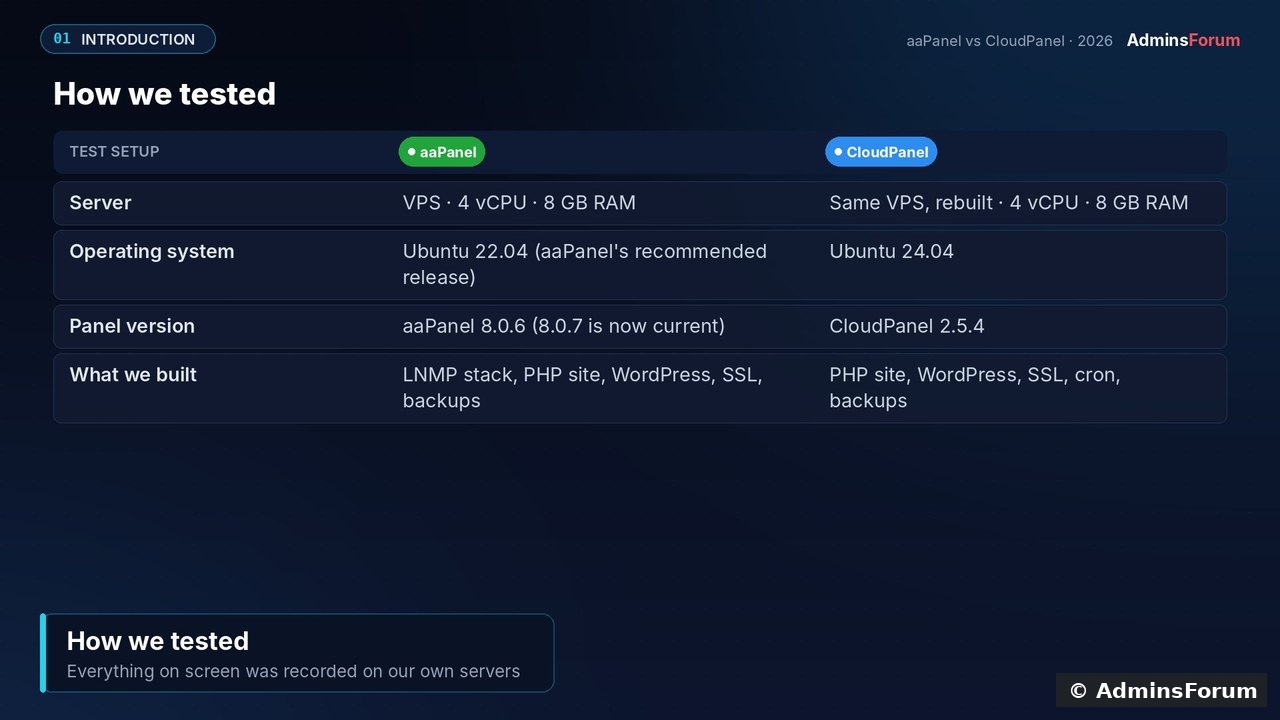
1. What each panel is built for
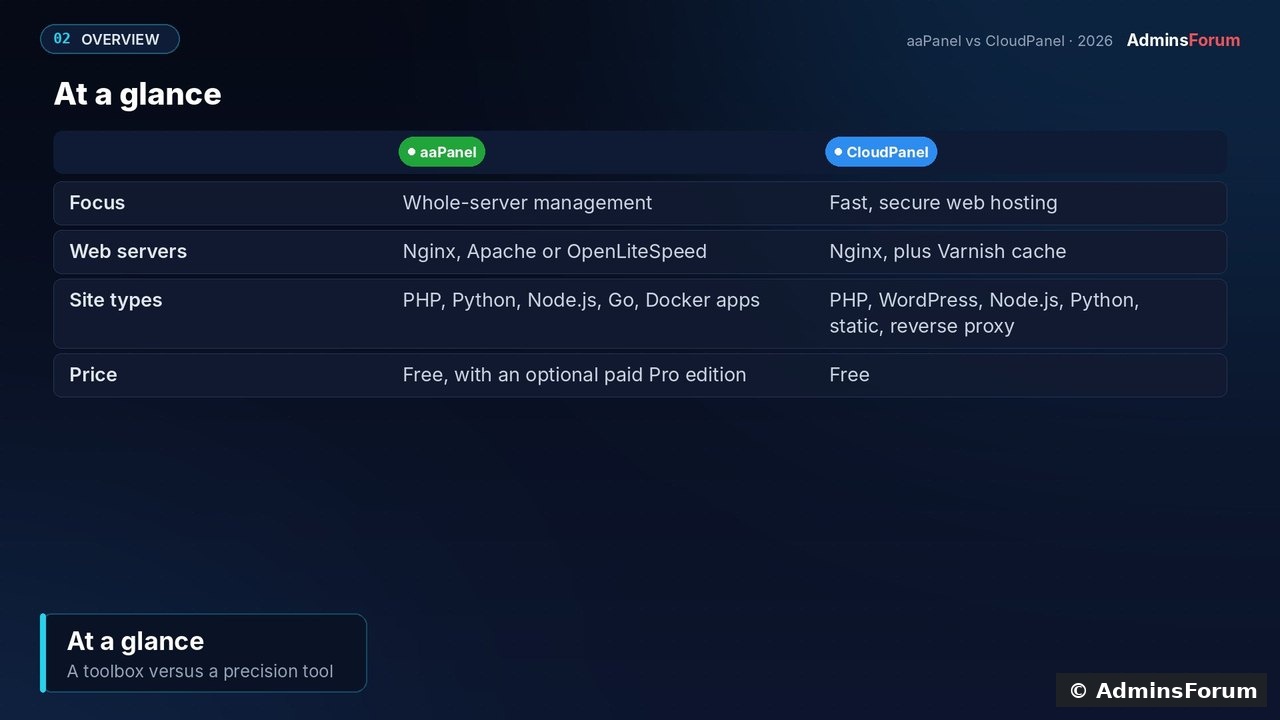
aaPanel is an all-in-one server panel. Besides websites it manages databases, FTP, Docker, a mail server, cron, a firewall and an app store with 200+ one-click apps. You can run Nginx, Apache or OpenLiteSpeed, with PHP, Python, Node.js and Go projects.
CloudPanel is narrower by design: a free panel for running web apps fast on Nginx, PHP-FPM, MySQL or MariaDB, Redis and Varnish. It hosts PHP, WordPress, Node.js, Python, static sites and reverse proxies, each isolated, on x86 or ARM.
2. Requirements and installation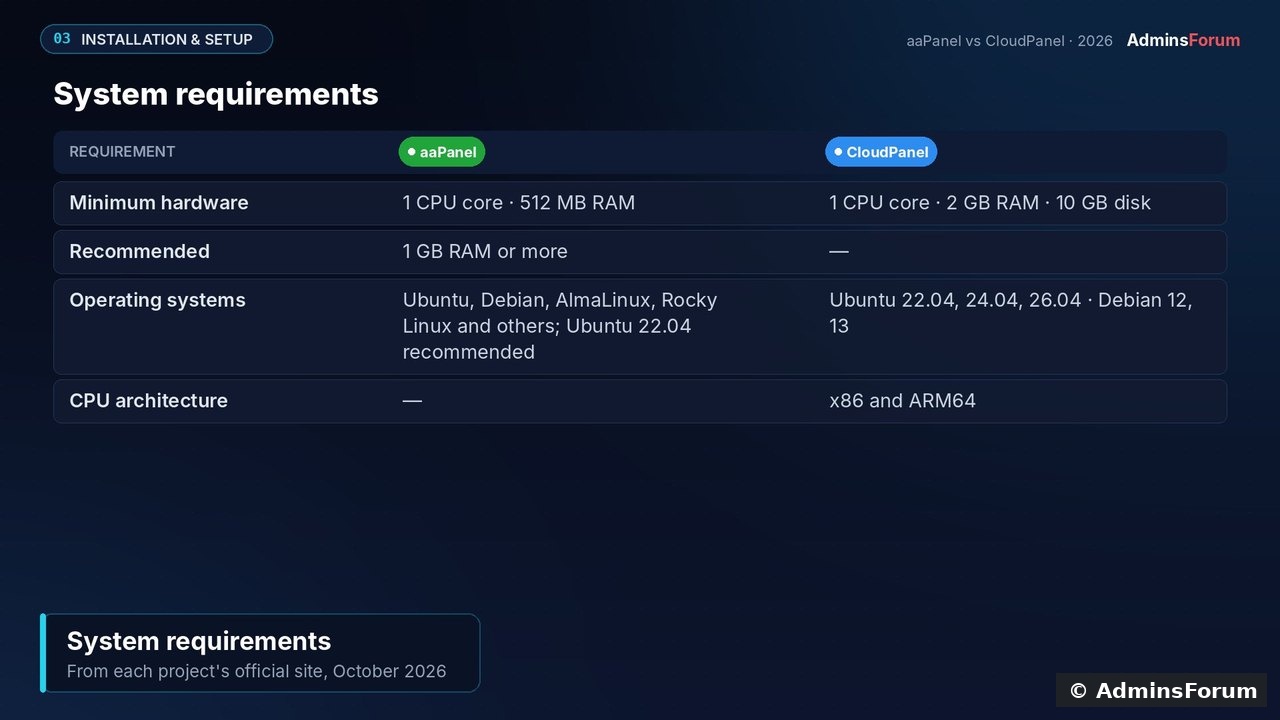
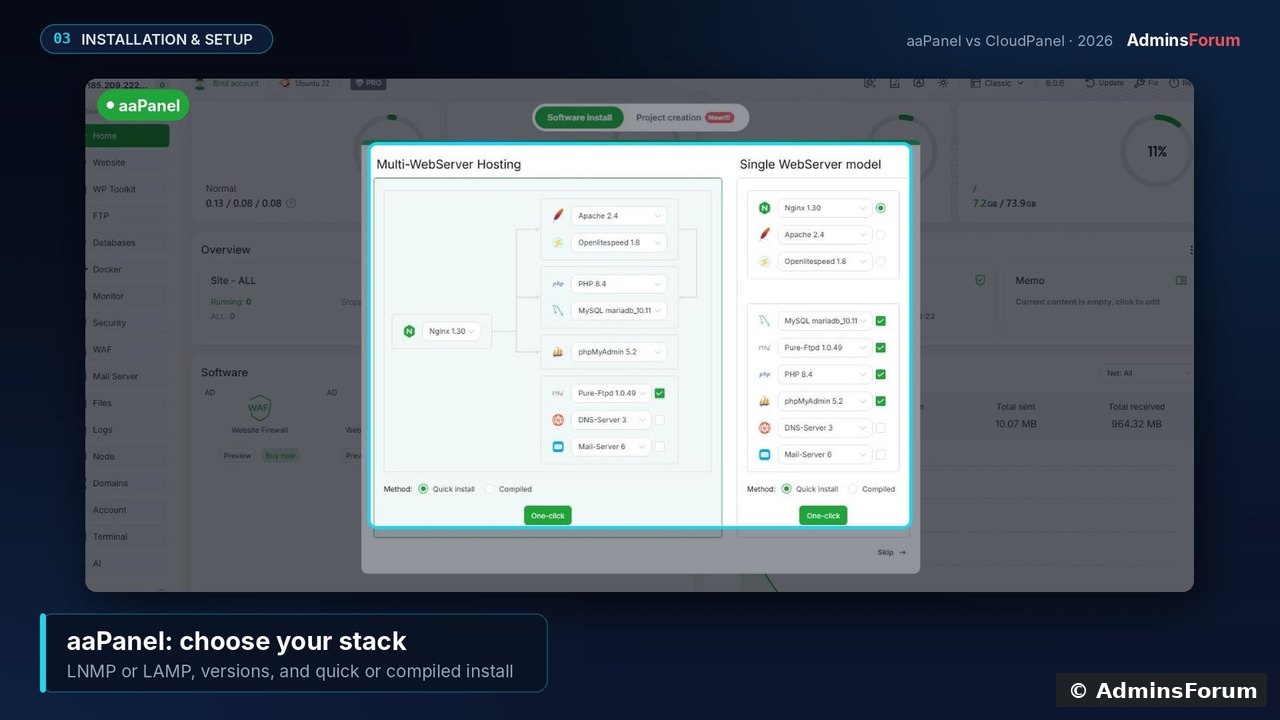
The first big difference: on first login aaPanel asks you to choose your stack (Nginx/Apache/OpenLiteSpeed, versions, quick or compiled install). CloudPanel installs and tunes everything for you.
3. Interface and ease of use
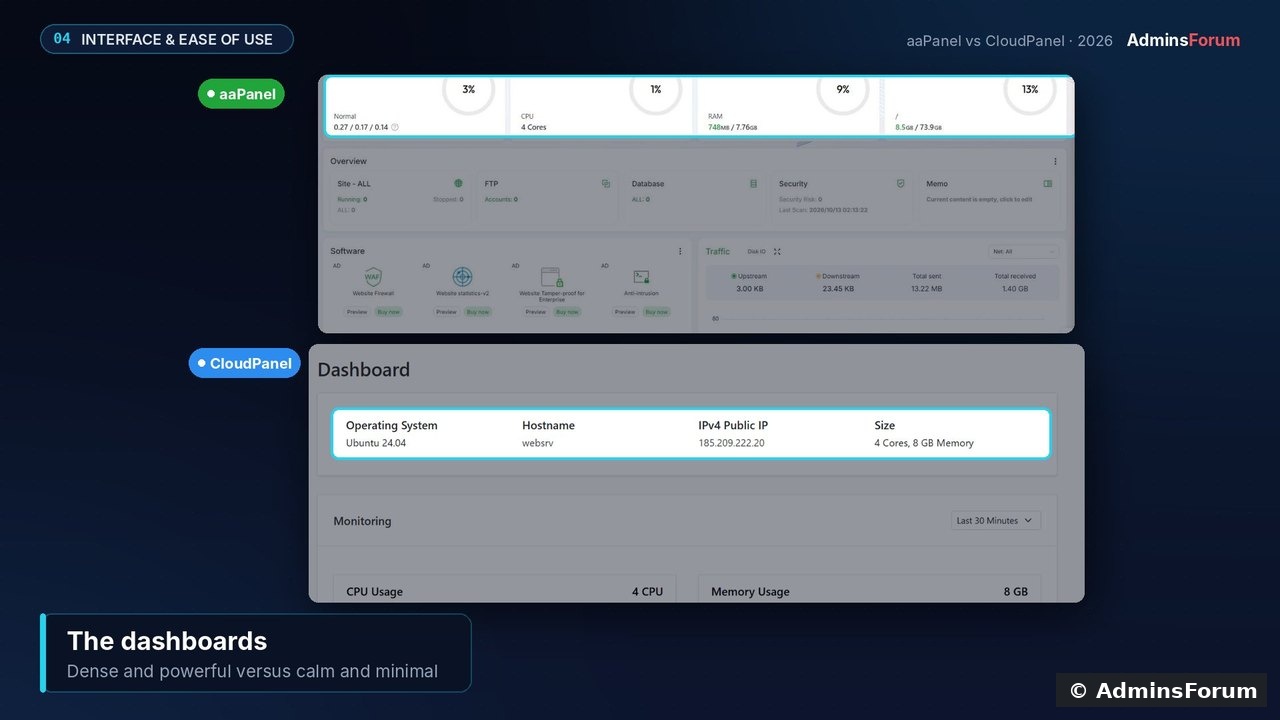
aaPanel's dashboard is dense: gauges, overview, software and traffic panels, plus a long menu. CloudPanel's is calm: server details, monitoring charts, and two main links. In daily use, CloudPanel is easier to learn; aaPanel rewards the time you spend exploring it.
4. Features
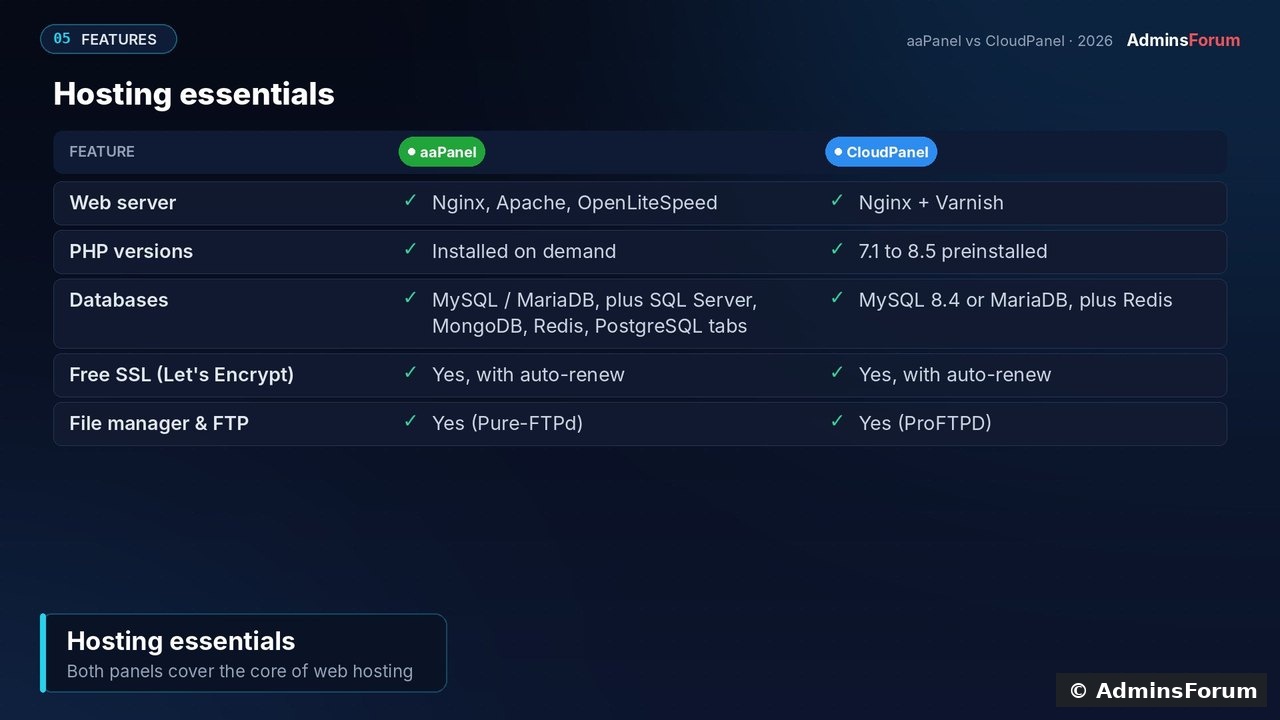
Both cover the essentials: multiple PHP versions, MySQL/MariaDB with phpMyAdmin, free Let's Encrypt SSL with auto-renew, a file manager and FTP. aaPanel adds Apache/OpenLiteSpeed and tabs for SQL Server, MongoDB, Redis and PostgreSQL.
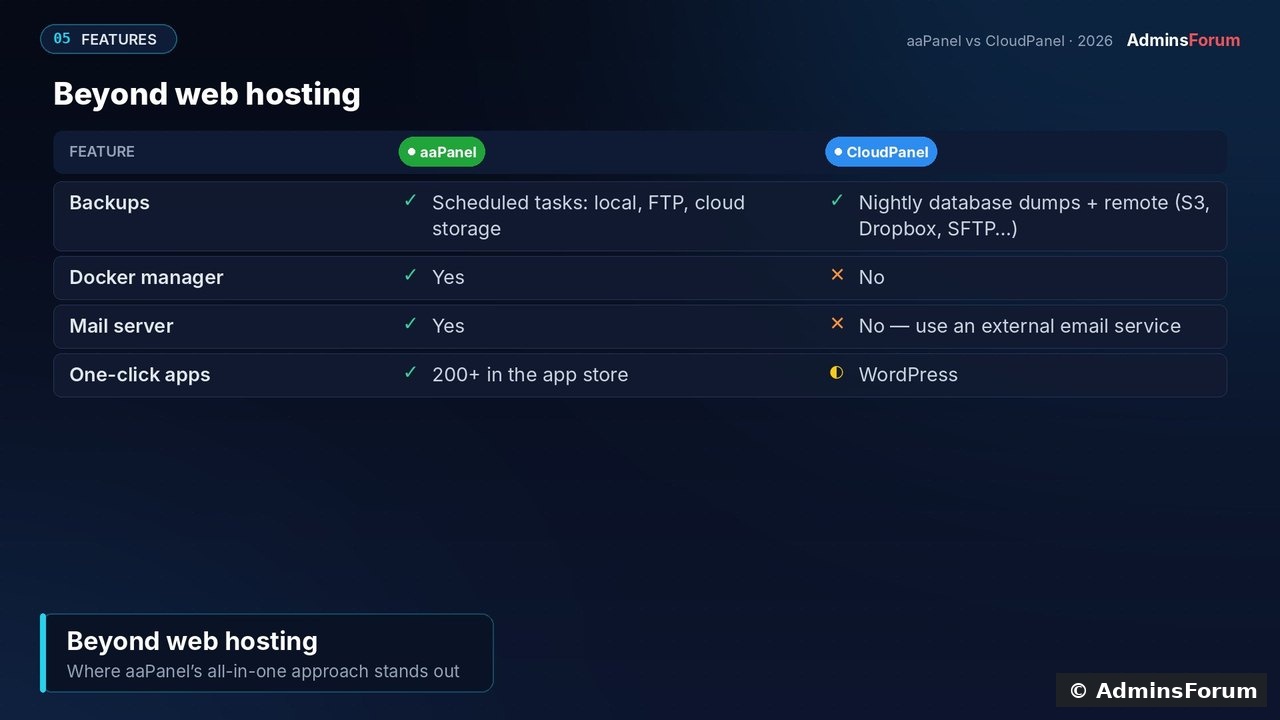
Beyond hosting, aaPanel pulls ahead: a Docker manager, a mail server and a big app store. CloudPanel has none of these by design, so for email you'd pair it with an external service.
5. Performance and resources
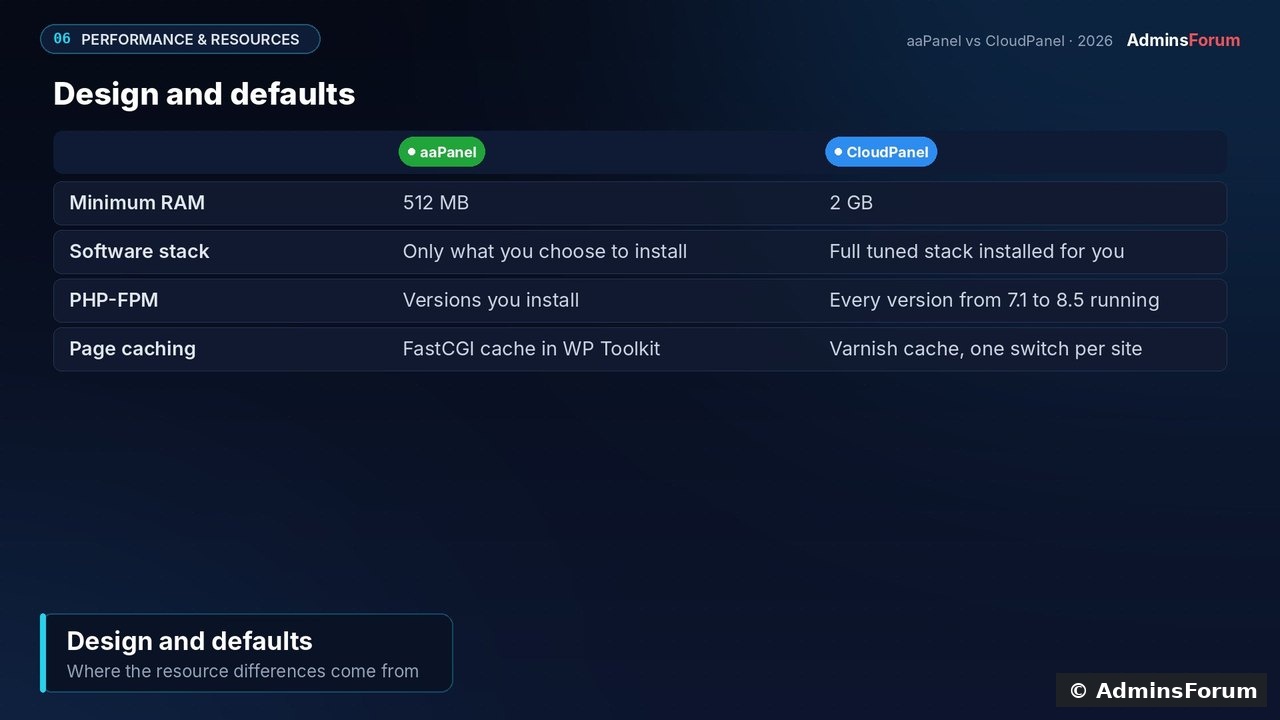
We did not run a controlled load test of both panels, so we make no speed claims. What we can compare is design and defaults:
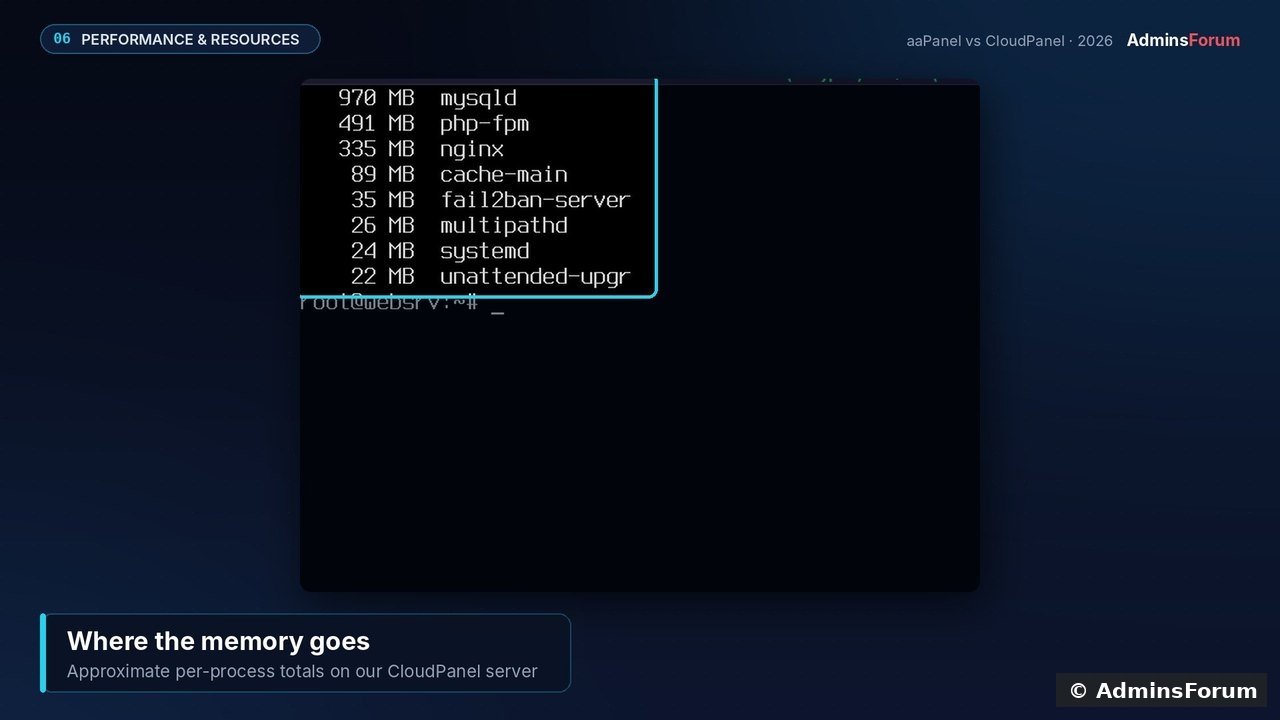
On our CloudPanel server (two sites, a few hours after install), 1.95 GB of 7.9 GB was in use. Most of that was MySQL (~970 MB, sized for the server's RAM), plus PHP-FPM pools for every PHP version, Nginx and Varnish. aaPanel only installs what you pick, which is why it can run on 512 MB.
Takeaway: on a very small VPS, aaPanel's lighter minimum is a real advantage. On a dedicated web server, CloudPanel gives you a tuned stack out of the box. For real numbers, load test your own site (k6 or wrk) on the plan you actually use.
6. Security and updates
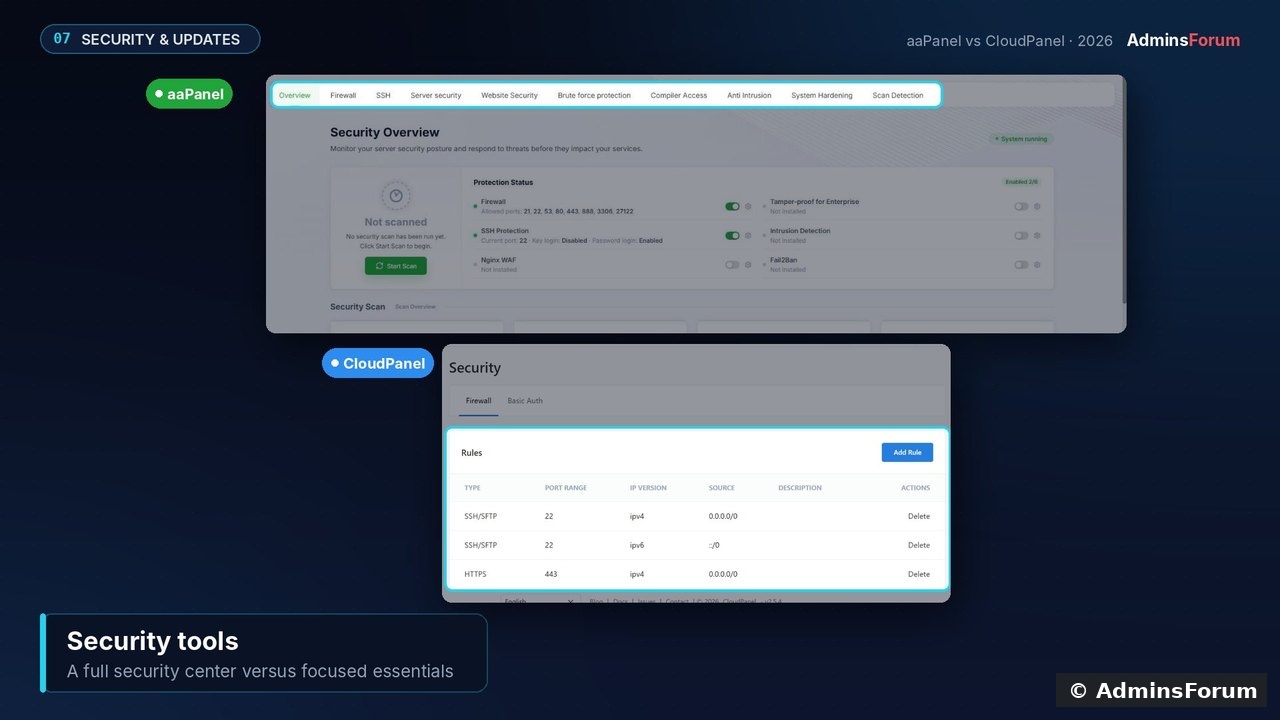
aaPanel has a full security centre: firewall, SSH settings, brute-force protection, intrusion detection, scanning and an optional WAF. CloudPanel sticks to the essentials: firewall rules, basic auth in front of the panel, IP and bot blocking, 2FA and a Cloudflare-only mode. It also ships fail2ban, which we saw running on our server.
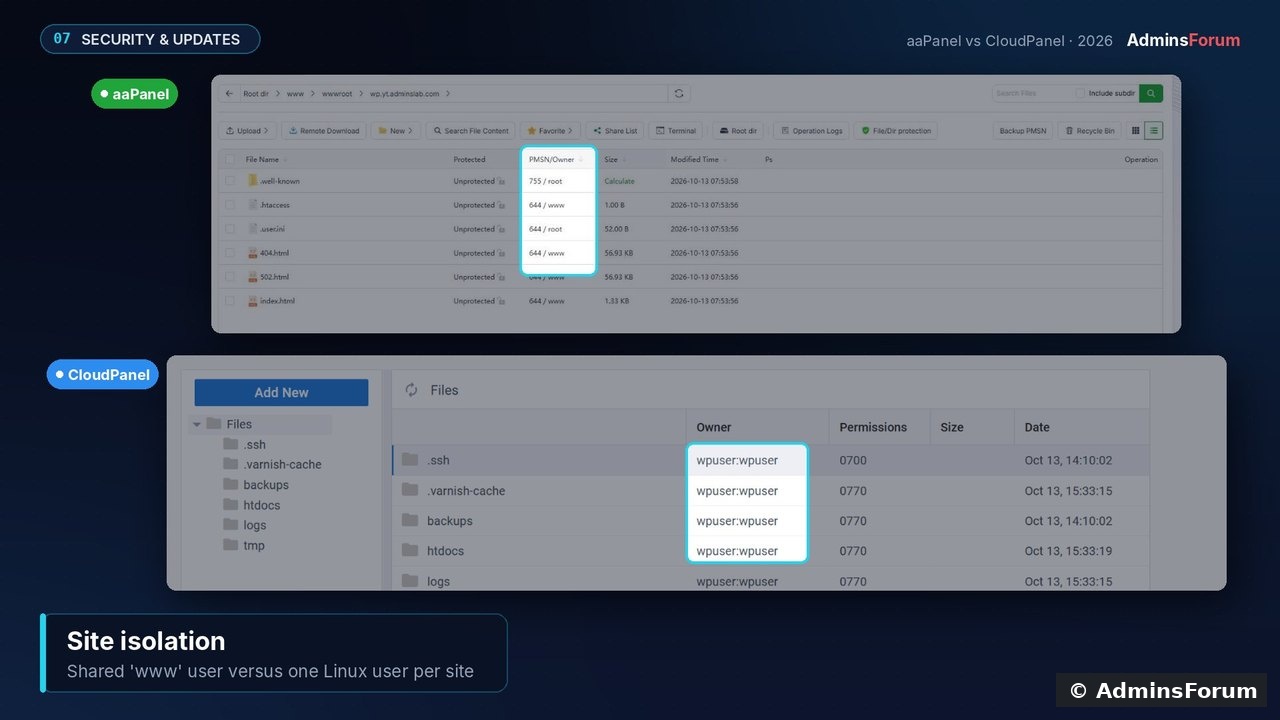
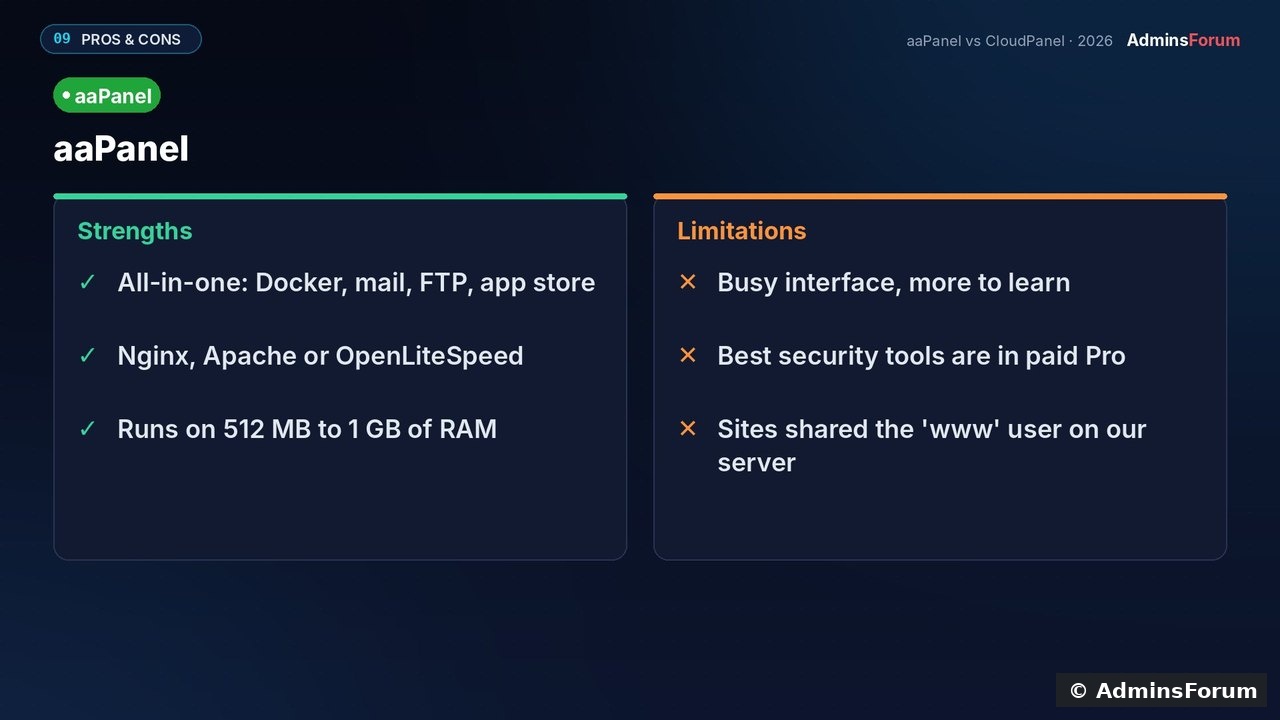
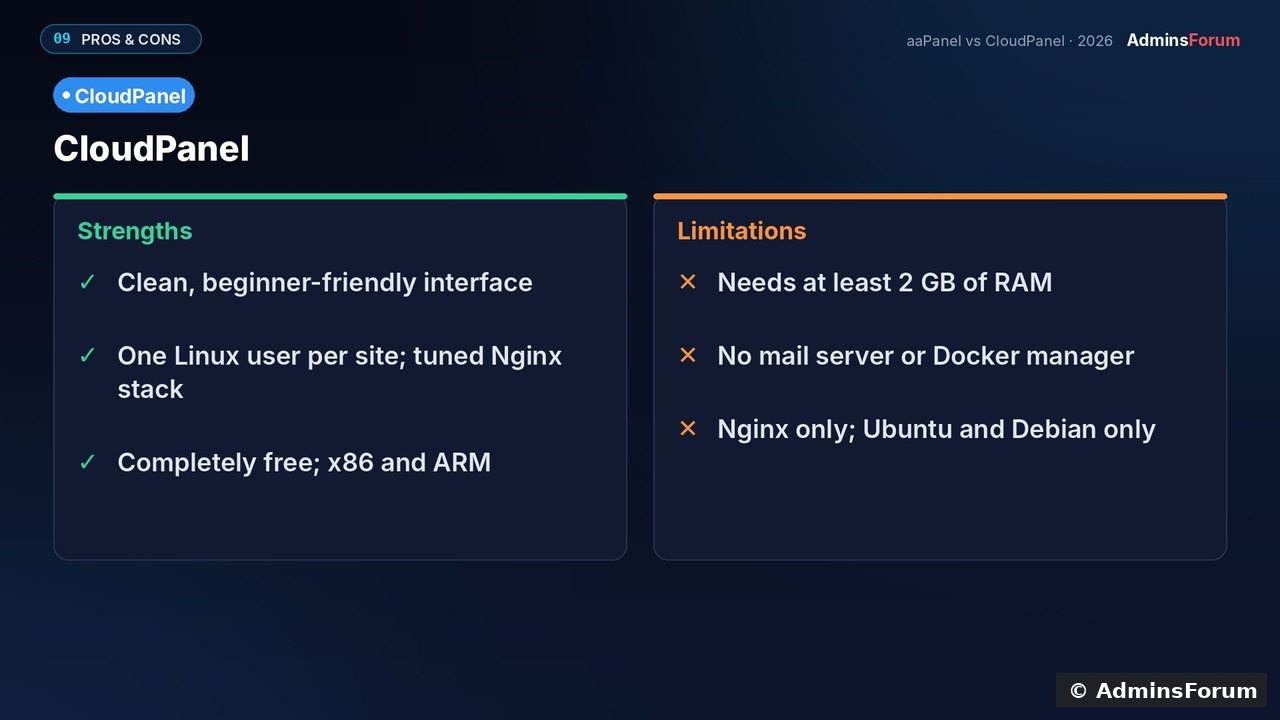
A structural difference: on our aaPanel server, site files were owned by the shared www user. CloudPanel gives every site its own Linux user, which limits the damage if one site is compromised.
Updates: aaPanel uses the Update button in the panel, and CloudPanel uses the
command (take a snapshot first). OS updates, strong passwords and off-server backups are still your job with either panel.
7. Pricing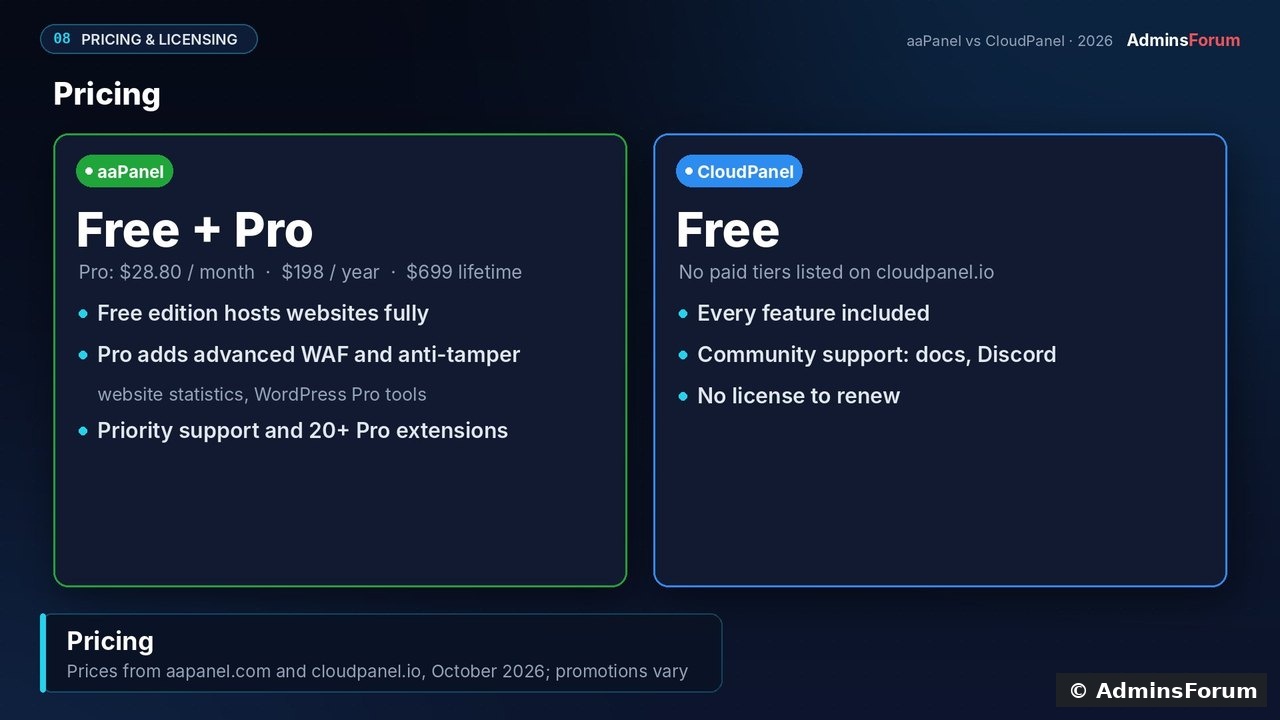
The bigger cost is usually the server: aaPanel runs on a 1 GB VPS, while CloudPanel needs at least 2 GB.
8. Pros and cons
Verdict
Stay with (or choose) aaPanel if you want one dashboard for the whole server, need Docker, a mail server or many apps, run a small 1 GB VPS, or need Apache/OpenLiteSpeed.
Choose CloudPanel if you mainly host PHP, WordPress or Node.js sites and want a clean, fast setup where every site is isolated, on ARM servers too, with nothing to buy.
Sources (checked October 2026; prices change): aaPanel pricing · aaPanel requirements · CloudPanel requirements · cloudpanel.io
Which panel do you run, and why? Share your setup below. If you get stuck installing either one, ask in the aaPanel or CloudPanel support forums.
If you already know aaPanel, you've probably seen CloudPanel recommended as the "lighter, faster" alternative. We installed both on the same VPS and used them for real (sites, SSL, databases, backups and security), so you can see exactly where aaPanel wins, where CloudPanel wins, and which one fits your server.
How we tested
- Server: the same VPS for both: 4 vCPU, 8 GB RAM.
- aaPanel 8.0.6 on Ubuntu 22.04 (aaPanel's recommended release). 8.0.7 is now current.
- CloudPanel 2.5.4 on Ubuntu 24.04.
- Every screenshot below comes from those installs, tested in October 2026.
1. What each panel is built for
aaPanel is an all-in-one server panel. Besides websites it manages databases, FTP, Docker, a mail server, cron, a firewall and an app store with 200+ one-click apps. You can run Nginx, Apache or OpenLiteSpeed, with PHP, Python, Node.js and Go projects.
CloudPanel is narrower by design: a free panel for running web apps fast on Nginx, PHP-FPM, MySQL or MariaDB, Redis and Varnish. It hosts PHP, WordPress, Node.js, Python, static sites and reverse proxies, each isolated, on x86 or ARM.
2. Requirements and installation
- aaPanel: 1 core and 512 MB RAM minimum (1 GB recommended), and it supports many distros. Install is one command and takes about one minute. The installer prints a panel URL with a random port and security entrance, plus a generated login.
- CloudPanel: 1 core, 2 GB RAM and 10 GB disk minimum; Ubuntu 22.04/24.04/26.04 or Debian 12/13 only. Install is one command (verify the SHA-256 checksum from the docs), with the database engine chosen up front. It took about five minutes on our server. Create the admin user on port 8443 right away, because until you do, the first visitor can claim it.
The first big difference: on first login aaPanel asks you to choose your stack (Nginx/Apache/OpenLiteSpeed, versions, quick or compiled install). CloudPanel installs and tunes everything for you.
3. Interface and ease of use
aaPanel's dashboard is dense: gauges, overview, software and traffic panels, plus a long menu. CloudPanel's is calm: server details, monitoring charts, and two main links. In daily use, CloudPanel is easier to learn; aaPanel rewards the time you spend exploring it.
4. Features
Both cover the essentials: multiple PHP versions, MySQL/MariaDB with phpMyAdmin, free Let's Encrypt SSL with auto-renew, a file manager and FTP. aaPanel adds Apache/OpenLiteSpeed and tabs for SQL Server, MongoDB, Redis and PostgreSQL.
Beyond hosting, aaPanel pulls ahead: a Docker manager, a mail server and a big app store. CloudPanel has none of these by design, so for email you'd pair it with an external service.
5. Performance and resources
We did not run a controlled load test of both panels, so we make no speed claims. What we can compare is design and defaults:
On our CloudPanel server (two sites, a few hours after install), 1.95 GB of 7.9 GB was in use. Most of that was MySQL (~970 MB, sized for the server's RAM), plus PHP-FPM pools for every PHP version, Nginx and Varnish. aaPanel only installs what you pick, which is why it can run on 512 MB.
Takeaway: on a very small VPS, aaPanel's lighter minimum is a real advantage. On a dedicated web server, CloudPanel gives you a tuned stack out of the box. For real numbers, load test your own site (k6 or wrk) on the plan you actually use.
6. Security and updates
aaPanel has a full security centre: firewall, SSH settings, brute-force protection, intrusion detection, scanning and an optional WAF. CloudPanel sticks to the essentials: firewall rules, basic auth in front of the panel, IP and bot blocking, 2FA and a Cloudflare-only mode. It also ships fail2ban, which we saw running on our server.
A structural difference: on our aaPanel server, site files were owned by the shared www user. CloudPanel gives every site its own Linux user, which limits the damage if one site is compromised.
Updates: aaPanel uses the Update button in the panel, and CloudPanel uses the
Code:
clp-update7. Pricing
- aaPanel: the free edition hosts websites fully. aaPanel Pro is $28.80/month, $198/year or $699 lifetime (sales run at times). It adds an advanced WAF, anti-tamper, website statistics, WordPress Pro tools, priority support and 20+ Pro extensions.
- CloudPanel: free, with no paid tiers listed.
The bigger cost is usually the server: aaPanel runs on a 1 GB VPS, while CloudPanel needs at least 2 GB.
8. Pros and cons
Verdict
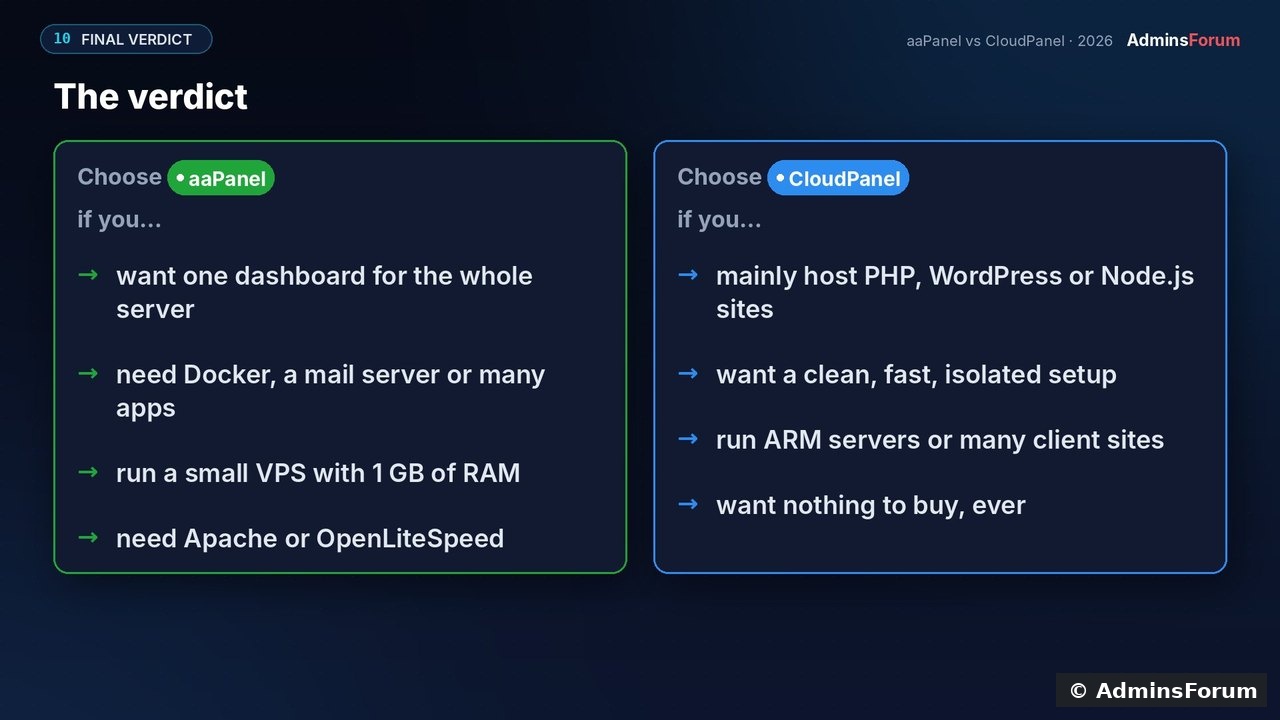
Stay with (or choose) aaPanel if you want one dashboard for the whole server, need Docker, a mail server or many apps, run a small 1 GB VPS, or need Apache/OpenLiteSpeed.
Choose CloudPanel if you mainly host PHP, WordPress or Node.js sites and want a clean, fast setup where every site is isolated, on ARM servers too, with nothing to buy.
Sources (checked October 2026; prices change): aaPanel pricing · aaPanel requirements · CloudPanel requirements · cloudpanel.io
Which panel do you run, and why? Share your setup below. If you get stuck installing either one, ask in the aaPanel or CloudPanel support forums.