



Yesterday, 07:43 AM
This is the starting point for our aaPanel CLI tutorials. Before using individual commands, see the complete bt menu and understand which jobs it can perform.
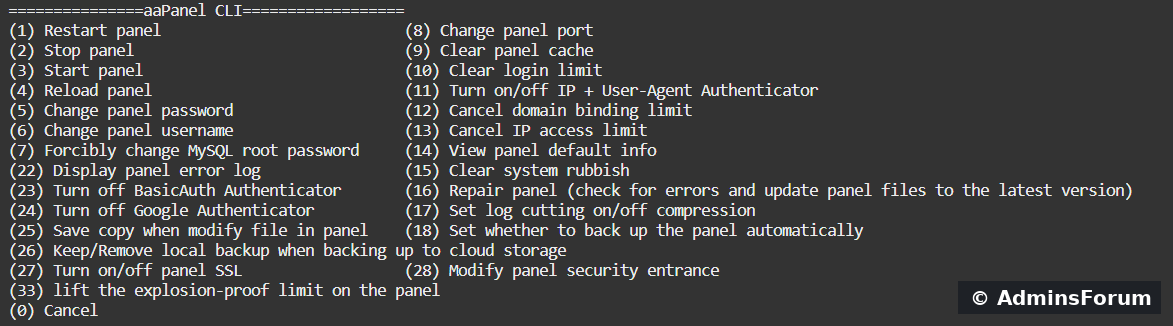
The full aaPanel CLI menu. Options shown here match the menu we inspected on our aaPanel Free 8.0.7 lab; labels and numbers can change between releases.
What is the aaPanel CLI?
CLI means command-line interface. aaPanel provides the bt command so an authorized server administrator can manage the panel from an SSH terminal, including when the browser dashboard cannot be reached. It is a panel maintenance tool, not a replacement for every Linux or application command.
How to open this menu
Connect to your VPS through SSH using your own authorized account. Then run:
If your account requires administrator elevation, use sudo bt. The menu displays numbered actions and asks which one to run. Read the current label on your own server before entering a number. To leave without choosing a change, enter 0.
Everything shown in the menu
The list below follows the option numbers rather than the screenshot's two-column layout.
Which kinds of tasks are available?
Start with a status check
To inspect whether the panel processes are running without selecting a menu operation:
In our lab, this reported Bt-Panel and Bt-Task running. We also opened the menu and cancelled with 0. Credential changes and security-disable options were not executed merely to make this overview.
Next lesson: detailed commands and menu options
How to Use the aaPanel bt Command: Complete Command and Menu Reference
That guide explains each service command and visible menu option, when it is useful, what it changes and how to verify the result. It also includes our tested panel restart output.
AdminsForum CLI series — begin with this menu overview, then use the detailed reference for the operation you actually need.
The full aaPanel CLI menu. Options shown here match the menu we inspected on our aaPanel Free 8.0.7 lab; labels and numbers can change between releases.
What is the aaPanel CLI?
CLI means command-line interface. aaPanel provides the bt command so an authorized server administrator can manage the panel from an SSH terminal, including when the browser dashboard cannot be reached. It is a panel maintenance tool, not a replacement for every Linux or application command.
How to open this menu
Connect to your VPS through SSH using your own authorized account. Then run:
Code:
btEverything shown in the menu
The list below follows the option numbers rather than the screenshot's two-column layout.
- 0 — Cancel
- 1 — Restart panel
- 2 — Stop panel
- 3 — Start panel
- 4 — Reload panel
- 5 — Change panel password
- 6 — Change panel username
- 7 — Forcibly change MySQL root password
- 8 — Change panel port
- 9 — Clear panel cache
- 10 — Clear login limit
- 11 — Turn on/off IP + User-Agent Authenticator
- 12 — Cancel domain binding limit
- 13 — Cancel IP access limit
- 14 — View panel default info
- 15 — Clear system rubbish
- 16 — Repair panel: check for errors and update panel files
- 17 — Toggle compression for log cutting
- 18 — Toggle automatic panel backups
- 22 — Display panel error log
- 23 — Turn off BasicAuth Authenticator
- 24 — Turn off Google Authenticator
- 25 — Save a copy when modifying files in the panel
- 26 — Keep/remove local backups when backing up to cloud storage
- 27 — Turn on/off panel SSL
- 28 — Modify panel security entrance
- 33 — Lift the panel's “explosion-proof” login limit
Which kinds of tasks are available?
- Panel service control: start, stop, restart and reload.
- Account and access recovery: credentials, port, domain/IP restrictions and login limits.
- Security settings: authentication, SSL and the private security entrance.
- Diagnostics and maintenance: error logs, cache/session cleanup, repair and system cleanup.
- Recovery settings: automatic panel backups, local backup retention and saved file copies.
Start with a status check
To inspect whether the panel processes are running without selecting a menu operation:
Code:
bt statusNext lesson: detailed commands and menu options
How to Use the aaPanel bt Command: Complete Command and Menu Reference
That guide explains each service command and visible menu option, when it is useful, what it changes and how to verify the result. It also includes our tested panel restart output.
AdminsForum CLI series — begin with this menu overview, then use the detailed reference for the operation you actually need.