



10-13-2026, 07:06 PM
CloudPanel vs aaPanel: an honest look from the CloudPanel side
CloudPanel is often called the clean, fast alternative to aaPanel. Is that true, and what do you give up? We ran both panels on the same 4 vCPU / 8 GB VPS and compared them hands-on. Here's what CloudPanel users (and people thinking of switching) should know.
The short answer
Test setup
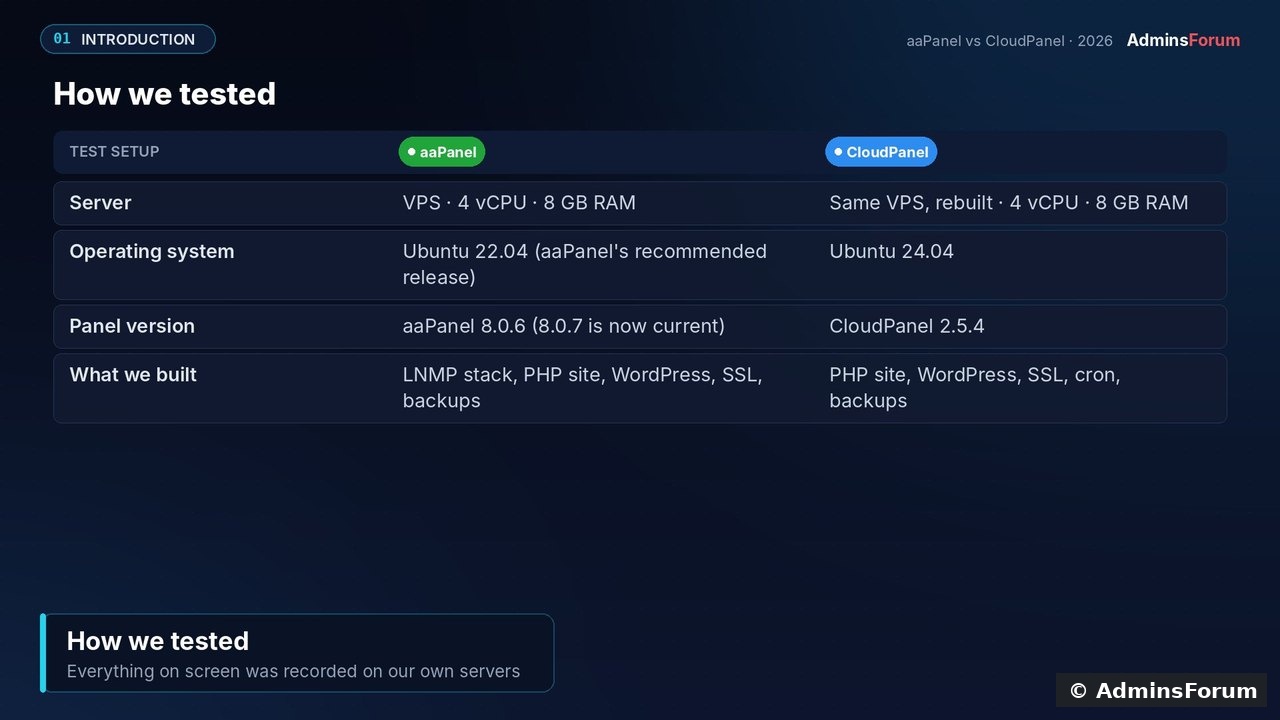
CloudPanel 2.5.4 on Ubuntu 24.04, and aaPanel 8.0.6 on Ubuntu 22.04 (its recommended release; 8.0.7 is now current). Same VPS, tested October 2026, with real screenshots throughout.
Where CloudPanel is different by design
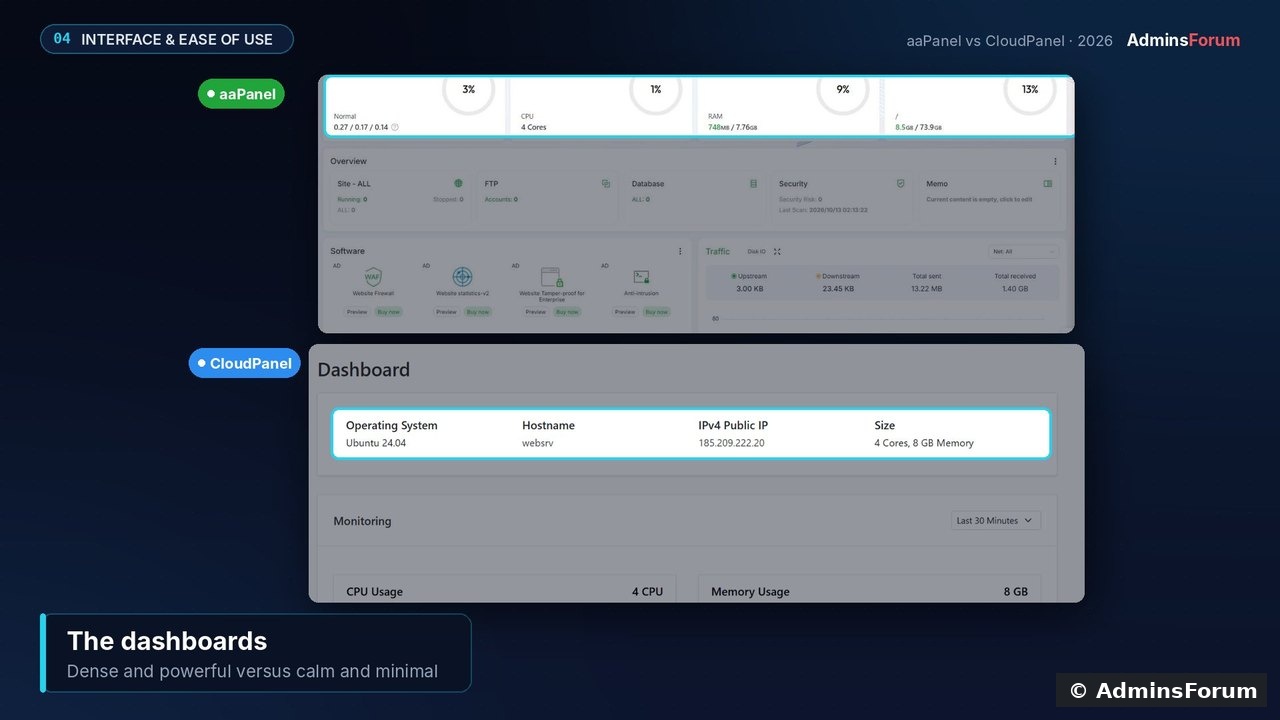
CloudPanel doesn't try to manage everything. It installs a complete, tuned stack for you (Nginx, every PHP version from 7.1 to 8.5, MySQL 8.4 or MariaDB, Redis and Varnish) and gives you a calm interface with just Dashboard and Sites. aaPanel's dashboard packs in gauges, software lists, traffic graphs and a long tools menu.
Requirements: the one place CloudPanel asks for more
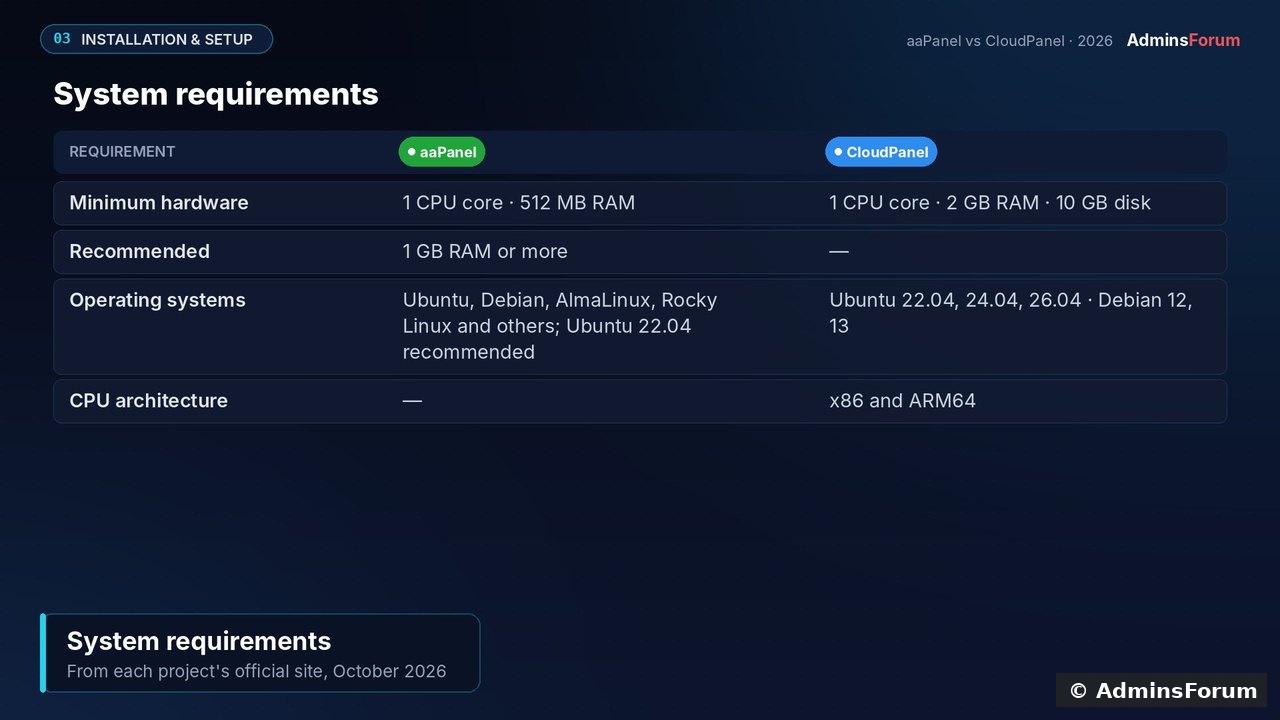
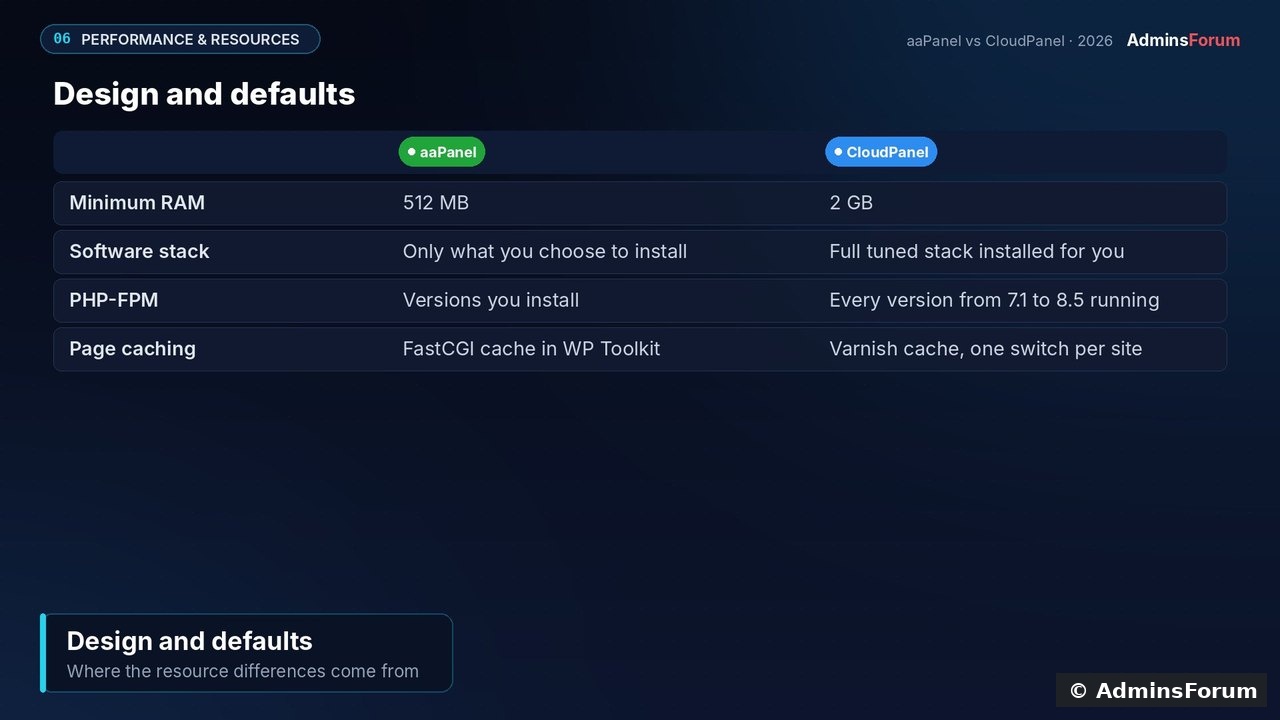
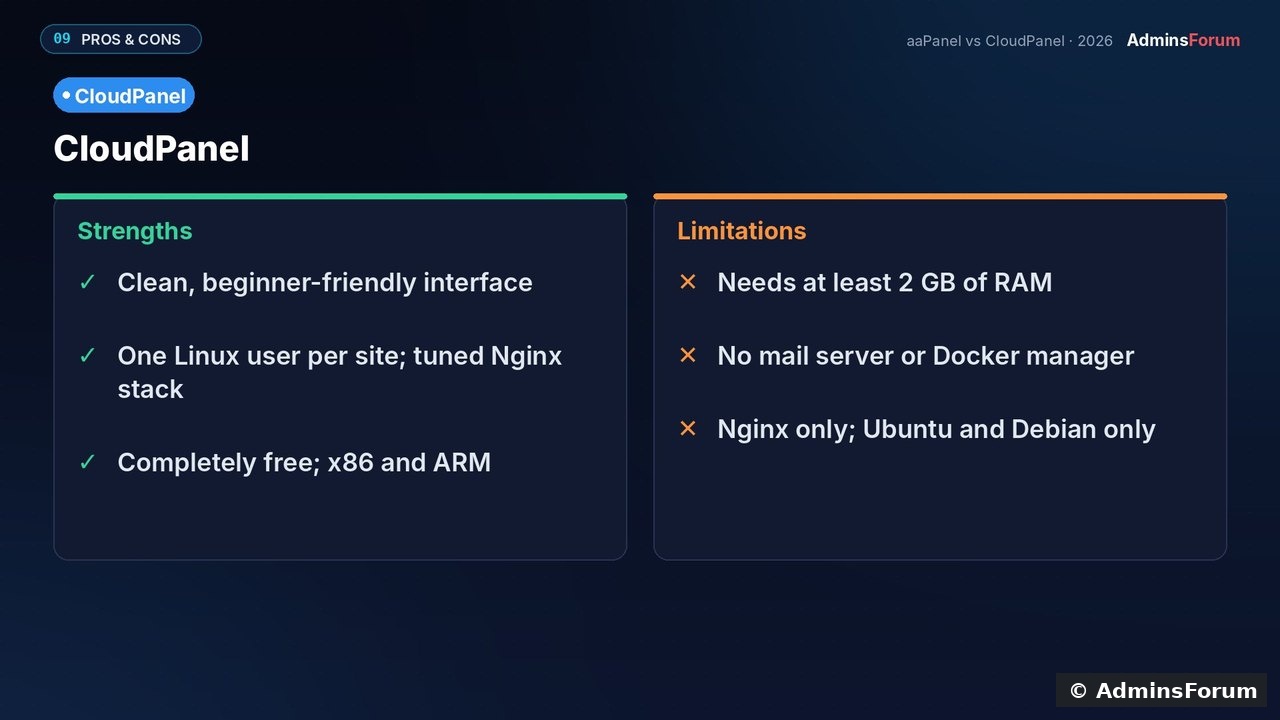
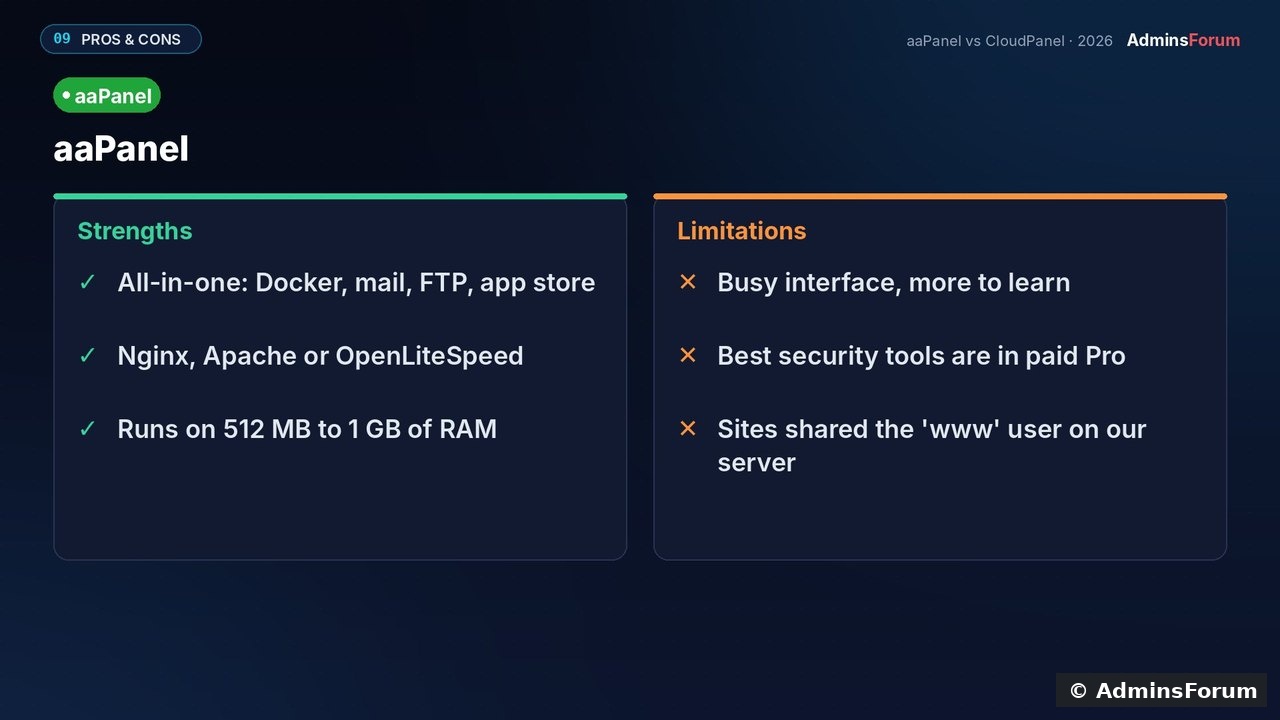
CloudPanel needs at least 2 GB RAM and 10 GB disk, and supports Ubuntu 22.04/24.04/26.04 and Debian 12/13 on x86 and ARM64. aaPanel starts at 512 MB (1 GB recommended) and supports more distros.
Install tip: verify the installer checksum from the CloudPanel docs, choose your DB engine (we used MySQL 8.4), then open
and create the admin user immediately. Until it exists, the first visitor can create it. Better still, restrict port 8443 to your IP.
Hosting features, side by side
For everyday hosting the two are close: PHP versions, databases with one-click phpMyAdmin, free Let's Encrypt with auto-renew, a file manager and FTP.
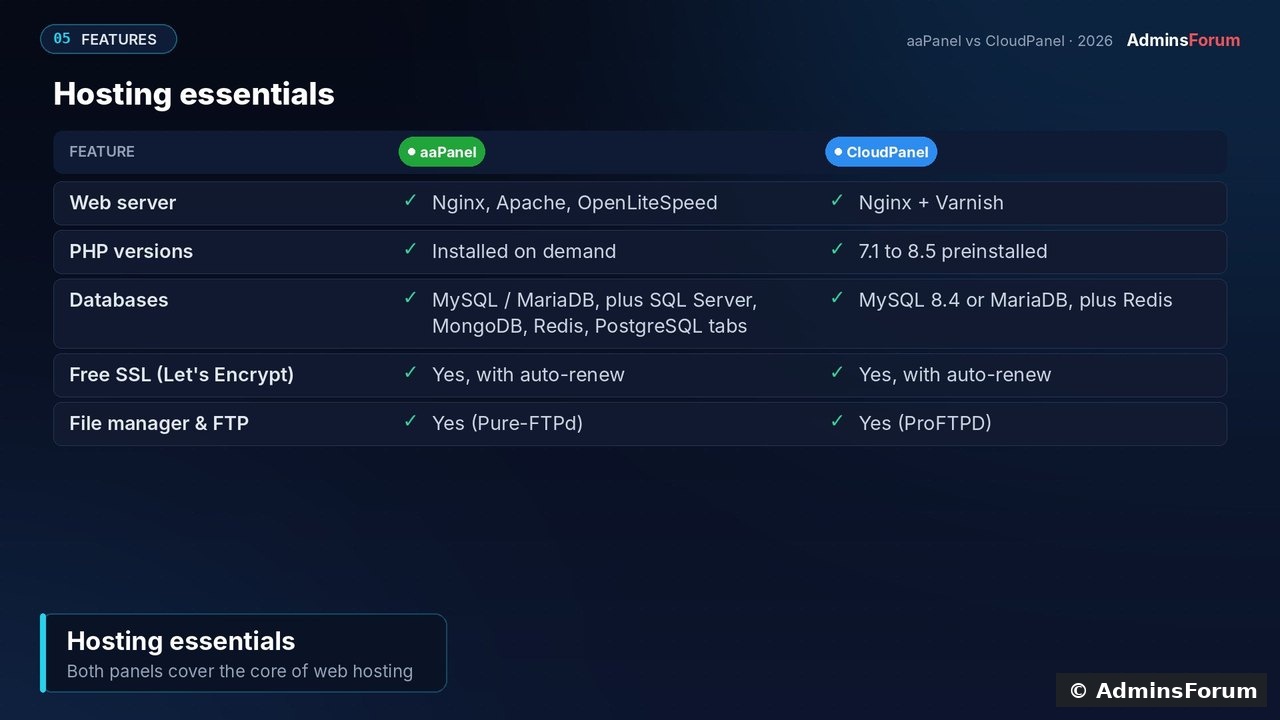
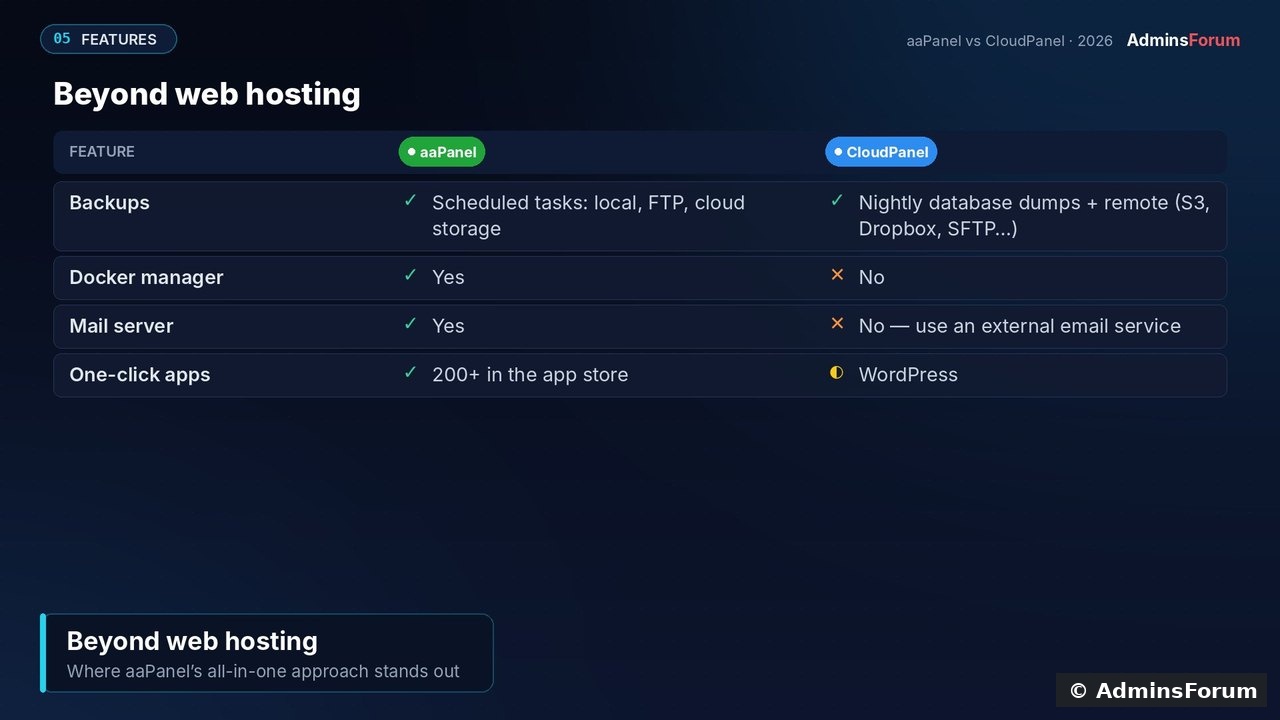
What CloudPanel deliberately leaves out: there's no Docker manager, no mail server and no app store. Use an external email service, and run containers yourself behind a CloudPanel reverse-proxy site.
Memory: what CloudPanel actually uses
We didn't run a controlled benchmark of the two panels, so no speed claims here. We did measure our CloudPanel server: two sites, a few hours after install, 1.95 GB used of 7.9 GB.
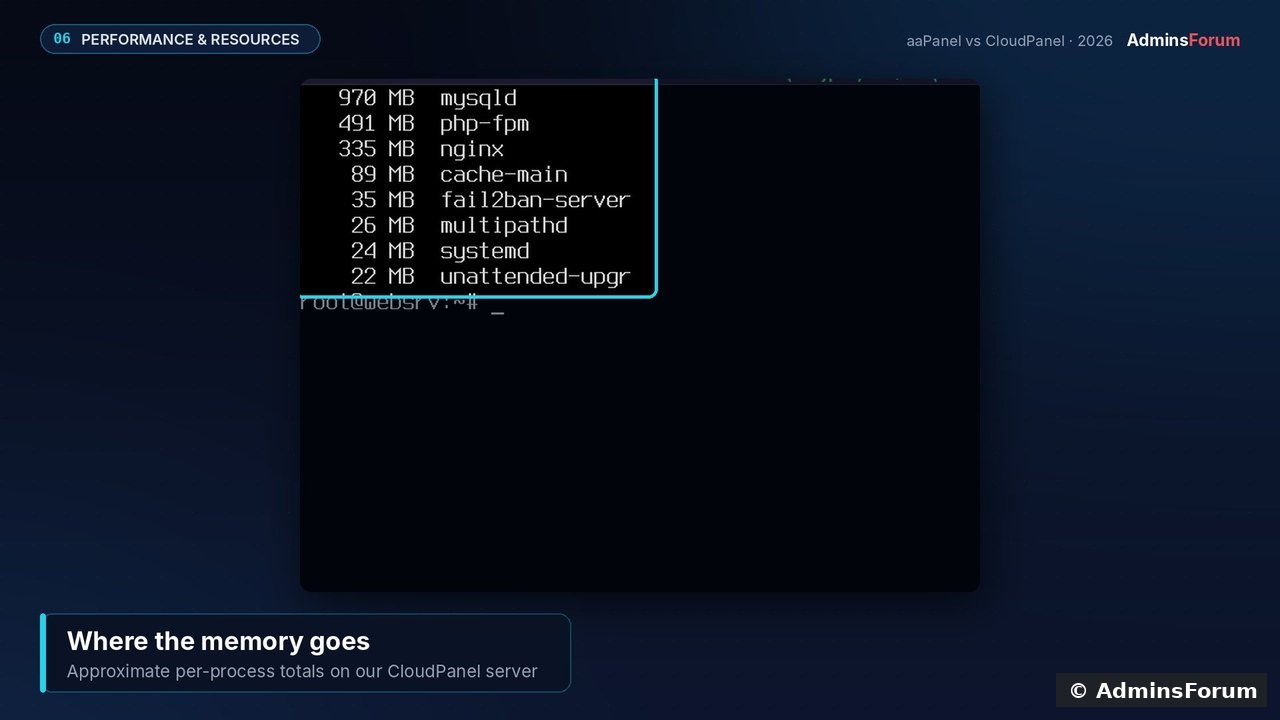
Most of it is MySQL's cache (~970 MB, sized to the server's RAM), plus PHP-FPM pools for every installed PHP version, Nginx and Varnish. That memory is put to work, but it's why CloudPanel wants 2 GB minimum. aaPanel installs only what you choose, so it can start smaller.
Security: isolation is CloudPanel's big win
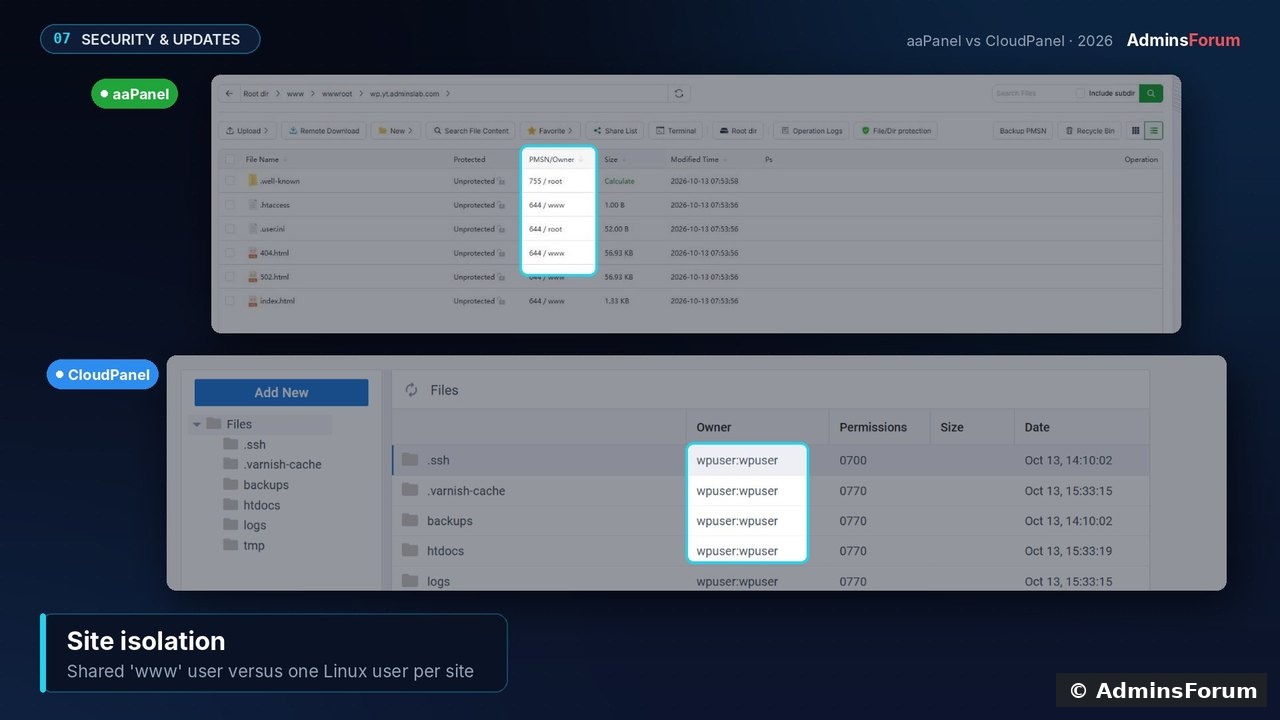
Every CloudPanel site runs as its own Linux user. On our aaPanel server, site files were owned by the shared www user, so one compromised site has more reach there.
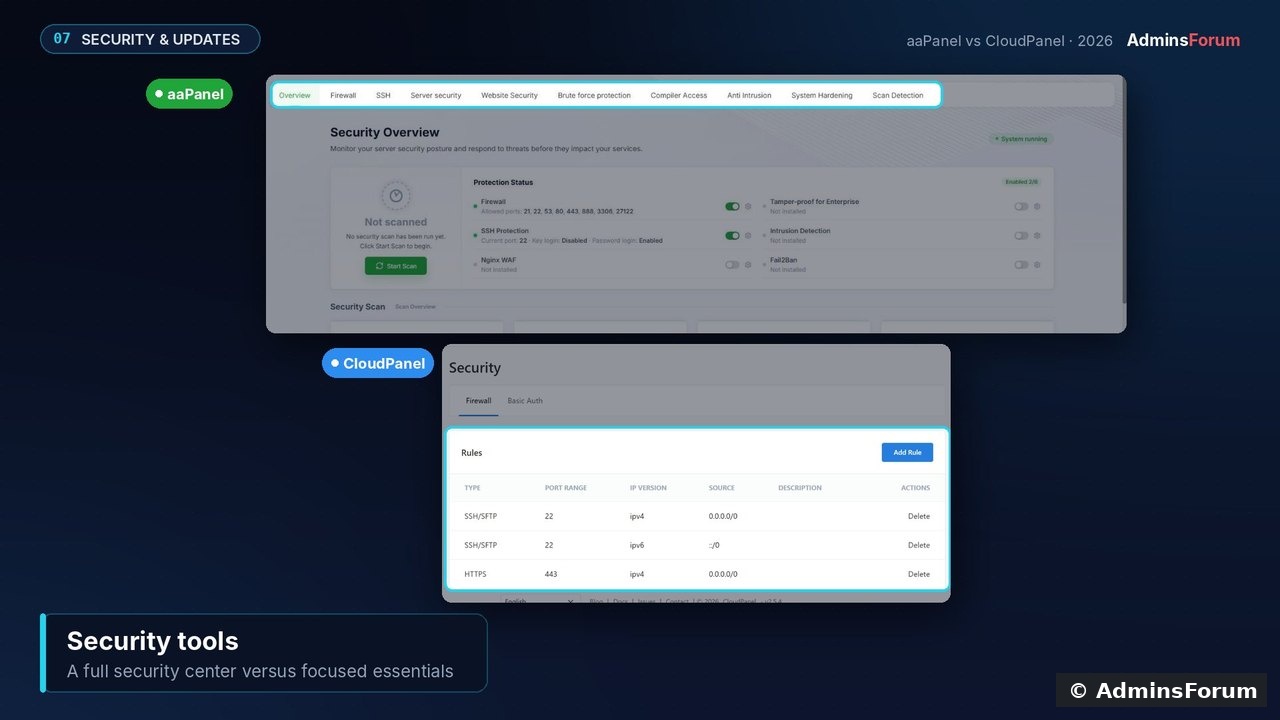
aaPanel has the bigger security toolbox (security centre, SSH controls, brute-force protection, intrusion detection, optional WAF, with more in Pro). CloudPanel covers the essentials: firewall rules, basic auth, IP and bot blocking, 2FA and Cloudflare-only mode, plus fail2ban out of the box.
Keep it updated: take a snapshot, then run
. aaPanel updates from its Update button. Either way, OS updates and off-server backups are still on you. CloudPanel's remote backups (S3, Wasabi, Dropbox, Google Drive, SFTP and others) make the second part easy.
Price
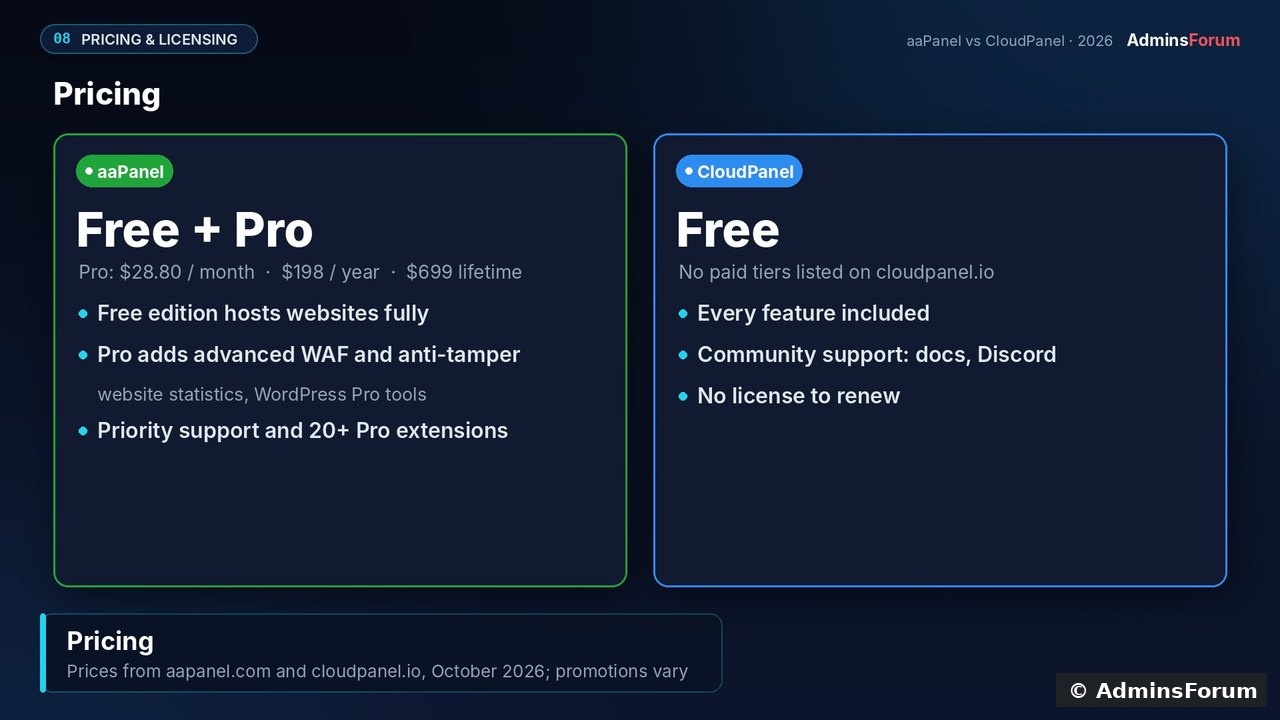
CloudPanel is free, with no paid tiers. aaPanel's free edition also hosts sites fully, but aaPanel Pro costs $28.80/month, $198/year or $699 lifetime for the advanced WAF, anti-tamper, statistics and WordPress Pro tools.
Strengths and limitations
Should you choose CloudPanel?
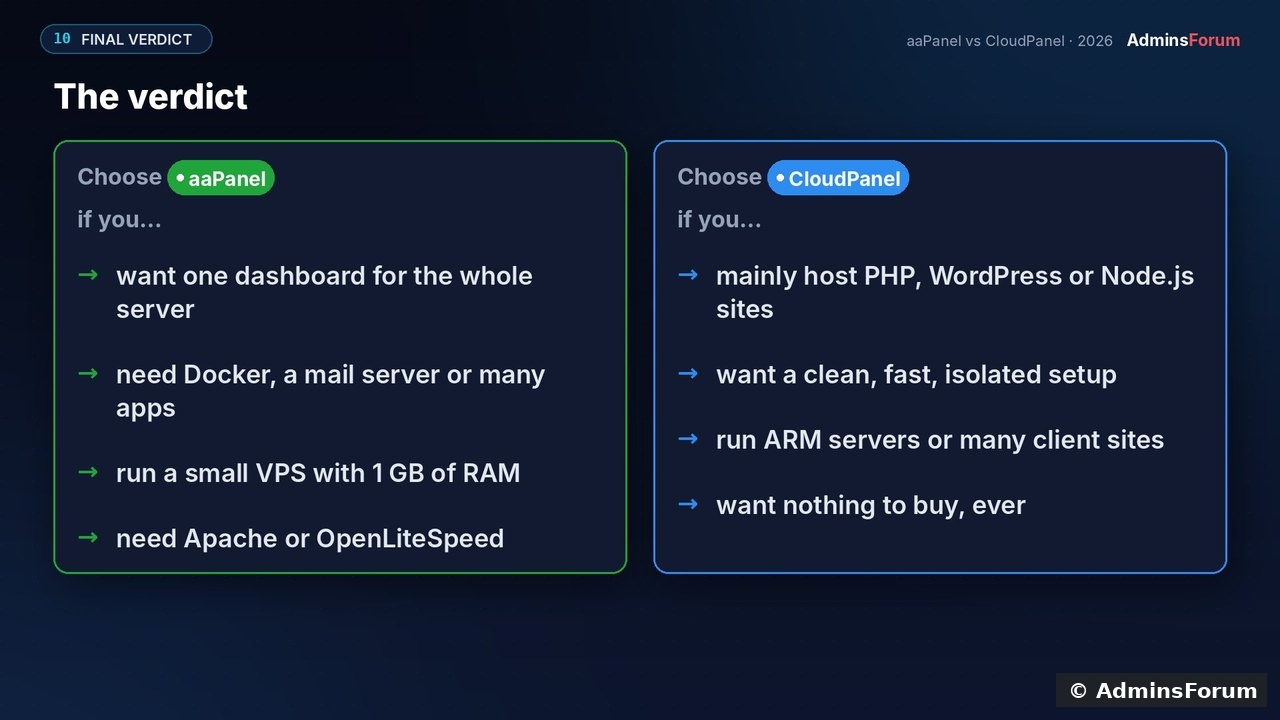
Yes, if you mainly host PHP, WordPress or Node.js sites, want every site isolated, run ARM servers or many client sites, and want nothing to buy, ever.
Pick aaPanel instead if you need Docker, a mail server or lots of one-click apps, need Apache or OpenLiteSpeed, or have only 1 GB of RAM.
Sources (checked October 2026; prices change): CloudPanel requirements · CloudPanel install docs · aaPanel pricing · aaPanel requirements
Running CloudPanel already? Tell us what you host on it. Questions about installing or migrating are welcome in CloudPanel Support & Troubleshooting.
CloudPanel is often called the clean, fast alternative to aaPanel. Is that true, and what do you give up? We ran both panels on the same 4 vCPU / 8 GB VPS and compared them hands-on. Here's what CloudPanel users (and people thinking of switching) should know.
The short answer
- CloudPanel is the better pick for focused web hosting: PHP, WordPress, Node.js and Python sites, each with its own Linux user, on a tuned Nginx stack, completely free.
- aaPanel is the better pick if you want one panel for the whole server (Docker, mail, FTP, 200+ apps) or you're on a tiny VPS.
Test setup
CloudPanel 2.5.4 on Ubuntu 24.04, and aaPanel 8.0.6 on Ubuntu 22.04 (its recommended release; 8.0.7 is now current). Same VPS, tested October 2026, with real screenshots throughout.
Where CloudPanel is different by design
CloudPanel doesn't try to manage everything. It installs a complete, tuned stack for you (Nginx, every PHP version from 7.1 to 8.5, MySQL 8.4 or MariaDB, Redis and Varnish) and gives you a calm interface with just Dashboard and Sites. aaPanel's dashboard packs in gauges, software lists, traffic graphs and a long tools menu.
Requirements: the one place CloudPanel asks for more
CloudPanel needs at least 2 GB RAM and 10 GB disk, and supports Ubuntu 22.04/24.04/26.04 and Debian 12/13 on x86 and ARM64. aaPanel starts at 512 MB (1 GB recommended) and supports more distros.
Install tip: verify the installer checksum from the CloudPanel docs, choose your DB engine (we used MySQL 8.4), then open
Code:
https://YOUR_IP:8443Hosting features, side by side
For everyday hosting the two are close: PHP versions, databases with one-click phpMyAdmin, free Let's Encrypt with auto-renew, a file manager and FTP.
What CloudPanel deliberately leaves out: there's no Docker manager, no mail server and no app store. Use an external email service, and run containers yourself behind a CloudPanel reverse-proxy site.
Memory: what CloudPanel actually uses
We didn't run a controlled benchmark of the two panels, so no speed claims here. We did measure our CloudPanel server: two sites, a few hours after install, 1.95 GB used of 7.9 GB.
Most of it is MySQL's cache (~970 MB, sized to the server's RAM), plus PHP-FPM pools for every installed PHP version, Nginx and Varnish. That memory is put to work, but it's why CloudPanel wants 2 GB minimum. aaPanel installs only what you choose, so it can start smaller.
Security: isolation is CloudPanel's big win
Every CloudPanel site runs as its own Linux user. On our aaPanel server, site files were owned by the shared www user, so one compromised site has more reach there.
aaPanel has the bigger security toolbox (security centre, SSH controls, brute-force protection, intrusion detection, optional WAF, with more in Pro). CloudPanel covers the essentials: firewall rules, basic auth, IP and bot blocking, 2FA and Cloudflare-only mode, plus fail2ban out of the box.
Keep it updated: take a snapshot, then run
Code:
clp-updatePrice
CloudPanel is free, with no paid tiers. aaPanel's free edition also hosts sites fully, but aaPanel Pro costs $28.80/month, $198/year or $699 lifetime for the advanced WAF, anti-tamper, statistics and WordPress Pro tools.
Strengths and limitations
Should you choose CloudPanel?
Yes, if you mainly host PHP, WordPress or Node.js sites, want every site isolated, run ARM servers or many client sites, and want nothing to buy, ever.
Pick aaPanel instead if you need Docker, a mail server or lots of one-click apps, need Apache or OpenLiteSpeed, or have only 1 GB of RAM.
Sources (checked October 2026; prices change): CloudPanel requirements · CloudPanel install docs · aaPanel pricing · aaPanel requirements
Running CloudPanel already? Tell us what you host on it. Questions about installing or migrating are welcome in CloudPanel Support & Troubleshooting.
