



1 hour ago
A logged 408 during an upload can mean Nginx stopped waiting for the incoming request. Identify whether it was waiting for headers or the body before changing application or upstream timeouts.
This guide demonstrates a deliberately stalled tiny request body on a private endpoint. It also records an important limit: the client received no HTTP response bytes in our test even though the access log recorded 408. A browser connection error and an origin log entry can describe the same incident differently.
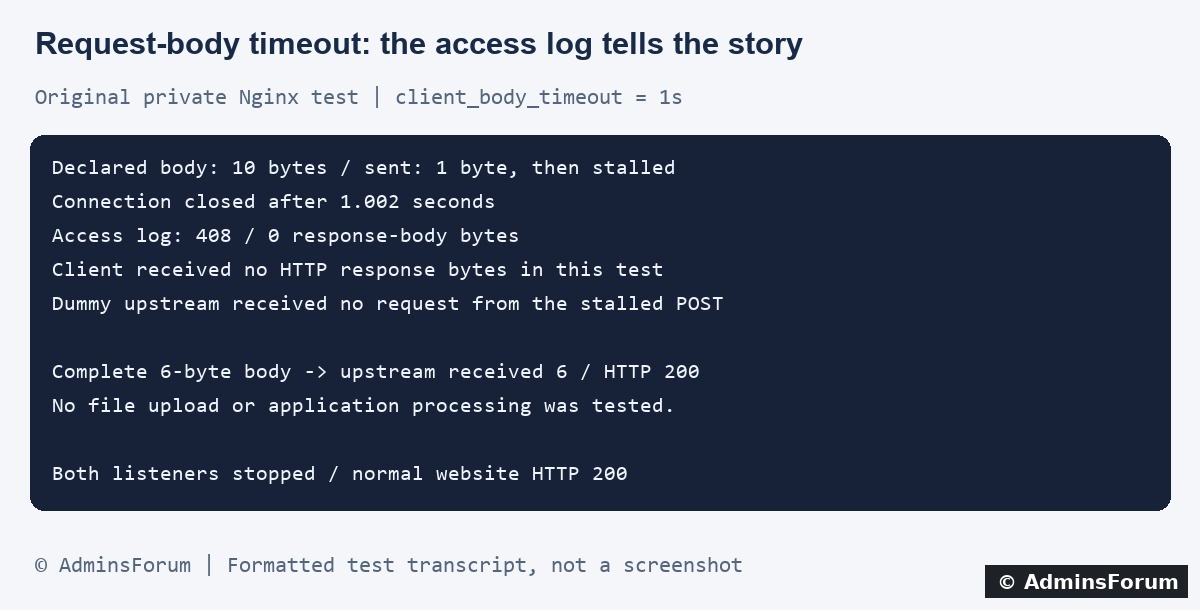
Original AdminsForum lab evidence, formatted as a transcript rather than a screenshot.
1. Record what failed and when
Note the URL path, time and timezone, action, approximate input size and whether the client was still sending data. Does the issue affect one network, one browser or many users? An upload failure before the body reaches the application is a different problem from slow processing after reception.
Use a safe test file or synthetic data in staging. Do not repeatedly submit a real import, purchase or other operation with possible side effects. Inspect browser Network information without publishing authentication cookies, private URLs or captured request bodies.
2. Inspect both access and error logs
In aaPanel open Website → PHP Project, locate the affected site and use its Log control. Check Access log and Error log around the incident. Panel labels may vary.
Our lab site's normal log paths are:
Use your actual configured paths. A bounded SSH example is:
The access log may be decisive even when the error log has no explanatory entry. Our isolated stalled request was recorded as:
There was no matching explanatory timeout message in that test's error log. Do not assume an empty error-log search means the request completed normally.
3. Separate request reception from upstream processing
4. Understand the applicable Nginx timers
Nginx documents client_body_timeout as the allowed gap between successive body-read operations, not a universal total upload-duration budget. A transfer can take longer overall while continuing to make progress. Header reception has a separate timeout.
Locate the active configuration and its scope before proposing a change. Proxy and FastCGI read timeouts govern another side of the request flow. PHP execution time also does not describe every earlier network-reception stage.
5. What our private test demonstrated
We ran Nginx 1.30.5 with a separate configuration and a dummy HTTP backend. Both listeners were bound only to loopback. The exact test location used a deliberately short one-second body timeout and request buffering.
Both listeners were stopped and the isolated PID file disappeared. The main Nginx configuration hash remained unchanged, and the normal HTTPS website returned 200 afterward. No live website timeout or firewall rule changed.
6. Investigate why the request stopped progressing
Compare a small harmless staging request over a stable connection with the affected client path. Inspect interrupted connectivity, a stalled upload implementation or a proxy that stops forwarding body data. Avoid recreating a slow-client pattern against the production service.
Check whether the application or uploader supplies a valid request and completes its body. An advertised Content-Length larger than the actual sent body is one possible failure pattern; it was deliberately used in our lab, not proven to be your site's cause.
For large legitimate transfers, review the application's supported upload method, resumability and relevant proxy limits. Do not switch request buffering or expose a backend port simply because one timed-out request occurred. Those changes have wider resource and behavior consequences.
7. Adjust a timeout only for a measured requirement
A one-second setting was chosen to make our private demonstration bounded. It is not a production recommendation. Extending an allowance can be justified for a measured legitimate workflow, but also permits idle requests to occupy connections longer.
Back up the affected configuration and record the current value and scope. Review the chain of client, CDN/proxy, origin and application limits. Change only the relevant setting through the supported workflow, validate Nginx configuration before applying an edit and keep the previous configuration for rollback.
Do not disable timeouts or weaken protections globally to hide a network symptom. A larger allowance will not make a client send missing data or fix an unrelated processing error.
8. Verify the complete intended operation
In staging, repeat a safe representative upload and confirm expected content, byte count and application outcome. Check the access logs and relevant application records. A 200 response from a dummy handler does not prove a file was stored or an import completed.
Observe a representative period after any justified change and compare affected client networks. Retain redacted evidence and remove temporary diagnostics. Keep a rollback plan if the change increases resource pressure or fails to address the incident.
For a support request
Include the time, safe path, proxy layout, size, whether the body was fully sent, relevant status/log entry and recent changes. Exclude cookie values, credentials and private uploaded content.
Related guides
Investigate request-body size errors
Investigate upstream response timeouts
Find website access and error logs
Technical references
Nginx client-body timeout
Nginx client-header timeout
Nginx discussion of logged 408 and connection-close behavior
This guide demonstrates a deliberately stalled tiny request body on a private endpoint. It also records an important limit: the client received no HTTP response bytes in our test even though the access log recorded 408. A browser connection error and an origin log entry can describe the same incident differently.
Original AdminsForum lab evidence, formatted as a transcript rather than a screenshot.
1. Record what failed and when
Note the URL path, time and timezone, action, approximate input size and whether the client was still sending data. Does the issue affect one network, one browser or many users? An upload failure before the body reaches the application is a different problem from slow processing after reception.
Use a safe test file or synthetic data in staging. Do not repeatedly submit a real import, purchase or other operation with possible side effects. Inspect browser Network information without publishing authentication cookies, private URLs or captured request bodies.
2. Inspect both access and error logs
In aaPanel open Website → PHP Project, locate the affected site and use its Log control. Check Access log and Error log around the incident. Panel labels may vary.
Our lab site's normal log paths are:
Code:
/www/wwwlogs/adminslab.com.log
/www/wwwlogs/adminslab.com.error.logCode:
tail -n 100 /www/wwwlogs/example.com.log
tail -n 100 /www/wwwlogs/example.com.error.logCode:
"POST /body-check HTTP/1.1" 408 03. Separate request reception from upstream processing
- 408 recorded while receiving a request: investigate the incoming header/body phase and the layer recording it.
- 413 Request Entity Too Large: investigate body-size allowances; a bigger timeout does not fix a body-size rejection.
- 504 Gateway Timeout: investigate an upstream wait; increasing client-body reception time does not repair a slow application response.
4. Understand the applicable Nginx timers
Code:
client_body_timeout
client_header_timeoutLocate the active configuration and its scope before proposing a change. Proxy and FastCGI read timeouts govern another side of the request flow. PHP execution time also does not describe every earlier network-reception stage.
5. What our private test demonstrated
We ran Nginx 1.30.5 with a separate configuration and a dummy HTTP backend. Both listeners were bound only to loopback. The exact test location used a deliberately short one-second body timeout and request buffering.
- The client sent complete headers declaring a 10-byte body, sent only one body byte, then stopped sending.
- The connection closed after 1.002 seconds. The access log recorded 408, while the client received zero HTTP response bytes. The buffered incomplete request did not reach our dummy backend.
- A separate complete six-byte POST reached the backend, which counted six bytes and returned the expected message with HTTP 200. The same timeout setting remained in place.
Both listeners were stopped and the isolated PID file disappeared. The main Nginx configuration hash remained unchanged, and the normal HTTPS website returned 200 afterward. No live website timeout or firewall rule changed.
6. Investigate why the request stopped progressing
Compare a small harmless staging request over a stable connection with the affected client path. Inspect interrupted connectivity, a stalled upload implementation or a proxy that stops forwarding body data. Avoid recreating a slow-client pattern against the production service.
Check whether the application or uploader supplies a valid request and completes its body. An advertised Content-Length larger than the actual sent body is one possible failure pattern; it was deliberately used in our lab, not proven to be your site's cause.
For large legitimate transfers, review the application's supported upload method, resumability and relevant proxy limits. Do not switch request buffering or expose a backend port simply because one timed-out request occurred. Those changes have wider resource and behavior consequences.
7. Adjust a timeout only for a measured requirement
A one-second setting was chosen to make our private demonstration bounded. It is not a production recommendation. Extending an allowance can be justified for a measured legitimate workflow, but also permits idle requests to occupy connections longer.
Back up the affected configuration and record the current value and scope. Review the chain of client, CDN/proxy, origin and application limits. Change only the relevant setting through the supported workflow, validate Nginx configuration before applying an edit and keep the previous configuration for rollback.
Do not disable timeouts or weaken protections globally to hide a network symptom. A larger allowance will not make a client send missing data or fix an unrelated processing error.
8. Verify the complete intended operation
In staging, repeat a safe representative upload and confirm expected content, byte count and application outcome. Check the access logs and relevant application records. A 200 response from a dummy handler does not prove a file was stored or an import completed.
Observe a representative period after any justified change and compare affected client networks. Retain redacted evidence and remove temporary diagnostics. Keep a rollback plan if the change increases resource pressure or fails to address the incident.
For a support request
Include the time, safe path, proxy layout, size, whether the body was fully sent, relevant status/log entry and recent changes. Exclude cookie values, credentials and private uploaded content.
Related guides
Investigate request-body size errors
Investigate upstream response timeouts
Find website access and error logs
Technical references
Nginx client-body timeout
Nginx client-header timeout
Nginx discussion of logged 408 and connection-close behavior