



Yesterday, 10:14 AM
When a website fails, check the service that handles the failing request. aaPanel-installed Nginx, PHP-FPM and database services can have different names and paths from distribution packages. Inspect the installed service before copying a generic command.
Tested lab: Ubuntu 22.04.5 and aaPanel Free 8.0.7. We checked Nginx, MariaDB under the mysqld service name, and PHP-FPM 8.4/8.5. Nginx and both PHP-FPM configuration tests passed. This lesson tested diagnostic commands without restarting those services.
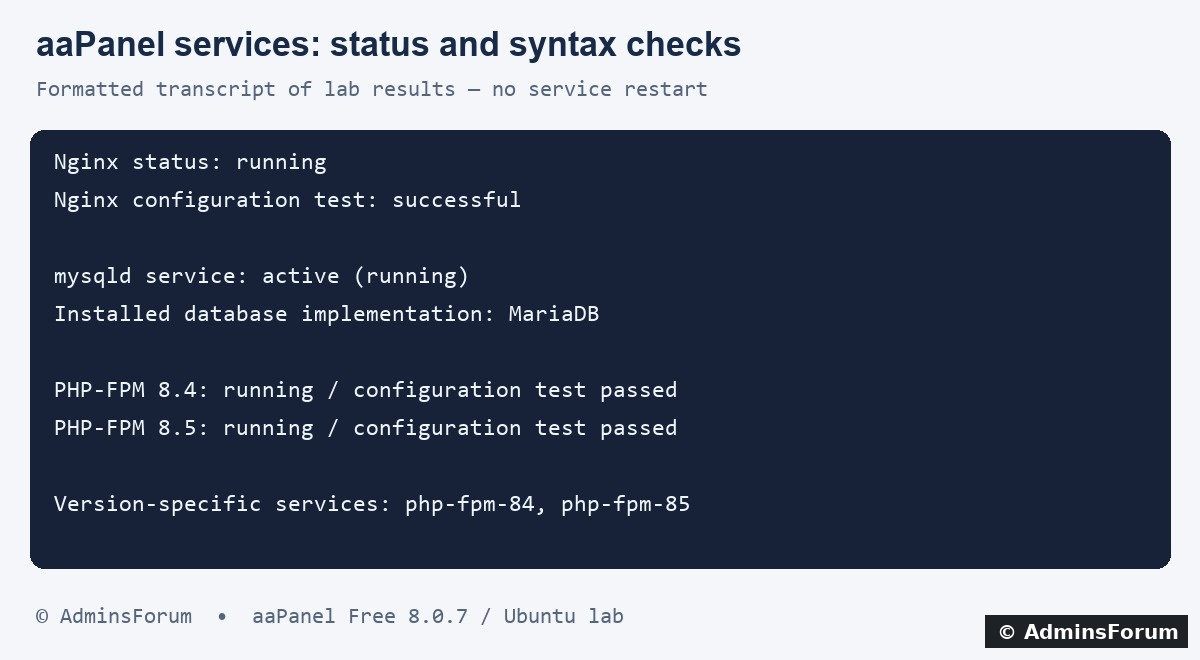
Formatted transcript summarizing actual status and configuration-test results from our lab.
1. Know which component you are checking
2. Find the installed service names
From an authorized SSH administrator session:
Our lab had nginx, mysqld, php-fpm-84 and php-fpm-85. If your server uses Apache, another PHP version or a different database setup, inspect those actual names rather than assuming these apply. Missing paths are a reason to verify installation, not to reinstall the server stack blindly.
3. Check Nginx and validate configuration
The lab's status reported Nginx running. The syntax test reported that /www/server/nginx/conf/nginx.conf was valid and the test was successful.
A syntax test does not prove the site serves the right content. After a configuration change, check a real HTTP/HTTPS request as well. If validation fails, correct the reported file and line before reloading. Keep a backup of the changed configuration.
Reload versus restart
For a reviewed Nginx configuration change, a reload asks the running server to load the new configuration. A restart stops and starts the service and can interrupt requests. The installed init script supports service controls, but this guide did not execute a reload or restart:
These are operational examples, not commands to run merely because you are reading this guide. Validate first and choose the action that the maintenance requires.
4. Check the website's PHP-FPM version
Confirm the PHP version selected for the website in aaPanel. Our lab has two separate services:
Both reported running. Version-specific configuration tests were:
Both passed. Use the matching path for your installed version. Restarting 8.4 will not repair a site served by 8.5.
If maintenance genuinely requires restarting the website's PHP-FPM service, its installed service script provides the restart action. For example:
We did not execute that restart in this lesson. It can affect every site using that PHP-FPM version. Afterwards check service status, recent logs and a meaningful PHP request.
The shell's php --version can identify a CLI default rather than the PHP-FPM version handling a specific website. Do not use it as the only evidence of the site's runtime.
5. Check MySQL or MariaDB
Our status output identified MariaDB and active (running), despite the service script being named mysqld. Both naming and installed implementation matter when interpreting commands.
A database restart can interrupt applications and active connections. Do not restart it as the first response to an authentication or missing-table error. Confirm the actual failure and plan maintenance before using a control action such as:
This restart was not executed for the lesson. Before database maintenance, preserve an appropriate backup and recovery plan. Afterwards verify service readiness and an application connection through its normal secure configuration; do not put database passwords into public command examples.
6. Verify the website beyond status
A running process is one signal, not the whole result. Check:
Common mistakes
What our lab verified
Nginx was running and passed its configuration test. MariaDB's mysqld service was active. Both PHP-FPM 8.4 and 8.5 were running and passed configuration tests. Service restart examples were explained, not executed or claimed as tested.
AdminsForum CLI series. The image is a formatted lab-result transcript; use the service names and paths actually installed on your own server.
Tested lab: Ubuntu 22.04.5 and aaPanel Free 8.0.7. We checked Nginx, MariaDB under the mysqld service name, and PHP-FPM 8.4/8.5. Nginx and both PHP-FPM configuration tests passed. This lesson tested diagnostic commands without restarting those services.
Formatted transcript summarizing actual status and configuration-test results from our lab.
1. Know which component you are checking
- aaPanel: management dashboard, checked with bt status.
- Nginx: handles website requests and proxies dynamic work.
- PHP-FPM: executes PHP for sites configured to use that PHP version.
- MySQL/MariaDB: stores database data; a running database process does not prove an application's credentials work.
2. Find the installed service names
From an authorized SSH administrator session:
Code:
ls /etc/init.d/nginx /etc/init.d/mysqld /etc/init.d/php-fpm-*3. Check Nginx and validate configuration
Code:
/etc/init.d/nginx status
/www/server/nginx/sbin/nginx -tA syntax test does not prove the site serves the right content. After a configuration change, check a real HTTP/HTTPS request as well. If validation fails, correct the reported file and line before reloading. Keep a backup of the changed configuration.
Reload versus restart
For a reviewed Nginx configuration change, a reload asks the running server to load the new configuration. A restart stops and starts the service and can interrupt requests. The installed init script supports service controls, but this guide did not execute a reload or restart:
Code:
/etc/init.d/nginx reload
/etc/init.d/nginx restart4. Check the website's PHP-FPM version
Confirm the PHP version selected for the website in aaPanel. Our lab has two separate services:
Code:
/etc/init.d/php-fpm-84 status
/etc/init.d/php-fpm-85 statusCode:
/www/server/php/84/sbin/php-fpm -t
/www/server/php/85/sbin/php-fpm -tIf maintenance genuinely requires restarting the website's PHP-FPM service, its installed service script provides the restart action. For example:
Code:
/etc/init.d/php-fpm-85 restartThe shell's php --version can identify a CLI default rather than the PHP-FPM version handling a specific website. Do not use it as the only evidence of the site's runtime.
5. Check MySQL or MariaDB
Code:
/etc/init.d/mysqld statusA database restart can interrupt applications and active connections. Do not restart it as the first response to an authentication or missing-table error. Confirm the actual failure and plan maintenance before using a control action such as:
Code:
/etc/init.d/mysqld restart6. Verify the website beyond status
A running process is one signal, not the whole result. Check:
- The intended service and PHP version.
- Configuration validation after edits.
- The hostname's response with normal certificate validation.
- A dynamic application action and database connection where relevant.
- Recent relevant errors rather than old log entries.
Common mistakes
- Using system package paths for software installed under /www/server.
- Restarting every service instead of diagnosing the failing component.
- Checking the CLI PHP version instead of the website's configured PHP-FPM version.
- Treating mysqld as proof that the database implementation must be MySQL.
- Reloading invalid configuration or assuming a successful syntax test proves application health.
- Posting raw logs that contain tokens or database credentials.
What our lab verified
Nginx was running and passed its configuration test. MariaDB's mysqld service was active. Both PHP-FPM 8.4 and 8.5 were running and passed configuration tests. Service restart examples were explained, not executed or claimed as tested.
AdminsForum CLI series. The image is a formatted lab-result transcript; use the service names and paths actually installed on your own server.