



10-13-2026, 02:58 AM
Quick answer
Create a DNS-only A record for a dedicated panel hostname, keep the existing aaPanel port and security entrance, and install a trusted certificate covering that hostname. In our lab, cp.adminslab.com points to 217.217.235.82 and the panel still uses port 18443. We left the Domain binding field empty.
Before you start
Have a working panel login and an independent SSH/provider-console recovery route. Record the current port and security entrance privately. These are your existing values, not a reason to reset them. Back up panel configuration before replacing a certificate. Use a subdomain dedicated to administration, such as cp.example.com, rather than reusing a public website hostname.
1. Add the DNS record
In Cloudflare, select the correct domain → DNS → Records → Add record. Choose A, enter cp as the name and your VPS IPv4 address as the content. Turn Proxy status off so it says DNS only, leave TTL at Auto and save.
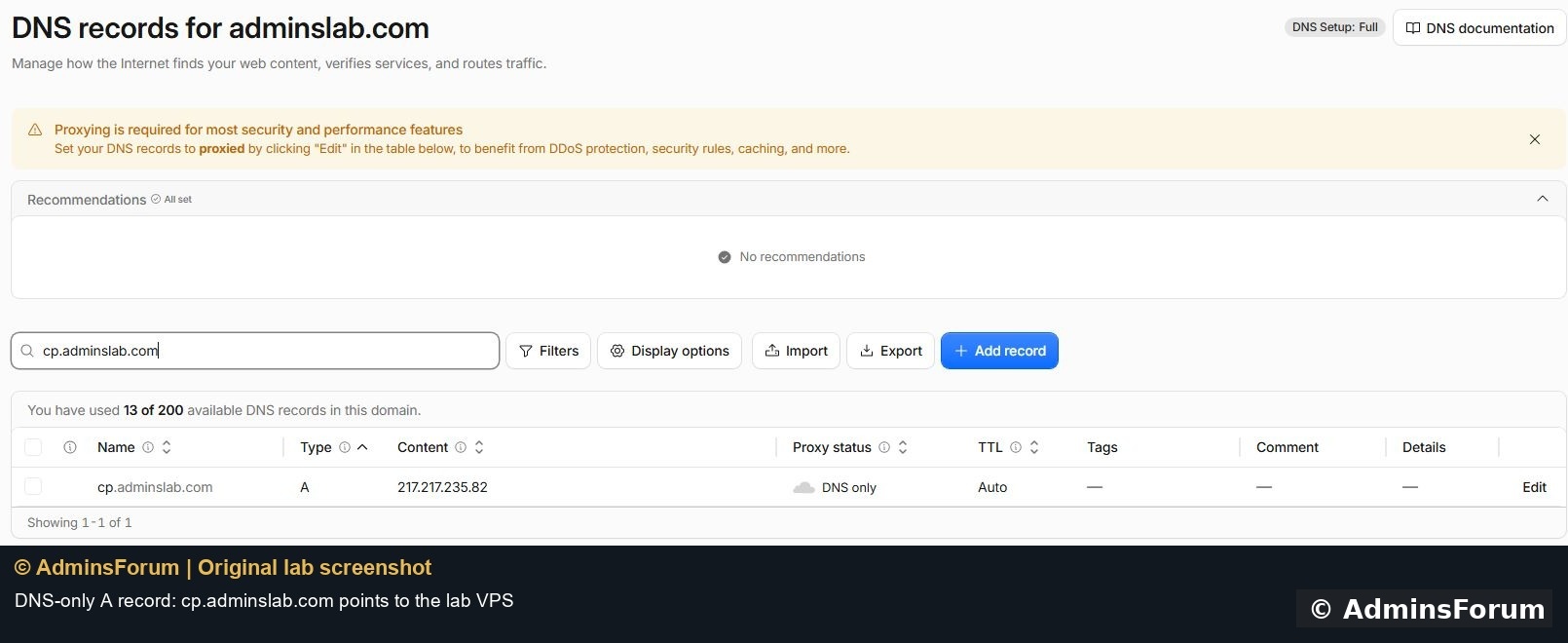
Our saved record resolves cp.adminslab.com to the lab VPS. Replace that domain and address with your own values. Do not change your main website or mail records while adding the panel record.
The lab's port 18443 is outside Cloudflare's ordinary supported proxy ports. Orange-cloud proxying would not make this direct panel URL work. DNS only sends the browser directly to the origin; retain your server firewall and panel authentication.
2. Understand the complete URL
The login address contains three parts:
The domain replaces the IP address. The port and security entrance remain the ones already configured in aaPanel. Our port is 18443, but your installation may use another number. Keep the real entrance private; this guide deliberately does not publish it.
A DNS record does not move the panel onto port 443 or change its login path. Typing only the hostname may reach a website or a default web-server page instead of aaPanel.
3. Install HTTPS before signing in through the hostname
A certificate issued for the server IP will not automatically cover the new domain. In Settings → Panel SSL → Modify, use the certificate workflow for the panel hostname. Our native Let's Encrypt workflow applied and deployed a certificate for cp.adminslab.com.
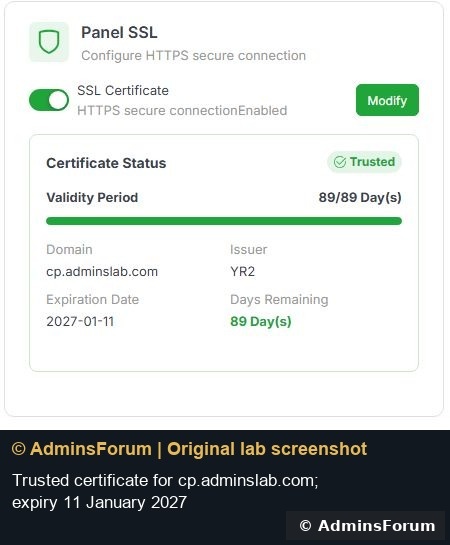
We verified its chain and hostname with normal certificate checks, negotiated TLS 1.3 and then signed in through the domain. Its displayed expiry is 11 January 2027. This is evidence from the lab, not a promise that your application will complete without DNS or validation fixes.
4. Keep Domain binding separate
Settings → Domain is a restriction, not the DNS record editor. The panel warns that setting it limits access to that domain. We kept it empty while testing, so changing the hostname did not also add an access restriction.
There is still a certificate consequence: after installing a domain-only certificate, visiting the raw IP through HTTPS produces a name mismatch. Empty binding does not make that certificate valid for the IP. Use the proper domain URL and retain SSH/provider-console access for recovery; do not bypass certificate warnings.
5. Verify the new route
Check the DNS answer is your VPS, confirm the URL contains the actual port and entrance, inspect the certificate domain and expiry, and sign in using the existing account. Open a normal panel page after login to confirm the session works. Our domain login and settings page passed these checks.
Do not change the panel port, enable a reverse proxy or restrict authorized IPs during the same first test. Each adds a separate failure point and deserves its own verified step.
Troubleshooting
References: aaPanel domain-access documentation and Cloudflare supported ports. © AdminsForum.
Create a DNS-only A record for a dedicated panel hostname, keep the existing aaPanel port and security entrance, and install a trusted certificate covering that hostname. In our lab, cp.adminslab.com points to 217.217.235.82 and the panel still uses port 18443. We left the Domain binding field empty.
Before you start
Have a working panel login and an independent SSH/provider-console recovery route. Record the current port and security entrance privately. These are your existing values, not a reason to reset them. Back up panel configuration before replacing a certificate. Use a subdomain dedicated to administration, such as cp.example.com, rather than reusing a public website hostname.
1. Add the DNS record
In Cloudflare, select the correct domain → DNS → Records → Add record. Choose A, enter cp as the name and your VPS IPv4 address as the content. Turn Proxy status off so it says DNS only, leave TTL at Auto and save.
Our saved record resolves cp.adminslab.com to the lab VPS. Replace that domain and address with your own values. Do not change your main website or mail records while adding the panel record.
The lab's port 18443 is outside Cloudflare's ordinary supported proxy ports. Orange-cloud proxying would not make this direct panel URL work. DNS only sends the browser directly to the origin; retain your server firewall and panel authentication.
2. Understand the complete URL
The login address contains three parts:
Code:
https://cp.example.com:YOUR_PANEL_PORT/YOUR_SECURITY_ENTRANCEA DNS record does not move the panel onto port 443 or change its login path. Typing only the hostname may reach a website or a default web-server page instead of aaPanel.
3. Install HTTPS before signing in through the hostname
A certificate issued for the server IP will not automatically cover the new domain. In Settings → Panel SSL → Modify, use the certificate workflow for the panel hostname. Our native Let's Encrypt workflow applied and deployed a certificate for cp.adminslab.com.
We verified its chain and hostname with normal certificate checks, negotiated TLS 1.3 and then signed in through the domain. Its displayed expiry is 11 January 2027. This is evidence from the lab, not a promise that your application will complete without DNS or validation fixes.
4. Keep Domain binding separate
Settings → Domain is a restriction, not the DNS record editor. The panel warns that setting it limits access to that domain. We kept it empty while testing, so changing the hostname did not also add an access restriction.
There is still a certificate consequence: after installing a domain-only certificate, visiting the raw IP through HTTPS produces a name mismatch. Empty binding does not make that certificate valid for the IP. Use the proper domain URL and retain SSH/provider-console access for recovery; do not bypass certificate warnings.
5. Verify the new route
Check the DNS answer is your VPS, confirm the URL contains the actual port and entrance, inspect the certificate domain and expiry, and sign in using the existing account. Open a normal panel page after login to confirm the session works. Our domain login and settings page passed these checks.
Do not change the panel port, enable a reverse proxy or restrict authorized IPs during the same first test. Each adds a separate failure point and deserves its own verified step.
Troubleshooting
- DNS points elsewhere: correct the A record and wait for the relevant DNS cache to refresh. Check for an unintended AAAA record if IPv6 takes a different route.
- Timeout: check the exact panel port, server firewall, provider firewall and DNS-only status.
- 404 at the hostname: confirm the security entrance and port. aaPanel may intentionally return 404 for the wrong entrance.
- Certificate mismatch: use the hostname covered by the certificate or deploy the correct certificate. A website certificate on 443 does not automatically configure the panel listener.
- IP URL stopped validating: expected if the replacement certificate covers only the domain. Recover through the correct hostname or your independent administration route.
References: aaPanel domain-access documentation and Cloudflare supported ports. © AdminsForum.